
查看应用程序输出
使用“Application Output ”视图,可在执行程序时查看其状态或调试输出。
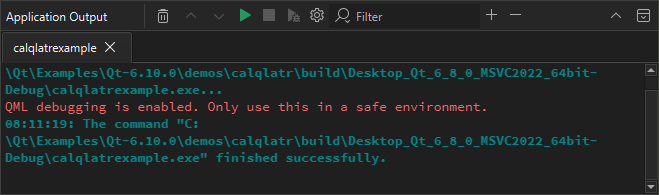
如果您在运行设置中指定了命令行参数,并在运行应用程序时将其传递给应用程序,这些参数将作为应用程序输出的一部分显示。有关详细信息,请参阅“在桌面上运行”。
选择工具栏按钮可运行应用程序、将调试器附加到正在运行的应用程序,以及停止运行或调试。
应用程序输出首选项
要设置应用程序输出显示的偏好设置:
- 选择“Preferences ” > “Build & Run ” > “Application Output ”。
- 在“Application Output ”中选择“
 ”(Configure )。
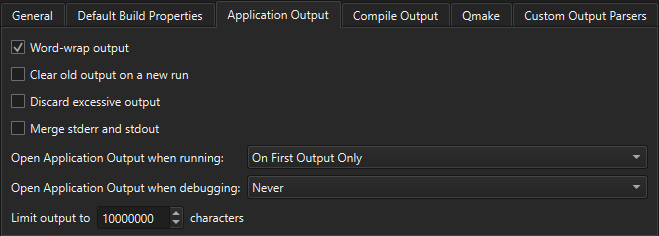
您可以选择在运行或调试应用程序时是否在输出窗口中打开Application Output ,是否在新运行时清除旧的输出内容,是否对输出进行自动换行,以及是否将输出限制为指定行数。
另请参阅 “查看输出”。
Copyright © The Qt Company Ltd. and other contributors. Documentation contributions included herein are the copyrights of their respective owners. The documentation provided herein is licensed under the terms of the GNU Free Documentation License version 1.3 as published by the Free Software Foundation. Qt and respective logos are trademarks of The Qt Company Ltd in Finland and/or other countries worldwide. All other trademarks are property of their respective owners.
