
查看输出
输出视图显示来自多个来源的输出,例如构建过程中遇到的错误和警告列表、编译器的详细输出、程序执行时的状态、调试输出或搜索结果。
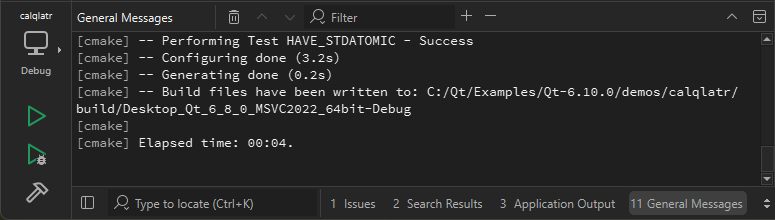
您可以在所有模式下通过以下方式打开输出视图:
- 选择输出视图。
- 选择“View ” > “Output ”。菜单项中还会显示可用的键盘快捷键。
- 按住Alt 键(macOS 上为Cmd 键)并输入视图编号。
- 选择“
 ”,然后选择要打开的视图。
要将已打开的输出视图最大化,请选择“ ”(Maximize )或按Alt+Shift+9。
要增大或减小输出文本的大小,请选择 (Zoom In )或Ctrl++
  (Zoom Out )或Ctrl+-。某些输出视图无法放大。
更改文本编码
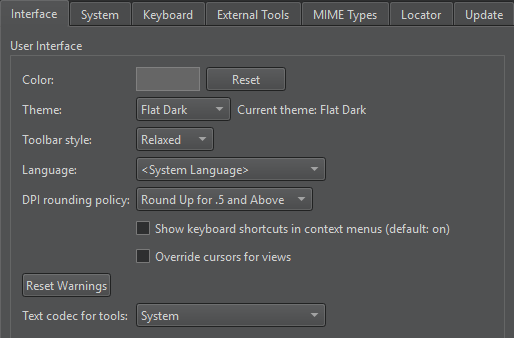
如果输出中的文本显示不正确,可能是因为“Qt Creator ”使用的编解码器与生成该输出的工具所用的编解码器不同。要指定要使用的编解码器,请选择“Preferences ” > “Environment ” > “Interface ”,然后在“Text codec for tools ”字段中选择编解码器。
查找和筛选输出
要在输出中进行搜索,请在视图处于活动状态时按Ctrl+F。在“Find ”字段中输入搜索条件。有关更多信息,请参阅“在当前文件中搜索”。
要筛选输出内容,请在“Filter ”字段中输入字符串。
若要指定筛选选项,请单击“ ”按钮。您可以使用正则表达式或区分大小写来筛选输出。选择“Show Non-matching Lines ”可隐藏与筛选条件匹配的行。
某些输出视图不支持查找和筛选功能。
将输出保存为文件
要将输出保存为文本文件,请在上下文菜单中选择“Save Contents ”。
若要将输出复制到临时文件,请选择“Copy Contents to Scratch Buffer ”。
另请参阅 “操作指南:调整用户界面”、“记录笔记”、“调整用户界面”和“问题”。
Copyright © The Qt Company Ltd. and other contributors. Documentation contributions included herein are the copyrights of their respective owners. The documentation provided herein is licensed under the terms of the GNU Free Documentation License version 1.3 as published by the Free Software Foundation. Qt and respective logos are trademarks of The Qt Company Ltd in Finland and/or other countries worldwide. All other trademarks are property of their respective owners.
