
设置 WebAssembly 开发环境
要设置 WebAssembly 开发环境:
- 访问Preferences >SDKs >WebAssembly 。
- 在“Emscripten SDK path ”中,输入您安装
emsdk的根目录。 - Qt Creator 如果您的 Qt for WebAssembly 版本支持
emsdk,系统将为您自动配置Emscripten SDK environment 。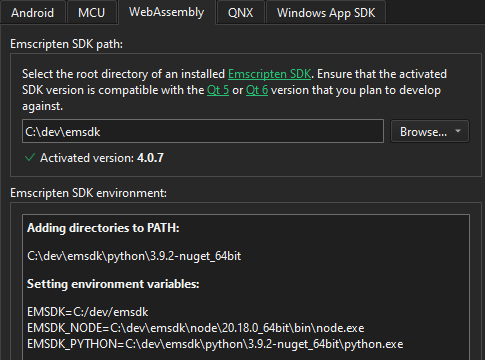
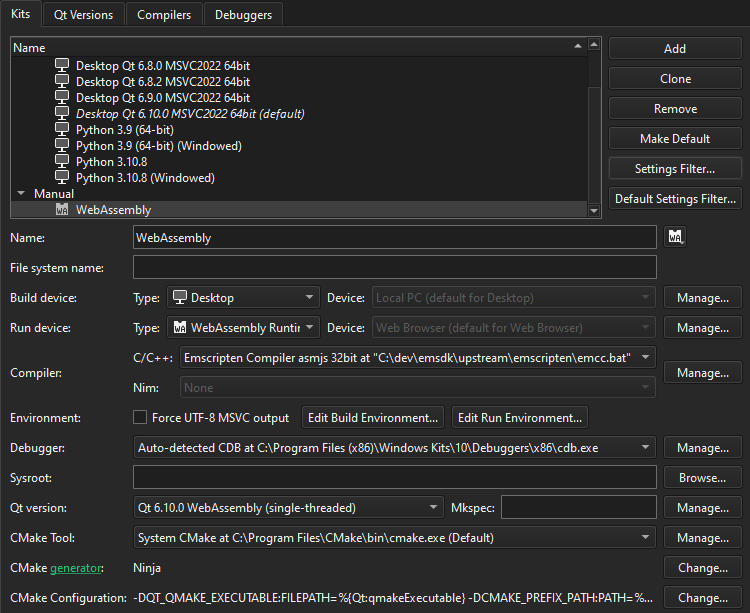
- 转至Preferences >Kits ,以检查由Qt Creator 生成的 WebAssembly 套件。如果C/C++ 未显示要使用的 Emscripten 编译器,请检查 emscripten 是否已正确配置。
另请参阅 《构建 Web 应用程序》、《如何:为 WebAssembly 开发》以及《启用和禁用插件》。
Copyright © The Qt Company Ltd. and other contributors. Documentation contributions included herein are the copyrights of their respective owners. The documentation provided herein is licensed under the terms of the GNU Free Documentation License version 1.3 as published by the Free Software Foundation. Qt and respective logos are trademarks of The Qt Company Ltd in Finland and/or other countries worldwide. All other trademarks are property of their respective owners.
