
查看源文件
“Source Files ”视图列出了项目中包含的所有源文件。如果您无法步入某条指令,可以检查该源文件是否确实属于该项目,还是在其他地方编译的。该视图会显示文件系统中每个文件的路径。
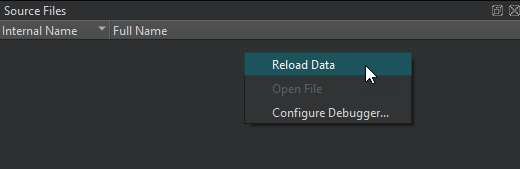
右键单击该视图可选择以下操作:
- 重新加载数据
- 打开所选文件
- 设置调试器首选项
默认情况下,“Source Files ”视图处于隐藏状态。要显示该视图,请在调试器工具栏的“Views ”中选中它。
外部源文件
若要在使用与库构建位置不同的源代码树副本时,使调试器能够步入代码并显示源代码,您可以在“Preferences ”>“Debugger ”>“General ”中将源路径映射到目标路径。
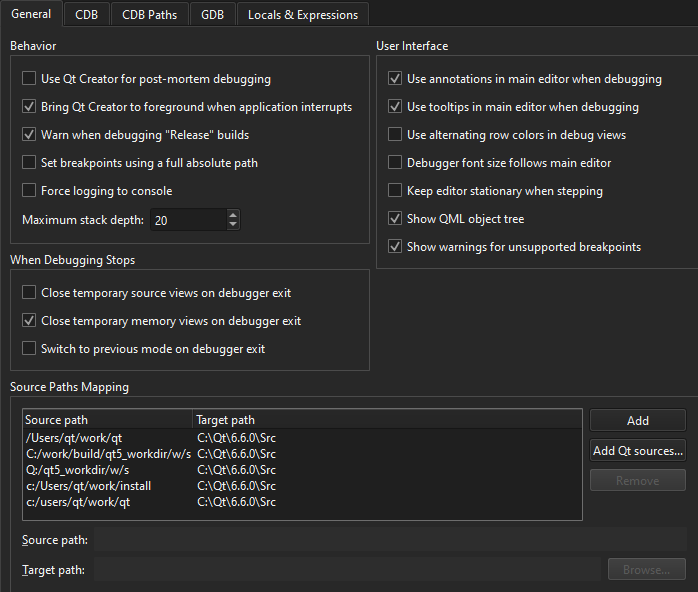
有关详细信息,请参阅“源路径映射”。
Copyright © The Qt Company Ltd. and other contributors. Documentation contributions included herein are the copyrights of their respective owners. The documentation provided herein is licensed under the terms of the GNU Free Documentation License version 1.3 as published by the Free Software Foundation. Qt and respective logos are trademarks of The Qt Company Ltd in Finland and/or other countries worldwide. All other trademarks are property of their respective owners.
