
查看模块
“Modules ”视图显示了正在调试的应用程序中包含的模块的相关信息。
模块是指:
- 在 Windows 系统中,即动态链接库(
.dll) - 在 Linux 中的共享对象(
.so) - 在 macOS 中的动态共享库(
.dylib)
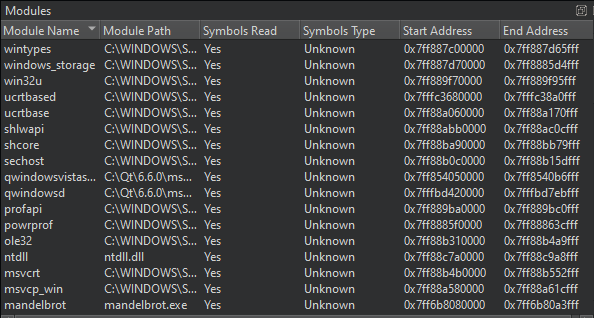
此外,该视图还会显示模块内的符号,并标明每个模块的加载位置。右键单击列标题可显示或隐藏视图中的列。
右键单击视图可执行以下操作:
- 更新模块列表
- 显示模块的源文件
- 显示模块之间的依赖关系(仅限 Windows)
- 加载模块的符号
- 检查模块
- 编辑模块文件
- 显示模块中的符号
- 显示模块中的节
- 设置调试器首选项
默认情况下,“Modules ”视图处于隐藏状态。要显示该视图,请在调试器工具栏的“Views ”中选中它。
在 CDB 中加载模块时暂停
当使用 CDB 作为调试后端时,您可以指定在加载或卸载应用程序模块时,调试器应暂停。要为指定的模块启用暂停功能,请转至“Preferences ”>“Debugger ”>“CDB ”。
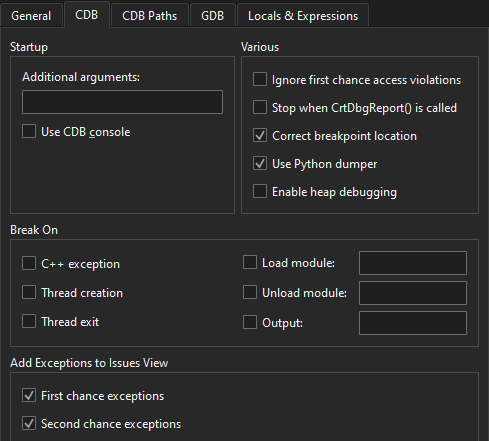
有关详细信息,请参阅CDB。
Copyright © The Qt Company Ltd. and other contributors. Documentation contributions included herein are the copyrights of their respective owners. The documentation provided herein is licensed under the terms of the GNU Free Documentation License version 1.3 as published by the Free Software Foundation. Qt and respective logos are trademarks of The Qt Company Ltd in Finland and/or other countries worldwide. All other trademarks are property of their respective owners.
