QTreeView

Inherited by: QHelpContentWidget, QTreeWidget
Synopsis
Functions
def
allColumnsShowFocus()def
autoExpandDelay()def
columnAt(x)def
columnViewportPosition(column)def
columnWidth(column)def
drawTree(painter, region)def
expandsOnDoubleClick()def
header()def
indentation()def
indexAbove(index)def
indexBelow(index)def
indexRowSizeHint(index)def
isAnimated()def
isColumnHidden(column)def
isExpanded(index)def
isFirstColumnSpanned(row, parent)def
isHeaderHidden()def
isRowHidden(row, parent)def
isSortingEnabled()def
itemsExpandable()def
resetIndentation()def
rootIsDecorated()def
rowHeight(index)def
setAllColumnsShowFocus(enable)def
setAnimated(enable)def
setAutoExpandDelay(delay)def
setColumnHidden(column, hide)def
setColumnWidth(column, width)def
setExpanded(index, expand)def
setExpandsOnDoubleClick(enable)def
setFirstColumnSpanned(row, parent, span)def
setHeader(header)def
setHeaderHidden(hide)def
setIndentation(i)def
setItemsExpandable(enable)def
setRootIsDecorated(show)def
setRowHidden(row, parent, hide)def
setSortingEnabled(enable)def
setTreePosition(logicalIndex)def
setUniformRowHeights(uniform)def
setWordWrap(on)def
sortByColumn(column, order)def
treePosition()def
uniformRowHeights()def
wordWrap()
Virtual functions
def
drawBranches(painter, rect, index)def
drawRow(painter, options, index)
Slots
def
collapse(index)def
collapseAll()def
columnCountChanged(oldCount, newCount)def
columnMoved()def
columnResized(column, oldSize, newSize)def
expand(index)def
expandAll()def
expandToDepth(depth)def
hideColumn(column)def
reexpand()def
resizeColumnToContents(column)def
rowsRemoved(parent, first, last)def
showColumn(column)def
sortByColumn(column)
Detailed Description
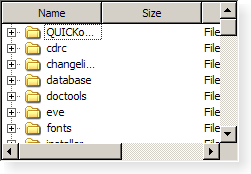
A
QTreeViewimplements a tree representation of items from a model. This class is used to provide standard hierarchical lists that were previously provided by theQListViewclass, but using the more flexible approach provided by Qt’s model/view architecture.The
QTreeViewclass is one of the Model/View Classes and is part of Qt’s model/view framework .
QTreeViewimplements the interfaces defined by theQAbstractItemViewclass to allow it to display data provided by models derived from theQAbstractItemModelclass.It is simple to construct a tree view displaying data from a model. In the following example, the contents of a directory are supplied by a
QFileSystemModeland displayed as a tree:model = QFileSystemModel() model.setRootPath(QDir.currentPath()) tree = QTreeView() tree.setModel(model)The model/view architecture ensures that the contents of the tree view are updated as the model changes.
Items that have children can be in an expanded (children are visible) or collapsed (children are hidden) state. When this state changes a
collapsed()orexpanded()signal is emitted with the model index of the relevant item.The amount of indentation used to indicate levels of hierarchy is controlled by the
indentationproperty.Headers in tree views are constructed using the
QHeaderViewclass and can be hidden usingheader()->hide(). Note that each header is configured with itsstretchLastSectionproperty set to true, ensuring that the view does not waste any of the space assigned to it for its header. If this value is set to true, this property will override the resize mode set on the last section in the header.By default, all columns in a tree view are movable except the first. To disable movement of these columns, use
QHeaderView‘ssetSectionsMovable()function. For more information about rearranging sections, seeMoving Header Sections.
Key Bindings
QTreeViewsupports a set of key bindings that enable the user to navigate in the view and interact with the contents of items:
Key
Action
Up
Moves the cursor to the item in the same column on the previous row. If the parent of the current item has no more rows to navigate to, the cursor moves to the relevant item in the last row of the sibling that precedes the parent.
Down
Moves the cursor to the item in the same column on the next row. If the parent of the current item has no more rows to navigate to, the cursor moves to the relevant item in the first row of the sibling that follows the parent.
Left
Hides the children of the current item (if present) by collapsing a branch.
Minus
Same as Left.
Right
Reveals the children of the current item (if present) by expanding a branch.
Plus
Same as Right.
Asterisk
Expands the current item and all its children (if present).
PageUp
Moves the cursor up one page.
PageDown
Moves the cursor down one page.
Home
Moves the cursor to an item in the same column of the first row of the first top-level item in the model.
End
Moves the cursor to an item in the same column of the last row of the last top-level item in the model.
F2
In editable models, this opens the current item for editing. The Escape key can be used to cancel the editing process and revert any changes to the data displayed.
Improving Performance
It is possible to give the view hints about the data it is handling in order to improve its performance when displaying large numbers of items. One approach that can be taken for views that are intended to display items with equal heights is to set the
uniformRowHeightsproperty to true.
-
class
QTreeView([parent=None])¶ - param parent
Constructs a tree view with a
parentto represent a model’s data. UsesetModel()to set the model.See also
-
PySide2.QtWidgets.QTreeView.allColumnsShowFocus()¶ - Return type
bool
See also
-
PySide2.QtWidgets.QTreeView.autoExpandDelay()¶ - Return type
int
See also
-
PySide2.QtWidgets.QTreeView.collapse(index)¶ - Parameters
index –
QModelIndex
Collapses the model item specified by the
index.See also
-
PySide2.QtWidgets.QTreeView.collapseAll()¶ Collapses all expanded items.
See also
-
PySide2.QtWidgets.QTreeView.collapsed(index)¶ - Parameters
index –
QModelIndex
-
PySide2.QtWidgets.QTreeView.columnAt(x)¶ - Parameters
x –
int- Return type
int
Returns the column in the tree view whose header covers the
xcoordinate given.
-
PySide2.QtWidgets.QTreeView.columnCountChanged(oldCount, newCount)¶ - Parameters
oldCount –
intnewCount –
int
Informs the tree view that the number of columns in the tree view has changed from
oldCounttonewCount.
-
PySide2.QtWidgets.QTreeView.columnMoved()¶ This slot is called whenever a column has been moved.
-
PySide2.QtWidgets.QTreeView.columnResized(column, oldSize, newSize)¶ - Parameters
column –
intoldSize –
intnewSize –
int
This function is called whenever
column‘s size is changed in the header.oldSizeandnewSizegive the previous size and the new size in pixels.See also
-
PySide2.QtWidgets.QTreeView.columnViewportPosition(column)¶ - Parameters
column –
int- Return type
int
Returns the horizontal position of the
columnin the viewport.
-
PySide2.QtWidgets.QTreeView.columnWidth(column)¶ - Parameters
column –
int- Return type
int
Returns the width of the
column.See also
-
PySide2.QtWidgets.QTreeView.drawBranches(painter, rect, index)¶ - Parameters
painter –
QPainterrect –
QRectindex –
QModelIndex
Draws the branches in the tree view on the same row as the model item
index, using thepaintergiven. The branches are drawn in the rectangle specified byrect.
-
PySide2.QtWidgets.QTreeView.drawRow(painter, options, index)¶ - Parameters
painter –
QPainteroptions –
QStyleOptionViewItemindex –
QModelIndex
Draws the row in the tree view that contains the model item
index, using thepaintergiven. Theoptioncontrols how the item is displayed.See also
-
PySide2.QtWidgets.QTreeView.drawTree(painter, region)¶ - Parameters
painter –
QPainterregion –
QRegion
Draws the part of the tree intersecting the given
regionusing the specifiedpainter.See also
paintEvent()
-
PySide2.QtWidgets.QTreeView.expand(index)¶ - Parameters
index –
QModelIndex
Expands the model item specified by the
index.See also
-
PySide2.QtWidgets.QTreeView.expandAll()¶ Expands all expandable items.
Warning: if the model contains a large number of items, this function will take some time to execute.
See also
-
PySide2.QtWidgets.QTreeView.expandToDepth(depth)¶ - Parameters
depth –
int
Expands all expandable items to the given
depth.
-
PySide2.QtWidgets.QTreeView.expanded(index)¶ - Parameters
index –
QModelIndex
-
PySide2.QtWidgets.QTreeView.expandsOnDoubleClick()¶ - Return type
bool
See also
-
PySide2.QtWidgets.QTreeView.header()¶ - Return type
Returns the header for the tree view.
See also
setHeader()headerData()
-
PySide2.QtWidgets.QTreeView.hideColumn(column)¶ - Parameters
column –
int
Hides the
columngiven.Note
This function should only be called after the model has been initialized, as the view needs to know the number of columns in order to hide
column.See also
-
PySide2.QtWidgets.QTreeView.indentation()¶ - Return type
int
See also
-
PySide2.QtWidgets.QTreeView.indexAbove(index)¶ - Parameters
index –
QModelIndex- Return type
QModelIndex
Returns the model index of the item above
index.
-
PySide2.QtWidgets.QTreeView.indexBelow(index)¶ - Parameters
index –
QModelIndex- Return type
QModelIndex
Returns the model index of the item below
index.
-
PySide2.QtWidgets.QTreeView.indexRowSizeHint(index)¶ - Parameters
index –
QModelIndex- Return type
int
Returns the size hint for the row indicated by
index.See also
sizeHintForColumn()uniformRowHeights()
-
PySide2.QtWidgets.QTreeView.isAnimated()¶ - Return type
bool
-
PySide2.QtWidgets.QTreeView.isColumnHidden(column)¶ - Parameters
column –
int- Return type
bool
Returns
trueif thecolumnis hidden; otherwise returnsfalse.See also
-
PySide2.QtWidgets.QTreeView.isExpanded(index)¶ - Parameters
index –
QModelIndex- Return type
bool
Returns
trueif the model itemindexis expanded; otherwise returns false.See also
-
PySide2.QtWidgets.QTreeView.isFirstColumnSpanned(row, parent)¶ - Parameters
row –
intparent –
QModelIndex
- Return type
bool
Returns
trueif the item in first column in the givenrowof theparentis spanning all the columns; otherwise returnsfalse.See also
-
PySide2.QtWidgets.QTreeView.isHeaderHidden()¶ - Return type
bool
-
PySide2.QtWidgets.QTreeView.isRowHidden(row, parent)¶ - Parameters
row –
intparent –
QModelIndex
- Return type
bool
Returns
trueif the item in the givenrowof theparentis hidden; otherwise returnsfalse.See also
-
PySide2.QtWidgets.QTreeView.isSortingEnabled()¶ - Return type
bool
-
PySide2.QtWidgets.QTreeView.itemsExpandable()¶ - Return type
bool
See also
-
PySide2.QtWidgets.QTreeView.reexpand()
-
PySide2.QtWidgets.QTreeView.resetIndentation()
-
PySide2.QtWidgets.QTreeView.resizeColumnToContents(column)¶ - Parameters
column –
int
Resizes the
columngiven to the size of its contents.See also
columnWidth()setColumnWidth()sizeHintForColumn()resizeContentsPrecision()
-
PySide2.QtWidgets.QTreeView.rootIsDecorated()¶ - Return type
bool
See also
-
PySide2.QtWidgets.QTreeView.rowHeight(index)¶ - Parameters
index –
QModelIndex- Return type
int
Returns the height of the row indicated by the given
index.See also
-
PySide2.QtWidgets.QTreeView.rowsRemoved(parent, first, last)¶ - Parameters
parent –
QModelIndexfirst –
intlast –
int
Informs the view that the rows from the
startrow to theendrow inclusive have been removed from the givenparentmodel item.
-
PySide2.QtWidgets.QTreeView.setAllColumnsShowFocus(enable)¶ - Parameters
enable –
bool
See also
-
PySide2.QtWidgets.QTreeView.setAnimated(enable)¶ - Parameters
enable –
bool
See also
-
PySide2.QtWidgets.QTreeView.setAutoExpandDelay(delay)¶ - Parameters
delay –
int
See also
-
PySide2.QtWidgets.QTreeView.setColumnHidden(column, hide)¶ - Parameters
column –
inthide –
bool
If
hideis true thecolumnis hidden, otherwise thecolumnis shown.See also
-
PySide2.QtWidgets.QTreeView.setColumnWidth(column, width)¶ - Parameters
column –
intwidth –
int
Sets the width of the given
columnto thewidthspecified.See also
-
PySide2.QtWidgets.QTreeView.setExpanded(index, expand)¶ - Parameters
index –
QModelIndexexpand –
bool
Sets the item referred to by
indexto either collapse or expanded, depending on the value ofexpanded.See also
-
PySide2.QtWidgets.QTreeView.setExpandsOnDoubleClick(enable)¶ - Parameters
enable –
bool
See also
-
PySide2.QtWidgets.QTreeView.setFirstColumnSpanned(row, parent, span)¶ - Parameters
row –
intparent –
QModelIndexspan –
bool
If
spanis true the item in the first column in therowwith the givenparentis set to span all columns, otherwise all items on theroware shown.See also
-
PySide2.QtWidgets.QTreeView.setHeader(header)¶ - Parameters
header –
QHeaderView
Sets the header for the tree view, to the given
header.The view takes ownership over the given
headerand deletes it when a new header is set.See also
headerData()
-
PySide2.QtWidgets.QTreeView.setHeaderHidden(hide)¶ - Parameters
hide –
bool
See also
-
PySide2.QtWidgets.QTreeView.setIndentation(i)¶ - Parameters
i –
int
See also
-
PySide2.QtWidgets.QTreeView.setItemsExpandable(enable)¶ - Parameters
enable –
bool
See also
-
PySide2.QtWidgets.QTreeView.setRootIsDecorated(show)¶ - Parameters
show –
bool
See also
-
PySide2.QtWidgets.QTreeView.setRowHidden(row, parent, hide)¶ - Parameters
row –
intparent –
QModelIndexhide –
bool
If
hideis true therowwith the givenparentis hidden, otherwise therowis shown.See also
-
PySide2.QtWidgets.QTreeView.setSortingEnabled(enable)¶ - Parameters
enable –
bool
See also
-
PySide2.QtWidgets.QTreeView.setTreePosition(logicalIndex)¶ - Parameters
logicalIndex –
int
This specifies that the tree structure should be placed at logical index
index. If set to -1 then the tree will always follow visual index 0.See also
-
PySide2.QtWidgets.QTreeView.setUniformRowHeights(uniform)¶ - Parameters
uniform –
bool
See also
-
PySide2.QtWidgets.QTreeView.setWordWrap(on)¶ - Parameters
on –
bool
See also
-
PySide2.QtWidgets.QTreeView.showColumn(column)¶ - Parameters
column –
int
Shows the given
columnin the tree view.See also
-
PySide2.QtWidgets.QTreeView.sortByColumn(column)¶ - Parameters
column –
int
This is an overloaded function.
Sorts the model by the values in the given
column.
-
PySide2.QtWidgets.QTreeView.sortByColumn(column, order) - Parameters
column –
intorder –
SortOrder
Sets the model up for sorting by the values in the given
columnandorder.columnmay be -1, in which case no sort indicator will be shown and the model will return to its natural, unsorted order. Note that not all models support this and may even crash in this case.See also
sortingEnabled
-
PySide2.QtWidgets.QTreeView.treePosition()¶ - Return type
int
Return the logical index the tree is set on. If the return value is -1 then the tree is placed on the visual index 0.
See also
-
PySide2.QtWidgets.QTreeView.uniformRowHeights()¶ - Return type
bool
See also
-
PySide2.QtWidgets.QTreeView.wordWrap()¶ - Return type
bool
See also
© 2018 The Qt Company Ltd. Documentation contributions included herein are the copyrights of their respective owners. The documentation provided herein is licensed under the terms of the GNU Free Documentation License version 1.3 as published by the Free Software Foundation. Qt and respective logos are trademarks of The Qt Company Ltd. in Finland and/or other countries worldwide. All other trademarks are property of their respective owners.