
Previous topic
Next topic
QPrintDialog
The
QPrintDialogclass provides a dialog for specifying the printer’s configuration. More…

Synopsis
Functions
def
open(receiver, member)def
options()def
setOption(option[, on=true])def
setOptions(options)def
testOption(option)
Signals
def
accepted(printer)
Detailed Description
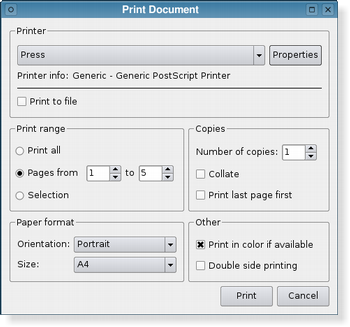
The dialog allows users to change document-related settings, such as the paper size and orientation, type of print (color or grayscale), range of pages, and number of copies to print.
Controls are also provided to enable users to choose from the printers available, including any configured network printers.
Typically,
QPrintDialogobjects are constructed with aQPrinterobject, and executed using theexec()function.printDialog = QPrintDialog(printer, parent) if printDialog.exec_() == QDialog.Accepted: # print ...If the dialog is accepted by the user, the
QPrinterobject is correctly configured for printing.
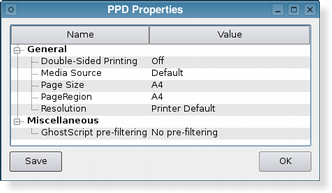
The printer dialog (shown above in Plastique style) enables access to common printing properties. On X11 platforms that use the CUPS printing system, the settings for each available printer can be modified via the dialog’s Properties push button.
On Windows and macOS, the native print dialog is used, which means that some
QWidgetandQDialogproperties set on the dialog won’t be respected. The native print dialog on macOS does not support setting printer options, i.e.setOptions()andsetOption()have no effect.In Qt 4.4, it was possible to use the static functions to show a sheet on macOS. This is no longer supported in Qt 4.5. If you want this functionality, use
open().See also
- class PySide2.QtPrintSupport.QPrintDialog(printer[, parent=None])
PySide2.QtPrintSupport.QPrintDialog([parent=None])
- param parent:
- param printer:
Constructs a new modal printer dialog for the given
printerwith the givenparent.
- PySide2.QtPrintSupport.QPrintDialog.accepted(printer)
- Parameters:
printer –
PySide2.QtPrintSupport.QPrinter
- PySide2.QtPrintSupport.QPrintDialog.open(receiver, member)
- Parameters:
receiver –
PySide2.QtCore.QObjectmember – str
This is an overloaded function.
Opens the dialog and connects its
accepted()signal to the slot specified byreceiverandmember.The signal will be disconnected from the slot when the dialog is closed.
- PySide2.QtPrintSupport.QPrintDialog.options()
- Return type:
PrintDialogOptions
This property holds the various options that affect the look and feel of the dialog.
By default, all options are disabled.
Options should be set before showing the dialog. Setting them while the dialog is visible is not guaranteed to have an immediate effect on the dialog (depending on the option and on the platform).
See also
- PySide2.QtPrintSupport.QPrintDialog.setOption(option[, on=true])
- Parameters:
option –
PrintDialogOptionon – bool
Sets the given
optionto be enabled ifonis true; otherwise, clears the givenoption.See also
- PySide2.QtPrintSupport.QPrintDialog.setOptions(options)
- Parameters:
options –
PrintDialogOptions
This property holds the various options that affect the look and feel of the dialog.
By default, all options are disabled.
Options should be set before showing the dialog. Setting them while the dialog is visible is not guaranteed to have an immediate effect on the dialog (depending on the option and on the platform).
See also
- PySide2.QtPrintSupport.QPrintDialog.testOption(option)
- Parameters:
option –
PrintDialogOption- Return type:
bool
Returns
trueif the givenoptionis enabled; otherwise, returns false.See also
© 2022 The Qt Company Ltd. Documentation contributions included herein are the copyrights of their respective owners. The documentation provided herein is licensed under the terms of the GNU Free Documentation License version 1.3 as published by the Free Software Foundation. Qt and respective logos are trademarks of The Qt Company Ltd. in Finland and/or other countries worldwide. All other trademarks are property of their respective owners.