
Table of Contents
- Model/View Tutorial
- 1. Introduction
- 1.1 Standard Widgets
- 1.2 Model/View to the Rescue
- 1.3 Overview of the Model/View Widgets
- 1.4 Using Adapters between Forms and Models
- 2. A Simple Model/View Application
- 2.1 A Read Only Table
- 2.2 Extending the Read Only Example with Roles
- 2.3 A Clock inside a Table Cell
- 2.4 Setting up Headers for Columns and Rows
- 2.5 The Minimal Editing Example
- 3. Intermediate Topics
- 3.1 TreeView
- 3.2 Working with Selections
- 3.3 Predefined Models
- 3.4 Delegates
- 3.5 Debugging with ModelTest
- 4. Good Sources of Additional Information
- 4.1 Books
- 4.2 Qt Documentation
Previous topic
Next topic
Model/View Tutorial
An introduction to ModelView programming
Every UI developer should know about ModelView programming and the goal of this tutorial is to provide you with an easily understandable introduction to this topic.
Table, list and tree widgets are components frequently used in GUIs. There are 2 different ways how these widgets can access their data. The traditional way involves widgets which include internal containers for storing data. This approach is very intuitive, however, in many non-trivial applications, it leads to data synchronization issues. The second approach is model/view programming, in which widgets do not maintain internal data containers. They access external data through a standardized interface and therefore avoid data duplication. This may seem complicated at first, but once you take a closer look, it is not only easy to grasp, but the many benefits of model/view programming also become clearer.
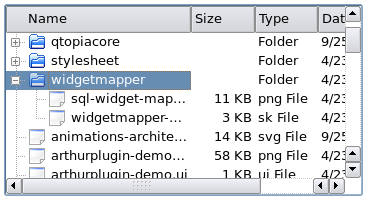
In the process, we will learn about some basic technologies provided by Qt, such as:
You will also learn whether your new application can be written easier with model/view programming or if classic widgets will work just as well.
This tutorial includes example code for you to edit and integrate into your project. The tutorial’s source code is located in Qt’s examples/widgets/tutorials/modelview directory.
For more detailed information you may also want to look at the reference documentation
1. Introduction
Model/View is a technology used to separate data from views in widgets that handle data sets. Standard widgets are not designed for separating data from views and this is why Qt has two different types of widgets. Both types of widgets look the same, but they interact with data differently.
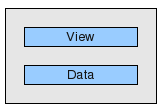
Standard widgets use data that is part of the widget.
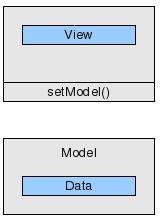
View classes operate on external data (the model)
1.1 Standard Widgets
Let’s have a closer look at a standard table widget. A table widget is a 2D array of the data elements that the user can change. The table widget can be integrated into a program flow by reading and writing the data elements that the table widget provides. This method is very intuitive and useful in many applications, but displaying and editing a database table with a standard table widget can be problematic. Two copies of the data have to be coordinated: one outside the widget; one inside the widget. The developer is responsible for synchronizing both versions. Besides this, the tight coupling of presentation and data makes it harder to write unit tests.
1.2 Model/View to the Rescue
Model/view stepped up to provide a solution that uses a more versatile architecture. Model/view eliminates the data consistency problems that may occur with standard widgets. Model/view also makes it easier to use more than one view of the same data because one model can be passed on to many views. The most important difference is that model/view widgets do not store data behind the table cells. In fact, they operate directly from your data. Since view classes do not know your data’s structure, you need to provide a wrapper to make your data conform to the
QAbstractItemModelinterface. A view uses this interface to read from and write to your data. Any instance of a class that implementsQAbstractItemModelis said to be a model. Once the view receives a pointer to a model, it will read and display its content and be its editor.
1.3 Overview of the Model/View Widgets
Here is an overview of the model/view widgets and their corresponding standard widgets.
Widget
Standard Widget (an item based convenience class)
Model/View View Class (for use with external data)
QListWidget
QListView
QTableWidget
QTableView
QTreeWidget
QTreeView
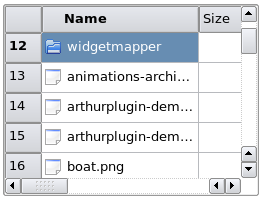
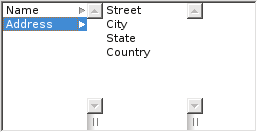
QColumnViewshows a tree as a hierarchy of lists

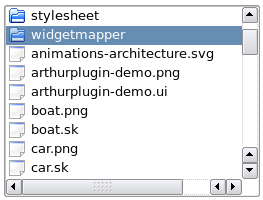
QComboBoxcan work as both a view class and also as a traditional widget
1.4 Using Adapters between Forms and Models
Having adapters between forms and models can come in handy.
We can edit data stored in tables directly from within the table itself, but it’s much more comfortable to edit data in text fields. There is no direct model/view counterpart that separates data and views for widgets that operate on one value (
QLineEdit,QCheckBox…) instead of a dataset, so we need an adapter in order to connect the form to the source of data.
QDataWidgetMapperis a great solution because it maps form widgets to a table row and makes it very easy to build forms for database tables.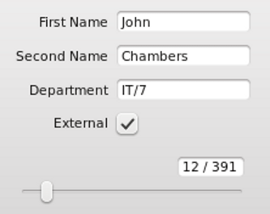
Another example of an adapter is
QCompleter. Qt hasQCompleterfor providing auto-completions in Qt widgets such asQComboBoxand, as shown below,QLineEdit.QCompleteruses a model as its data source.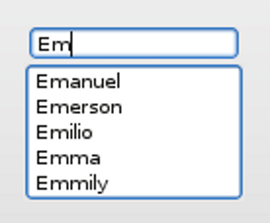
2. A Simple Model/View Application
If you want to develop a model/view application, where should you start? We recommend starting with a simple example and extending it step-by-step. This makes understanding the architecture a lot easier. Trying to understand the model/view architecture in detail before invoking the IDE has proven to be less convenient for many developers. It is substantially easier to start with a simple model/view application that has demo data. Give it a try! Simply replace the data in the examples below with your own.
Below are 7 very simple and independent applications that show different sides of model/view programming. The source code can be found inside the
examples/widgets/tutorials/modelviewdirectory.
2.1 A Read Only Table
We start with an application that uses a
QTableViewto show data. We will add editing capabilities later.(file source: examples/widgets/tutorials/modelview/1_readonly/main.cpp)
// main.cpp
#include <QApplication>
#include <QTableView>
#include "mymodel.h"

int main(int argc, char *argv[])
{
    QApplication a(argc, argv);
    QTableView tableView;
    MyModel myModel;
    tableView.setModel(&myModel);
    tableView.show();
    return a.exec();
}
We have the usual main() function:
Here is the interesting part: We create an instance of MyModel and use
setModel(&myModel);to pass a pointer of it totableView.tableViewwill invoke the methods of the pointer it has received to find out two things:
How many rows and columns should be displayed.
What content should be printed into each cell.
The model needs some code to respond to this.
We have a table data set, so let’s start with
QAbstractTableModelsince it is easier to use than the more generalQAbstractItemModel.(file source: examples/widgets/tutorials/modelview/1_readonly/mymodel.h)
// mymodel.h
#include <QAbstractTableModel>

class MyModel : public QAbstractTableModel
{
    Q_OBJECT
public:
    MyModel(QObject *parent = nullptr);
    int rowCount(const QModelIndex &parent = QModelIndex()) const override;
    int columnCount(const QModelIndex &parent = QModelIndex()) const override;
    QVariant data(const QModelIndex &index, int role = Qt::DisplayRole) const override;
};
QAbstractTableModelrequires the implementation of three abstract methods.(file source: examples/widgets/tutorials/modelview/1_readonly/mymodel.cpp)
// mymodel.cpp
#include "mymodel.h"

MyModel::MyModel(QObject *parent)
    : QAbstractTableModel(parent)
{
}

int MyModel::rowCount(const QModelIndex & /*parent*/) const
{
   return 2;
}

int MyModel::columnCount(const QModelIndex & /*parent*/) const
{
    return 3;
}

QVariant MyModel::data(const QModelIndex &index, int role) const
{
    if (role == Qt::DisplayRole)
       return QString("Row%1, Column%2")
                   .arg(index.row() + 1)
                   .arg(index.column() +1);

    return QVariant();
}
The number of rows and columns is provided by
rowCount()andcolumnCount(). When the view has to know what the cell’s text is, it calls the methoddata(). Row and column information is specified with parameterindexand the role is set toDisplayRole. Other roles are covered in the next section. In our example, the data that should be displayed is generated. In a real application,MyModelwould have a member calledMyData, which serves as the target for all reading and writing operations.This small example demonstrates the passive nature of a model. The model does not know when it will be used or which data is needed. It simply provides data each time the view requests it.
What happens when the model’s data needs to be changed? How does the view realize that data has changed and needs to be read again? The model has to emit a signal that indicates what range of cells has changed. This will be demonstrated in section 2.3.
2.2 Extending the Read Only Example with Roles
In addition to controlling what text the view displays, the model also controls the text’s appearance. When we slightly change the model, we get the following result:
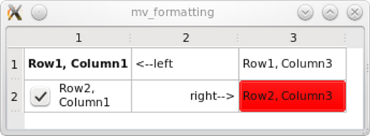
In fact, nothing except for the
data()method needs to be changed to set fonts, background colour, alignment and a checkbox. Below is thedata()method that produces the result shown above. The difference is that this time we use parameter int role to return different pieces of information depending on its value.(file source: examples/widgets/tutorials/modelview/2_formatting/mymodel.cpp)
// mymodel.cpp
QVariant MyModel::data(const QModelIndex &index, int role) const
{
    int row = index.row();
    int col = index.column();
    // generate a log message when this method gets called
    qDebug() << QString("row %1, col%2, role %3")
            .arg(row).arg(col).arg(role);

    switch (role) {
    case Qt::DisplayRole:
        if (row == 0 && col == 1) return QString("<--left");
        if (row == 1 && col == 1) return QString("right-->");

        return QString("Row%1, Column%2")
                .arg(row + 1)
                .arg(col +1);
    case Qt::FontRole:
        if (row == 0 && col == 0) { //change font only for cell(0,0)
            QFont boldFont;
            boldFont.setBold(true);
            return boldFont;
        }
        break;
    case Qt::BackgroundRole:
        if (row == 1 && col == 2)  //change background only for cell(1,2)
            return QBrush(Qt::red);
        break;
    case Qt::TextAlignmentRole:
        if (row == 1 && col == 1) //change text alignment only for cell(1,1)
            return int(Qt::AlignRight | Qt::AlignVCenter);
        break;
    case Qt::CheckStateRole:
        if (row == 1 && col == 0) //add a checkbox to cell(1,0)
            return Qt::Checked;
        break;
    }
    return QVariant();
}
Each formatting property will be requested from the model with a separate call to the
data()method. Theroleparameter is used to let the model know which property is being requested:
ItemDataRoleMeaning
Type
Qt.ItemDataRoleDisplayRoletext
QString
FontRolefont
QFont
BackgroundRolebrush for the background of the cell
QBrush
TextAlignmentRoletext alignment
AlignmentFlag
CheckStateRolesuppresses checkboxes with
QVariant(),sets checkboxes with
Checkedor
Unchecked
ItemDataRoleRefer to the Qt namespace documentation to learn more about the
ItemDataRoleenum’s capabilities.Now we need to determine how using a separated model impacts the application’s performance, so let’s trace how often the view calls the
data()method. In order to track how often the view calls the model, we have put a debug statement in thedata()method, which logs onto the error output stream. In our small example,data()will be called 42 times. Each time you hover the cursor over the field,data()will be called again – 7 times for each cell. That’s why it is important to make sure that your data is available whendata()is invoked and expensive lookup operations are cached.
2.3 A Clock inside a Table Cell
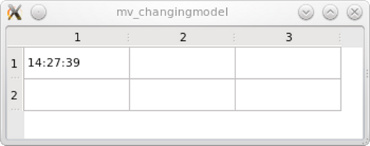
We still have a read only table, but this time the content changes every second because we are showing the current time.
(file source: examples/widgets/tutorials/modelview/3_changingmodel/mymodel.cpp)
<Code snippet "tutorials/modelview/3_changingmodel/mymodel.cpp:quoting mymodel_QVariant" not found>Something is missing to make the clock tick. We need to tell the view every second that the time has changed and that it needs to be read again. We do this with a timer. In the constructor, we set its interval to 1 second and connect its timeout signal.
(file source: examples/widgets/tutorials/modelview/3_changingmodel/mymodel.cpp)
MyModel::MyModel(QObject *parent)
    : QAbstractTableModel(parent)
    , timer(new QTimer(this))
{
    timer->setInterval(1000);
    connect(timer, &QTimer::timeout , this, &MyModel::timerHit);
    timer->start();
}
Here is the corresponding slot:
(file source: examples/widgets/tutorials/modelview/3_changingmodel/mymodel.cpp)
<Code snippet "tutorials/modelview/3_changingmodel/mymodel.cpp:quoting mymodel_b" not found>We ask the view to read the data in the top left cell again by emitting the
dataChanged()signal. Note that we did not explicitly connect thedataChanged()signal to the view. This happened automatically when we calledsetModel().
2.4 Setting up Headers for Columns and Rows
Headers can be hidden via a view method:
tableView->verticalHeader()->hide();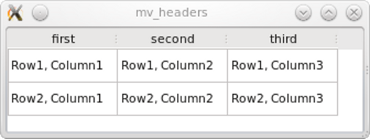
The header content, however, is set via the model, so we reimplement the
headerData()method:(file source: examples/widgets/tutorials/modelview/4_headers/mymodel.cpp)
QVariant MyModel::headerData(int section, Qt::Orientation orientation, int role) const
{
    if (role == Qt::DisplayRole && orientation == Qt::Horizontal) {
        switch (section) {
        case 0:
            return QString("first");
        case 1:
            return QString("second");
        case 2:
            return QString("third");
        }
    }
    return QVariant();
}
Note that method
headerData()also has a parameter role which has the same meaning as indata().
2.5 The Minimal Editing Example
In this example, we are going to build an application that automatically populates a window title with content by repeating values entered into table cells. To be able to access the window title easily we put the
QTableViewin aQMainWindow.The model decides whether editing capabilities are available. We only have to modify the model in order for the available editing capabilities to be enabled. This is done by reimplementing the following virtual methods:
setData()andflags().(file source: examples/widgets/tutorials/modelview/5_edit/mymodel.h)
// mymodel.h
#include <QAbstractTableModel>
#include <QString>

const int COLS= 3;
const int ROWS= 2;


class MyModel : public QAbstractTableModel
{
    Q_OBJECT
public:
    MyModel(QObject *parent = nullptr);
    int rowCount(const QModelIndex &parent = QModelIndex()) const override;
    int columnCount(const QModelIndex &parent = QModelIndex()) const override;
    QVariant data(const QModelIndex &index, int role = Qt::DisplayRole) const override;
    bool setData(const QModelIndex &index, const QVariant &value, int role = Qt::EditRole) override;
    Qt::ItemFlags flags(const QModelIndex &index) const override;
private:
    QString m_gridData[ROWS][COLS];  //holds text entered into QTableView
signals:
    void editCompleted(const QString &);
};
We use
thetwo-dimensional arrayQStringm_gridDatato store our data. This makesm_gridDatathe core ofMyModel. The rest ofMyModelacts like a wrapper and adaptsm_gridDatato theQAbstractItemModelinterface. We have also introduced theeditCompleted()signal, which makes it possible to transfer the modified text to the window title.(file source: examples/widgets/tutorials/modelview/5_edit/mymodel.cpp)
bool MyModel::setData(const QModelIndex &index, const QVariant &value, int role)
{
    if (role == Qt::EditRole) {
        if (!checkIndex(index))
            return false;
        //save value from editor to member m_gridData
        m_gridData[index.row()][index.column()] = value.toString();
        //for presentation purposes only: build and emit a joined string
        QString result;
        for (int row = 0; row < ROWS; row++) {
            for (int col= 0; col < COLS; col++)
                result += m_gridData[row][col] + ' ';
        }
        emit editCompleted(result);
        return true;
    }
    return false;
}
setData()will be called each time the user edits a cell. Theindexparameter tells us which field has been edited andvalueprovides the result of the editing process. The role will always be set toEditRolebecause our cells only contain text. If a checkbox were present and user permissions are set to allow the checkbox to be selected, calls would also be made with the role set toCheckStateRole.(file source: examples/widgets/tutorials/modelview/5_edit/mymodel.cpp)
Qt::ItemFlags MyModel::flags(const QModelIndex &index) const
{
    return Qt::ItemIsEditable | QAbstractTableModel::flags(index);
}
Various properties of a cell can be adjusted with
flags().Returning
ItemIsEnabledis enough to show an editor that a cell can be selected.If editing one cell modifies more data than the data in that particular cell, the model must emit a
dataChanged()signal in order for the data that has been changed to be read.
3. Intermediate Topics
3.1 TreeView
You can convert the example above into an application with a tree view. Simply replace
QTableViewwithQTreeView, which results in a read/write tree. No changes have to be made to the model. The tree won’t have any hierarchies because there aren’t any hierarchies in the model itself.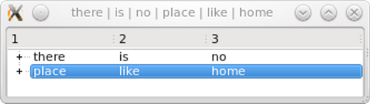
QListView,QTableViewandQTreeViewall use a model abstraction, which is a merged list, table and tree. This makes it possible to use several different types of view classes from the same model.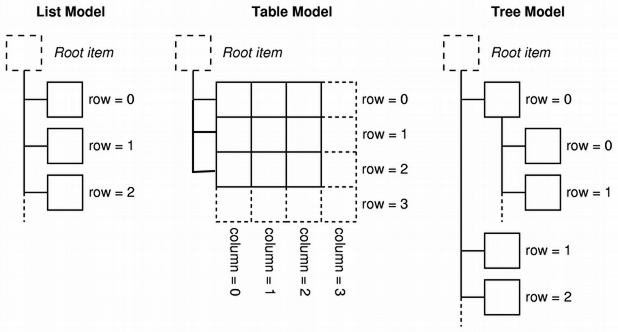
This is how our example model looks so far:
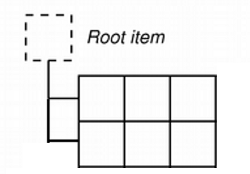
We want to present a real tree. We have wrapped our data in the examples above in order to make a model. This time we use
QStandardItemModel, which is a container for hierarchical data that also implementsQAbstractItemModel. To show a tree,QStandardItemModelmust be populated withQStandardItems, which are able to hold all the standard properties of items like text, fonts, checkboxes or brushes.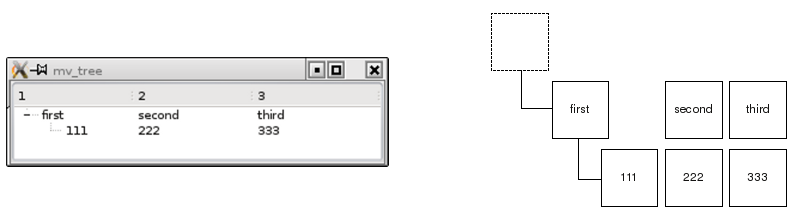
(file source: examples/widgets/tutorials/modelview/6_treeview/mainwindow.cpp)
// modelview.cpp
#include "mainwindow.h"

#include <QTreeView>
#include <QStandardItemModel>
#include <QStandardItem>

MainWindow::MainWindow(QWidget *parent)
    : QMainWindow(parent)
    , treeView(new QTreeView(this))
    , standardModel(new QStandardItemModel(this))
{
    setCentralWidget(treeView);

    QList<QStandardItem *> preparedRow = prepareRow("first", "second", "third");
    QStandardItem *item = standardModel->invisibleRootItem();
    // adding a row to the invisible root item produces a root element
    item->appendRow(preparedRow);

    QList<QStandardItem *> secondRow = prepareRow("111", "222", "333");
    // adding a row to an item starts a subtree
    preparedRow.first()->appendRow(secondRow);

    treeView->setModel(standardModel);
    treeView->expandAll();
}

QList<QStandardItem *> MainWindow::prepareRow(const QString &first,
                                              const QString &second,
                                              const QString &third) const
{
    return {new QStandardItem(first),
            new QStandardItem(second),
            new QStandardItem(third)};
}
We simply instantiate a
QStandardItemModeland add a couple ofQStandardItemsto the constructor. We can then make a hierarchical data structure because aQStandardItemcan hold otherQStandardItems. Nodes are collapsed and expanded within the view.
3.2 Working with Selections
We want to access a selected item’s content in order to output it into the window title together with the hierarchy level.
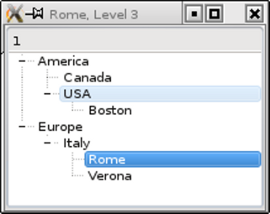
So let’s create a couple of items:
(file source: examples/widgets/tutorials/modelview/7 _selections /mainwindow.cpp)
#include "mainwindow.h"

#include <QTreeView>
#include <QStandardItemModel>
#include <QItemSelectionModel>

MainWindow::MainWindow(QWidget *parent)
    : QMainWindow(parent)
    , treeView(new QTreeView(this))
    , standardModel(new QStandardItemModel(this))
{
    setCentralWidget(treeView);
    QStandardItem *rootNode = standardModel->invisibleRootItem();


    //defining a couple of items
    QStandardItem *americaItem = new QStandardItem("America");
    QStandardItem *mexicoItem =  new QStandardItem("Canada");
    QStandardItem *usaItem =     new QStandardItem("USA");
    QStandardItem *bostonItem =  new QStandardItem("Boston");
    QStandardItem *europeItem =  new QStandardItem("Europe");
    QStandardItem *italyItem =   new QStandardItem("Italy");
    QStandardItem *romeItem =    new QStandardItem("Rome");
    QStandardItem *veronaItem =  new QStandardItem("Verona");

    //building up the hierarchy
    rootNode->    appendRow(americaItem);
    rootNode->    appendRow(europeItem);
    americaItem-> appendRow(mexicoItem);
    americaItem-> appendRow(usaItem);
    usaItem->     appendRow(bostonItem);
    europeItem->  appendRow(italyItem);
    italyItem->   appendRow(romeItem);
    italyItem->   appendRow(veronaItem);

    //register the model
    treeView->setModel(standardModel);
    treeView->expandAll();

    //selection changes shall trigger a slot
    QItemSelectionModel *selectionModel = treeView->selectionModel();
    connect(selectionModel, &QItemSelectionModel::selectionChanged,
            this, &MainWindow::selectionChangedSlot);
}
Views manage selections within a separate selection model, which can be retrieved with the
selectionModel()method. We retrieve the selection Model in order to connect a slot to itsselectionChanged()signal.(file source: examples/widgets/tutorials/modelview/7 _selections /mainwindow.cpp)
void MainWindow::selectionChangedSlot(const QItemSelection & /*newSelection*/, const QItemSelection & /*oldSelection*/)
{
    //get the text of the selected item
    const QModelIndex index = treeView->selectionModel()->currentIndex();
    QString selectedText = index.data(Qt::DisplayRole).toString();
    //find out the hierarchy level of the selected item
    int hierarchyLevel = 1;
    QModelIndex seekRoot = index;
    while (seekRoot.parent() != QModelIndex()) {
        seekRoot = seekRoot.parent();
        hierarchyLevel++;
    }
    QString showString = QString("%1, Level %2").arg(selectedText)
                         .arg(hierarchyLevel);
    setWindowTitle(showString);
}
We get the model index that corresponds to the selection by calling
treeView->selectionModel()->currentIndex()and we get the field’s string by using the model index. Then we just calculate the item’shierarchyLevel. Top level items do not have parents and theparent()method will return a default constructedQModelIndex(). This is why we use theparent()method to iterate to the top level while counting the steps performed during iteration.The selection model (as shown above) can be retrieved, but it can also be set with
setSelectionModel. This is how it’s possible to have 3 view classes with synchronized selections because only one instance of a selection model is used. To share a selection model between 3 views useselectionModel()and assign the result to the second and third view class withsetSelectionModel().
3.3 Predefined Models
The typical way to use model/view is to wrap specific data to make it usable with view classes. Qt, however, also provides predefined models for common underlying data structures. If one of the available data structures is suitable for your application, a predefined model can be a good choice.
QStringListModelStores a list of strings
QStandardItemModelStores arbitrary hierarchical items
QFileSystemModelQDirModelEncapsulate the local file system
QSqlQueryModelEncapsulate an SQL result set
QSqlTableModelEncapsulates an SQL table
QSqlRelationalTableModelEncapsulates an SQL table with foreign keys
QSortFilterProxyModelSorts and/or filters another model
3.4 Delegates
In all examples so far, data is presented as text or a checkbox in a cell and is edited as text or a checkbox. The component that provides these presentation and editing services is called a delegate . We are only just beginning to work with the delegate because the view uses a default delegate. But imagine that we want to have a different editor (e.g., a slider or a drop down list) Or imagine that we want to present data as graphics. Let’s take a look at an example called Star Delegate , in which stars are used to show a rating:
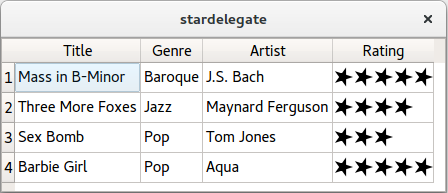
The view has a
setItemDelegate()method that replaces the default delegate and installs a custom delegate. A new delegate can be written by creating a class that inherits fromQStyledItemDelegate. In order to write a delegate that displays stars and has no input capabilities, we only need to override 2 methods.class StarDelegate : public QStyledItemDelegate { Q_OBJECT public: StarDelegate(QWidget *parent = 0); void paint(QPainter *painter, const QStyleOptionViewItem &option, const QModelIndex &index) const; QSize sizeHint(const QStyleOptionViewItem &option, const QModelIndex &index) const; };
paint()draws stars depending on the content of the underlying data. The data can be looked up by callingdata(). The delegate’ssizeHint()method is used to obtain each star’s dimensions, so the cell will provide enough height and width to accommodate the stars.Writing custom delegates is the right choice if you want to show your data with a custom graphical representation inside the grid of the view class. If you want to leave the grid, you would not use a custom delegate but a custom view class.
Other references to delegates in Qt Documentation:
QAbstractItemDelegate Class Reference
QSqlRelationalDelegate Class Reference
QStyledItemDelegate Class Reference
QItemDelegate Class Reference
3.5 Debugging with ModelTest
The passive nature of models provides new challenges for programmers. Inconsistencies in the model can cause the application to crash. Since the model is hit by numerous calls from the view, it is hard to find out which call has crashed the application and which operation has introduced the problem.
Qt Labs provides software called ModelTest , which checks models while your programming is running. Every time the model is changed, ModelTest scans the model and reports errors with an assert. This is especially important for tree models, since their hierarchical nature leaves many possibilities for subtle inconsistencies.
Unlike view classes, ModelTest uses out of range indexes to test the model. This means your application may crash with ModelTest even if it runs perfectly without it. So you also need to handle all of the indexes that are out of range when using ModelTest.
4. Good Sources of Additional Information
4.1 Books
Model/View programming is covered quite extensively in the documentation of Qt but also in several good books.
C++ GUI Programming with Qt 4 / Jasmin Blanchette, Mark Summerfield, Prentice Hall, 2nd edition, ISBN 0-13-235416-0. Also available in German: C++ GUI Programmierung mit Qt 4: Die offizielle Einführung, Addison-Wesley, ISBN 3-827327-29-6
The Book of Qt4, The Art of Building Qt Applications / Daniel Molkentin, Open Source Press, ISBN 1-59327-147-6. Translated from Qt 4, Einführung in die Applikationsentwicklung, Open Source Press, ISBN 3-937514-12-0.
Foundations of Qt Development / Johan Thelin, Apress, ISBN 1-59059-831-8.
Advanced Qt Programming / Mark Summerfield, Prentice Hall, ISBN 0-321-63590-6. This book covers Model/View programming on more than 150 pages.
The following list provides an overview of example programs contained in the first three books listed above. Some of them make very good templates for developing similar applications.
Example name
View class used
Model used
Aspects covered
Team Leaders
QListview
QStringListModelBook 1, Chapter 10, Figure 10.6
Directory Viewer
QTreeView
QDirModelBook 1, Chapter 10, Figure 10.7
Color Names
QListView
QSortFilterProxyModelapplied toQStringListModelBook 1, Chapter 10, Figure 10.8
Currencies
QTableViewcustom model based on
QAbstractTableModelRead only
Book 1, Chapter 10, Figure 10.10
Cities
QTableViewCustom model based on
QAbstractTableModelRead / write
Book 1, Chapter 10, Figure 10.12
Boolean Parser
QTreeViewCustom model based on
QAbstractItemModelRead only
Book 1, Chapter 10, Figure 10.14
Track Editor
QTableWidgetCustom delegate providing a custom editor
Book 1, Chapter 10, Figure 10.15
Four directory views
QListViewQTableViewQTreeView
QDirModelDemonstrates the use of multiple views
Book2, Chapter 8.2
Address Book
QListViewQTableViewQTreeViewCustom model based on
QAbstractTableModelRead / write
Book2, Chapter 8.4
Address Book with sorting
QSortfilterProxyModel
Introducing sort and filter capabilities
Book2, Chapter 8.5
Address Book with checkboxes
Introducing checkboxes in model/view
Book2, Chapter 8.6
Address Book with transposed grid
Custom proxy Model based on
QAbstractProxyModelIntroducing a custom model
Book2, Chapter 8.7
Address Book with drag and drop
Introducing drag and drop support
Book2, Chapter 8.8
Address Book with custom editor
Introducing custom delegates
Book2, Chapter 8.9
Views
QListViewQTableViewQTreeView
QStandardItemModelRead only
Book 3, Chapter 5, figure 5-3
Bardelegate
QTableViewCustom delegate for presentation based on
QAbstractItemDelegateBook 3, Chapter 5, figure 5-5
Editdelegate
QTableViewCustom delegate for editing based on
QAbstractItemDelegateBook 3, Chapter 5, figure 5-6
Singleitemview
Custom view based on
QAbstractItemViewCustom view
Book 3, Chapter 5, figure 5-7
listmodel
QTableViewCustom Model based on
QAbstractTableModelRead only
Book 3, Chapter 5, Figure 5-8
treemodel
QTreeViewCustom Model based on
QAbstractItemModelRead only
Book 3, Chapter 5, Figure 5-10
edit integers
QListViewCustom Model based on
QAbstractListModelRead / write
Book 3, Chapter 5, Listing 5-37, Figure 5-11
sorting
QTableView
QSortFilterProxyModelapplied toQStringListModelDemonstrates sorting
Book 3, Chapter 5, Figure 5-12
4.2 Qt Documentation
Qt 5.0 comes with 19 examples for model/view. The examples can be found on the Item Views Examples page.
Example name
View class used
Model used
Aspects covered
Address Book
QTableView
QAbstractTableModelQSortFilterProxyModelUsage of
QSortFilterProxyModelto generate different subsets from one data poolBasic Sort/Filter Model
QTreeView
QStandardItemModelQSortFilterProxyModelChart
Custom view
QStandardItemModelDesigning custom views that cooperate with selection models
Color Editor Factory
QTableWidgetEnhancing the standard delegate with a new custom editor to choose colours
Combo Widget Mapper
QDataWidgetMapperto mapQLineEdit,QTextEditandQComboBox
QStandardItemModelShows how a
QComboBoxcan serve as a view classCustom Sort/Filter Model
QTreeView
QStandardItemModelQSortFilterProxyModelSubclass
QSortFilterProxyModelfor advanced sorting and filteringDir View
QTreeView
QFileSystemModelVery small example to demonstrate how to assign a model to a view
Editable Tree Model
QTreeViewCustom tree model
Comprehensive example for working with trees, demonstrates editing cells and tree structure with an underlying custom model
Fetch More
QListViewCustom list model
Dynamically changing model
Frozen Column
QTableView
QStandardItemModelInterview
Multiple
Custom item model
Multiple views
Pixelator
QTableViewCustom table model
Implementation of a custom delegate
Puzzle
QListViewCustom list model
Model/view with drag and drop
Simple DOM Model
QTreeViewCustom tree model
Read only example for a custom tree model
Simple Tree Model
QTreeViewCustom tree model
Read only example for a custom tree model
Simple Widget Mapper
QDataWidgetMapperto mapQLineEdit,QTextEditandQSpinBox
QStandardItemModelBasic
QDataWidgetMapperusageSpin Box Delegate
QTableView
QStandardItemModelCustom delegate that uses a spin box as a cell editor
Spreadsheet
QTableViewCustom delegates
Star Delegate
QTableWidgetComprehensive custom delegate example.
A reference document for model/view technology is also available.
© 2022 The Qt Company Ltd. Documentation contributions included herein are the copyrights of their respective owners. The documentation provided herein is licensed under the terms of the GNU Free Documentation License version 1.3 as published by the Free Software Foundation. Qt and respective logos are trademarks of The Qt Company Ltd. in Finland and/or other countries worldwide. All other trademarks are property of their respective owners.