
Text Finder Example
Dynamically loading .ui files using
QUiLoader.The TextFinder example shows how to load and setup a
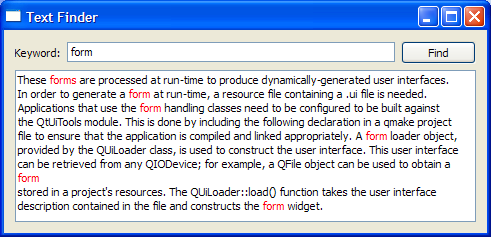
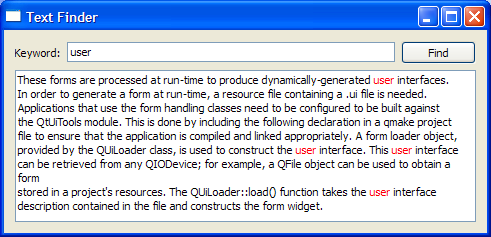
.uifile dynamically using theQUiLoaderclass that is part of the Qt UI Tools library.The program allows the user to look up a particular word within the contents of a text. The visual elements and layout of the user interface is loaded at runtime, from a the program resources.
Setting Up The Resource File
The resources required for the example are:
textfinder.ui- the user interface file created in Qt Designer
input.txt- a text file containing some text to be displayed in aQTextEdit
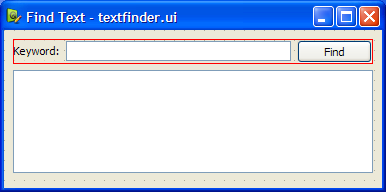
textfinder.uicontains all the necessaryQWidgetobjects for the Text Finder. AQLineEditis used for the user input, aQTextEditis used to display the contents ofinput.txt, aQLabelis used to display the text “Keyword”, and aQPushButtonis used for the Find button. Note that all the widgets have sensibleobjectName‘s assigned. These are used in code to identify them.The screenshot below shows the preview obtained in Qt Designer.
In this example, we store both resources in the applicaton’s executable by including the
textfinder.qrcfile. Alternatively, the files could also be loaded at runtime from the file system, or from an external binary resource.rccfile. For more information on resource files, see The Qt Resource System .The
textfinder.qrcfile lists all files that should be included as a resource:<Code snippet "/data/snapshot-qt5full-5.15/qt5/qtbase/textfinder/textfinder.qrc" not found>To generate a form at run-time, the example is linked against the Qt Ui Tools library. This is done in the
textfinder.profile:<Code snippet "textfinder/textfinder.pro:0" not found>
TextFinder Class Definition
The
TextFinderclass contains the main user interface. It declares pointers to theQPushButton,QTextEditandQLineEditelements described above. TheQLabelin the user interface is not declared here as we do not need to access it from code.class TextFinder : public QWidget { Q_OBJECT public: explicit TextFinder(QWidget *parent = nullptr); private slots: void on_findButton_clicked(); private: QPushButton *ui_findButton; QTextEdit *ui_textEdit; QLineEdit *ui_lineEdit; };The slot
on_findButton_clicked()is a slot named according to the Automatic Connection naming convention required byuic.
Loading the Resources
We use
QFileto load the data from the program resources at runtime. The code for this is in two method methods on top oftextfinder.cpp:loadUiFileandloadTextFile.The
loadUiFilefunction loads the user interface file previously created in Qt Designer. First, the content of thetextfinder.uifile is loaded from the resource system. Then aQUiLoaderinstance is created, and theload()function is called, with the first argument being the open file, and the second argument being the pointer of the widget that should be set as the parent. The createdQWidgetis returned.static QWidget *loadUiFile(QWidget *parent) { QFile file(":/forms/textfinder.ui"); file.open(QIODevice::ReadOnly); QUiLoader loader; return loader.load(&file, parent); }In a similar vein, the
loadTextFilefunction loadsinput.txtfrom the resources. Data is read usingQTextStreaminto aQStringwith thereadAll()function. We explicitly set the encoding to UTF-8 , becauseQTextStreamby default uses the current system locale. Finally, the loaded text is returned.static QString loadTextFile() { QFile inputFile(":/forms/input.txt"); inputFile.open(QIODevice::ReadOnly); QTextStream in(&inputFile); in.setCodec("UTF-8"); return in.readAll(); }
TextFinder Class Implementation
The
TextFinderclass’s constructor does not instantiate any child widgets directly. Instead, it calls theloadUiFile()function, and then usesfindChild()to locate the createdQWidgets by object name.TextFinder::TextFinder(QWidget *parent) : QWidget(parent) { QWidget *formWidget = loadUiFile(this); ui_findButton = findChild<QPushButton*>("findButton"); ui_textEdit = findChild<QTextEdit*>("textEdit"); ui_lineEdit = findChild<QLineEdit*>("lineEdit");We then use
connectSlotsByName()to enable the automatic calling of theon_findButton_clicked()slot.QMetaObject::connectSlotsByName(this);The
loadTextFilefunction is called to get the text to be shown in theQTextEdit.ui_textEdit->setText(loadTextFile());The dynamically loaded user interface in
formWidgetis now properly set up. We now embedformWidgetthrough aQVBoxLayout.QVBoxLayout *layout = new QVBoxLayout; layout->addWidget(formWidget); setLayout(layout);At the end of the constructor we set a window title.
    setWindowTitle(tr("Text Finder"));
}
The
on_findButton_clicked()function is a slot that is connected toui_findButton‘sclicked()signal. ThesearchStringis extracted from theui_lineEditand thedocumentis extracted fromui_textEdit. If there is an emptysearchString, aQMessageBoxis used, requesting the user to enter a word. Otherwise, we traverse through the words inui_textEdit, and highlight all ocurrences of thesearchString. TwoQTextCursorobjects are used: One to traverse through the words inlineand another to keep track of the edit blocks.void TextFinder::on_findButton_clicked() { QString searchString = ui_lineEdit->text(); QTextDocument *document = ui_textEdit->document(); bool found = false; // undo previous change (if any) document->undo(); if (searchString.isEmpty()) { QMessageBox::information(this, tr("Empty Search Field"), tr("The search field is empty. " "Please enter a word and click Find.")); } else { QTextCursor highlightCursor(document); QTextCursor cursor(document); cursor.beginEditBlock(); QTextCharFormat plainFormat(highlightCursor.charFormat()); QTextCharFormat colorFormat = plainFormat; colorFormat.setForeground(Qt::red); while (!highlightCursor.isNull() && !highlightCursor.atEnd()) { highlightCursor = document->find(searchString, highlightCursor, QTextDocument::FindWholeWords); if (!highlightCursor.isNull()) { found = true; highlightCursor.movePosition(QTextCursor::WordRight, QTextCursor::KeepAnchor); highlightCursor.mergeCharFormat(colorFormat); } } cursor.endEditBlock();The
foundflag is used to indicate if thesearchStringwas found within the contents ofui_textEdit. If it was not found, aQMessageBoxis used to inform the user.if (found == false) { QMessageBox::information(this, tr("Word Not Found"), tr("Sorry, the word cannot be found.")); } } }
main()
Function
The
main()function instantiates and showsTextFinder.int main(int argc, char *argv[]) { QApplication app(argc, argv); TextFinder textFinder; textFinder.show(); return app.exec(); }There are various approaches to include forms into applications. Using QUILoader is just one of them. See Using a Designer UI File in Your Application for more information on the other approaches available.
See also
Calculator Builder ExampleWorld Time Clock Builder Example
© 2022 The Qt Company Ltd. Documentation contributions included herein are the copyrights of their respective owners. The documentation provided herein is licensed under the terms of the GNU Free Documentation License version 1.3 as published by the Free Software Foundation. Qt and respective logos are trademarks of The Qt Company Ltd. in Finland and/or other countries worldwide. All other trademarks are property of their respective owners.