
Recipes Example
Using Qt XML Patterns to query XML data loaded from a file.
The Recipes example shows how to use Qt XML Patterns to query XML data loaded from a file.
Introduction
In this case, the XML data represents a cookbook,
cookbook.xml, which contains<cookbook>as its document element, which in turn contains a sequence of<recipe>elements. This XML data is searched using queries stored in XQuery files (*.xq).
The User Interface
The UI for this example was created using Qt Designer:
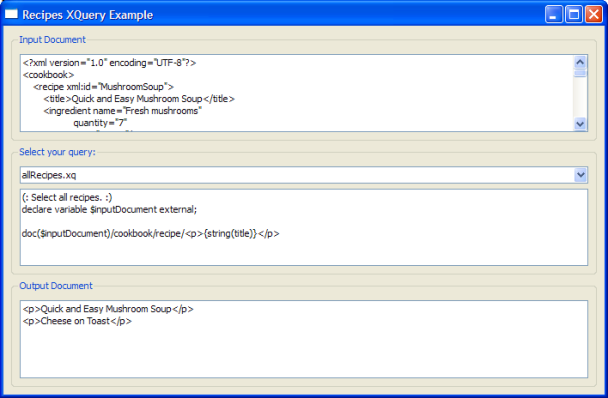
The UI consists of three
group boxesarranged vertically. The top one contains atext viewerthat displays the XML text from the cookbook file. The middle group box contains acombo boxfor choosing the XQuery to run and atext viewerfor displaying the text of the selected XQuery . The.xqfiles in the file list above are shown in the combo box menu. Choosing an XQuery loads, parses, and runs the selected XQuery . The query result is shown in the bottom group box’stext viewer.
Running your own XQueries
You can write your own XQuery files and run them in the example program. The file
xmlpatterns/recipes/recipes.qrcis the resource file for this example. It is used inmain.cpp(Q_INIT_RESOURCE(recipes);). It lists the XQuery files (.xq) that can be selected in the combobox.To add your own queries to the example’s combobox, store your
.xqfiles in theexamples/xmlpatterns/recipes/filesdirectory and add them torecipes.qrcas shown above.
Code Walk-Through
The example’s main() function creates the standard instance of
QApplication. Then it creates an instance of the UI class, shows it, and starts the Qt event loop:int main(int argc, char* argv[]) { Q_INIT_RESOURCE(recipes); QApplication app(argc, argv); QueryMainWindow* const queryWindow = new QueryMainWindow; queryWindow->show(); return app.exec(); }
The UI Class: QueryMainWindow
The example’s UI is a conventional Qt GUI application inheriting
QMainWindowand the class generated by Qt Designer:class QueryMainWindow : public QMainWindow, private Ui::QueryWidget { Q_OBJECT public: QueryMainWindow(); public slots: void displayQuery(int index); private: QComboBox *ui_defaultQueries = nullptr; void evaluate(const QString &str); void loadInputFile(); };The constructor finds the window’s
combo boxchild widget and connects itscurrentIndexChanged()signal to the window’sdisplayQuery()slot. It then callsloadInputFile()to loadcookbook.xmland display its contents in the top group box’stext viewer. Finally, it finds the XQuery files (.xq) and adds each one to thecombo boxmenu.QueryMainWindow::QueryMainWindow() { setupUi(this); new XmlSyntaxHighlighter(findChild<QTextEdit*>("inputTextEdit")->document()); new XmlSyntaxHighlighter(findChild<QTextEdit*>("outputTextEdit")->document()); ui_defaultQueries = findChild<QComboBox*>("defaultQueries"); QMetaObject::connectSlotsByName(this); connect(ui_defaultQueries, QOverload<int>::of(&QComboBox::currentIndexChanged), this, &QueryMainWindow::displayQuery); loadInputFile(); const QStringList queries(QDir(":/files/", "*.xq").entryList()); for (const auto &query : queries) ui_defaultQueries->addItem(query); if (queries.count() > 0) displayQuery(0); }The work is done in the displayQuery() slot and the evaluate() function it calls. displayQuery() loads and displays the selected query file and passes the XQuery text to evaluate() .
void QueryMainWindow::displayQuery(int index)
{
    QFile queryFile(QString(":files/") + ui_defaultQueries->itemText(index));
    queryFile.open(QIODevice::ReadOnly);
    const QString query(QString::fromLatin1(queryFile.readAll()));
    findChild<QTextEdit*>("queryTextEdit")->setPlainText(query);

    evaluate(query);
}
evaluate() demonstrates the standard Qt XML Patterns usage pattern. First, an instance of
QXmlQueryis created (query). Thequery'sbindVariable()function is then called to bind thecookbook.xmlfile to the XQuery variableinputDocument. After the variable is bound,setQuery()is called to pass the XQuery text to thequery.Note
setQuery()must be called afterbindVariable().Passing the XQuery to
setQuery()causes Qt XML Patterns to parse the XQuery .isValid()is called to ensure that the XQuery was correctly parsed.void QueryMainWindow::evaluate(const QString &str) { QFile sourceDocument; sourceDocument.setFileName(":/files/cookbook.xml"); sourceDocument.open(QIODevice::ReadOnly); QByteArray outArray; QBuffer buffer(&outArray); buffer.open(QIODevice::ReadWrite); QXmlQuery query; query.bindVariable("inputDocument", &sourceDocument); query.setQuery(str); if (!query.isValid()) return; QXmlFormatter formatter(query, &buffer); if (!query.evaluateTo(&formatter)) return; buffer.close(); findChild<QTextEdit*>("outputTextEdit")->setPlainText(QString::fromUtf8(outArray.constData())); }If the XQuery is valid, an instance of
QXmlFormatteris created to format the query result as XML into aQBuffer. To evaluate the XQuery , an overload ofevaluateTo()is called that takes aQAbstractXmlReceiverfor its output (QXmlFormatterinheritsQAbstractXmlReceiver). Finally, the formatted XML result is displayed in the UI’s bottom text view.Note
Each XQuery
.xqfile must declare the$inputDocumentvariable to represent thecookbook.xmldocument:(: All ingredients for Mushroom Soup. :) declare variable $inputDocument external; doc($inputDocument)/cookbook/recipe[@xml:id = "MushroomSoup"]/ingredient/ <p>{@name, @quantity}</p>Note
If you add add your own query.xq files, you must declare the
$inputDocumentand use it as shown above.
© 2022 The Qt Company Ltd. Documentation contributions included herein are the copyrights of their respective owners. The documentation provided herein is licensed under the terms of the GNU Free Documentation License version 1.3 as published by the Free Software Foundation. Qt and respective logos are trademarks of The Qt Company Ltd. in Finland and/or other countries worldwide. All other trademarks are property of their respective owners.