
Qt 프로젝트 만들기
프로젝트를 생성하려면 특정 프로젝트 유형에 대한 사전 설정을 선택하십시오:
- Welcome 로 이동한 다음, ‘ New project ’를 선택하십시오.
- Project 에서 프로젝트 유형을 선택하십시오.
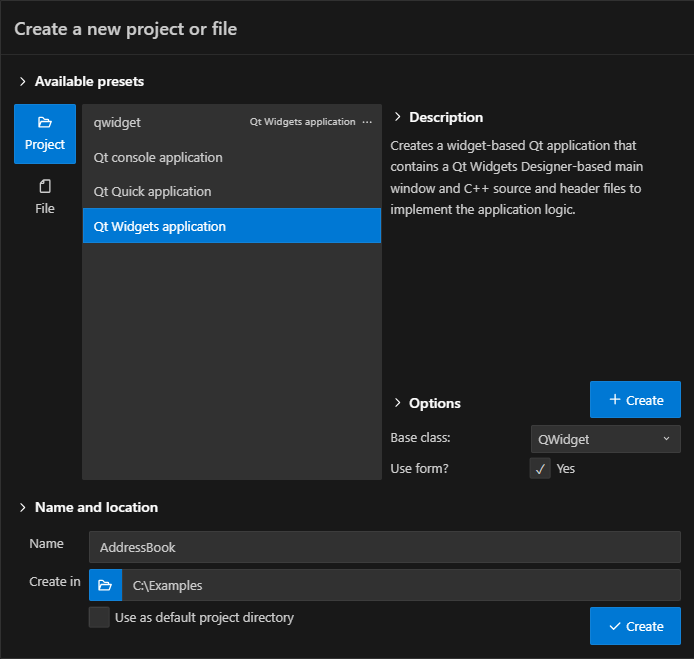
- Name 에서 프로젝트 이름을 입력합니다.
- Create in 에서 프로젝트 파일의 경로를 입력합니다. 예:
C:\Qt\examples. - Options 에서 프로젝트 유형에 따라 옵션을 설정합니다.
- Open in new window 을 선택하여 프로젝트 파일을 생성하고 새 VS Code 창에서 엽니다. 새 프로젝트를 작업 영역에 추가하려면 Add to workspace 을 선택합니다.
- 프로젝트에 사용할 CMake 키트를 선택합니다.
Create in 에 표시되는 프로젝트 폴더를 기본값으로 설정하려면, Command Palette 로 이동하여 Open Qt settings 를 선택하십시오.
사용자 지정 사전 설정 만들기
프로젝트나 파일 유형에 대한 ‘ Options ’를 변경할 때, ‘ Create ’를 선택하여 사용자 지정 사전 설정을 생성할 수 있습니다. 사용자 지정 사전 설정은 사전 설정 목록에 표시되며, 이를 선택하여 새 프로젝트나 파일을 생성할 수 있습니다.
사용자 지정 프리셋에 대한 변경 사항을 저장하려면 ‘ Save ’를 선택하십시오.
© 2026 The Qt Company Ltd. Documentation contributions included herein are the copyrights of their respective owners. The documentation provided herein is licensed under the terms of the GNU Free Documentation License version 1.3 as published by the Free Software Foundation. Qt and respective logos are trademarks of The Qt Company Ltd in Finland and/or other countries worldwide. All other trademarks are property of their respective owners.
