
위젯 기반 UI 디자인
Qt Widgets Designer 를 사용하여 위젯 기반 UI를 디자인하려면:
- Explorer 로 이동하여 .ui 파일을 선택합니다.
- 다음 항목을 선택합니다 Open this file with Qt Widgets Designer.
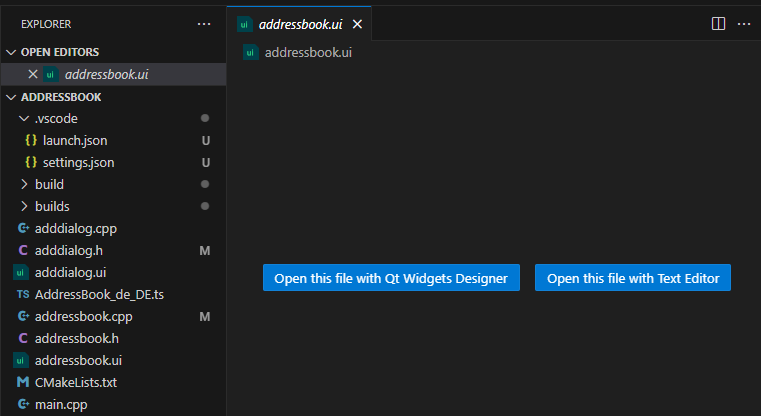
- 다음 기능을 사용하여 Qt Widgets Designer 를 사용하여 UI를 디자인합니다.
Qt Widgets Designer 의 위치를 설정하세요
VS Code에서 ` Qt Widgets Designer`을 찾을 수 없는 경우:
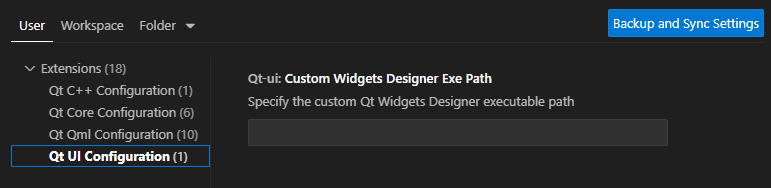
- Command Palette 로 이동하여 Qt: Open Qt Extension settings 를 선택합니다.
- Custom Widgets Designer Exe Path 에서 Qt Widgets Designer 를 설치한 폴더의 경로를 설정합니다.
텍스트 편집기에서 UI 파일 열기
텍스트 편집기에서 UI 파일을 열려면:
- Explorer 로 이동하여 .ui 파일을 선택합니다.
- Open this file with Text Editor 을 선택합니다.
- 텍스트 편집기를 사용하여 UI 파일을 수정합니다.
참조: 튜토리얼: Qt Widgets 애플리케이션 및 Qt 설정.
© 2026 The Qt Company Ltd. Documentation contributions included herein are the copyrights of their respective owners. The documentation provided herein is licensed under the terms of the GNU Free Documentation License version 1.3 as published by the Free Software Foundation. Qt and respective logos are trademarks of The Qt Company Ltd in Finland and/or other countries worldwide. All other trademarks are property of their respective owners.
