
7.4.11. Library Modules
7.4.11.1. Module bauhaus.rfg.misc
The module bauhaus.rfg.misc is automatically imported as well when importing bauhaus.rfg, you do not need to import it separately. However you can import it under another name, if you want.
Output
The functions node_str, edge_str, and set_str return a string representation of a node, an edge, or a set.
You have to set SOURCENAME to the attribute used for output of names of nodes (for a
meaningful output, consider using Source.Name or
Linkage.Name). You have to set GRAPH to the graph that is used for
querying attributes.
The script in Listing Display the predecessors of all nodes in a view dumps all nodes in the
Code Facts view of the RFG whose filename is given as command line argument.
Each node is printed along with its predecessors.
#!/usr/bin/env rfgscript
# Copyright (C) 2025 Axivion GmbH
# Copyright (C) 2025 The Qt Company GmbH, a subsidiary of The Qt Group
# https://www.qt.io

import sys

from bauhaus import rfg

my_rfg = rfg.Graph(sys.argv[1])
my_view = my_rfg.view(rfg.module_view_name())

rfg.misc.GRAPH = my_rfg
rfg.misc.SOURCENAME = my_rfg.node_attribute("Source.Name")

for n in my_view:
    print(
        "Predecessors of %s are: %s"
        % (rfg.misc.node_str(n), rfg.misc.set_str(n.predecessors(my_view)))
    )
Predicate Creators
The two functions create predicates matching a type. The result can be used as matcher function.
Argument names can be either a string, a set/list/tuple of strings, or a node/edge descriptor. If it is a string or a node/edge descriptor, subtypes are also checked. If it is a set/list/tuple, only the passed type names are checked.
Neighborhood
The function transitive_neighbors_and_edges returns the tuple of nodes and edges that are the trace with respect to the edgepredicate starting at nodes. The direction governs the kind of trace: “backward” creates a backtrace, “forward” creates a forward trace. “both” takes all edges into account (the direction of edges does not matter completely). The union of “forward” and “backward” is not necessarily the result for “both”.
Function transitive_neighbors just returns the nodes that transitive_neighbors_and_edges computes, not the edges.
Attributes
The four functions create a new node/edge/view/graph attribute name with type attr_type in the graph. If the attribute already exists (even with a different type), nothing happens.
Node and Edge Types
The two functions create a new node/edge type name within the graph. In this case, the resulting type is returned. If the type already exists (even with a different parent type) this existing type is returned.
7.4.11.2. Module bauhaus.rfg.hierarchies
The module bauhaus.rfg.hierarchies is automatically imported as well when importing bauhaus.rfg, you do not need to import it separately. However you can import it under another name, if you want.
A hierarchy is defined by
a view,
the contained set of nodes and edges,
and an predicate that tells hierarchy edges from “ordinary” edges.
The contents of the hierarchy view has to be a forest with respect to the hierarchy edges.
Caution
The api does not check if you break this condition, so make sure you do not unintentionally introduce cycles into the hierarchy view.
It depends on your traversal schema what happens if a view gets cyclic. You can use the cycle check to ensure that your preconditions are met.
If a view has a cycle in its hierarchical edges, it is not possible to open a hierarchical window for the view in the UI of Gravis.
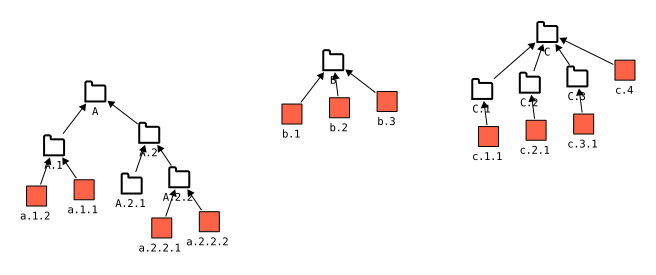
Example of a hierarchy.
A root is a node that does not possess a parent node. The roots
in Figure Example of a hierarchy. are A, B, and
C.
A leaf is a node that does not possess a child node. All the red nodes (“Routines”) are
leaf nodes. Additionally, node A.2.1 is also a leaf node.
A node that is not a root and not a leaf is called inner node.
Note
A node can be a root and a leaf at the same time.
has_children is a synonym of not is_leaf, has_parent is a synonym of
not is_root.
children and parent return the children and the parent of a node. Example
from Figure Example of a hierarchy.: Node A.1 has parent
A and children a.1.1 and a.1.2.
Inserting hierarchy edges and nodes can be done by using the ordinary editing functionality (e.g., add of class View).