
PathRectangle QML Type
Define un rectángulo con esquinas opcionalmente redondeadas. Más...
| Import Statement: | import QtQuick |
| Since: | QtQuick 6.8 |
Propiedades
- bevel : bool
(since 6.10) - bottomLeftBevel : bool
- bottomLeftRadius : real
- bottomRightBevel : bool
- bottomRightRadius : real
- height : real
- radius : real
- relativeX : real
- relativeY : real
- strokeAdjustment : real
- topLeftBevel : bool
- topLeftRadius : real
- topRightBevel : bool
- topRightRadius : real
- width : real
- x : real
- y : real
Descripción detallada
PathRectangle proporciona una forma sencilla de especificar un rectángulo, opcionalmente con esquinas redondeadas o biseladas. La API corresponde a la del elemento Rectangle.

    Shape {
        id: rectangleShape
        width: 200
        height: 150
        anchors.centerIn: parent
        preferredRendererType: Shape.CurveRenderer

        ShapePath {
            fillColor: "#3ad23c"

            PathRectangle {
                width: rectangleShape.width
                height: rectangleShape.height
                topLeftRadius: 30
                bottomRightRadius: 30
                bevel: true
            }
        }
    }
Véase también Path, PathLine, PathQuad, PathCubic, PathArc, PathAngleArc, PathCurve, y PathSvg.
Documentación de propiedades
bevel : bool [since 6.10]
Esta propiedad define si las esquinas del rectángulo están biseladas.
Si se establece en false se obtienen esquinas afiladas o redondeadas, dependiendo de los valores de las propiedades individuales de radius.
Esta propiedad puede ser sobrescrita por las propiedades individuales de bisel.
    Shape {
        id: rectangleShape
        width: 200
        height: 150
        anchors.centerIn: parent
        preferredRendererType: Shape.CurveRenderer

        ShapePath {
            fillColor: "#3ad23c"

            PathRectangle {
                width: rectangleShape.width
                height: rectangleShape.height
                topLeftRadius: 30
                bottomRightRadius: 30
                bevel: true
            }
        }
    }
Esta propiedad se introdujo en Qt 6.10.
Ver también topLeftBevel, topRightBevel, bottomLeftBevel, y bottomRightBevel.
Si se establecen, estas propiedades definen los biseles individuales de las esquinas. Si se establecen en false, se obtienen esquinas afiladas o redondeadas, dependiendo de los valores de las propiedades individuales de radius. Si se establecen en true, se obtienen esquinas biseladas. Si no se establecen, se utiliza el valor de bevel.
Estas propiedades están desactivadas por defecto. Asígneles undefined para que vuelvan a su estado original.
En el siguiente ejemplo, bottomRightBevel tiene el valor verdadero:
    Shape {
        id: rectangleShape
        width: 200
        height: 150
        anchors.centerIn: parent
        preferredRendererType: Shape.CurveRenderer

        ShapePath {
            strokeColor: "black"
            strokeWidth: 4
            joinStyle: ShapePath.MiterJoin

            PathRectangle {
                width: rectangleShape.width
                height: rectangleShape.height
                radius: 10
                topLeftRadius: 0
                bottomRightBevel: true
            }
        }
    }
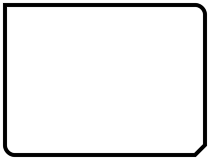
Véase también bevel.
Si se establecen, estas propiedades definen los radios individuales de las esquinas. Un valor cero define que esa esquina sea afilada, mientras que un valor positivo define que sea redondeada. Si no se definen, se utiliza el valor de radius.
Estas propiedades están desactivadas por defecto. Asigne undefined a estas propiedades para que vuelvan a estar desactivadas.
En el siguiente ejemplo, radius se asigna a 10, y topLeftRadius a 0:
    Shape {
        id: rectangleShape
        width: 200
        height: 150
        anchors.centerIn: parent
        preferredRendererType: Shape.CurveRenderer

        ShapePath {
            strokeColor: "black"
            strokeWidth: 4
            joinStyle: ShapePath.MiterJoin

            PathRectangle {
                width: rectangleShape.width
                height: rectangleShape.height
                radius: 10
                topLeftRadius: 0
                bottomRightBevel: true
            }
        }
    }
Véase también radius.
Define la anchura y la altura del rectángulo.
radius : real
Esta propiedad define el radio de la esquina utilizado para definir un rectángulo redondeado.
Si el radio es un valor positivo, el trazado del rectángulo se definirá como un rectángulo redondeado, en caso contrario se definirá como un rectángulo normal.
Esta propiedad puede ser anulada por las propiedades individuales de radio de las esquinas.
El valor por defecto es 0.
Véase también topLeftRadius, topRightRadius, bottomLeftRadius, y bottomRightRadius.
Define la esquina superior izquierda del rectángulo en relación con el punto inicial de la trayectoria.
Si se especifica tanto una posición final relativa como absoluta para un mismo eje, se utilizará la posición relativa.
Las posiciones relativas y absolutas pueden mezclarse, por ejemplo, es válido establecer una x relativa y una y absoluta.
strokeAdjustment : real
Esta propiedad define el ajuste del ancho del trazo a las coordenadas del rectángulo.
Cuando se utiliza en ShapePath con el trazo activado, el rectángulo trazado se extenderá por defecto más allá del rectángulo definido en la mitad del ancho del trazo en todos sus lados. Este es el comportamiento esperado, ya que el trazado define la línea del punto medio del trazo, y corresponde a QPainter y a la representación SVG.
Si en cambio se desea que el rectángulo definido sea el borde exterior del rectángulo trazado, como en un elemento de Rectangle con un borde, se puede establecer strokeAdjustment a la anchura del trazo. Esto desplazará todos los bordes hacia dentro la mitad del ancho del trazo. Como en el siguiente ejemplo:
ShapePath {
    id: myRec
    fillColor: "white"
    strokeColor: "black"
    strokeWidth: 16
    joinStyle: ShapePath.MiterJoin

    PathRectangle { x: 10; y: 10; width: 200; height: 100; strokeAdjustment: myRec.strokeWidth }
}
Define la esquina superior izquierda del rectángulo.
A menos que esa esquina esté redondeada, éste será también el punto inicial y final del trazado.
© 2026 The Qt Company Ltd. Documentation contributions included herein are the copyrights of their respective owners. The documentation provided herein is licensed under the terms of the GNU Free Documentation License version 1.3 as published by the Free Software Foundation. Qt and respective logos are trademarks of The Qt Company Ltd. in Finland and/or other countries worldwide. All other trademarks are property of their respective owners.
