
Qt 3D: Ejemplo sencillo en C++
Una aplicación en C++ que muestra cómo renderizar una escena en Qt 3D.
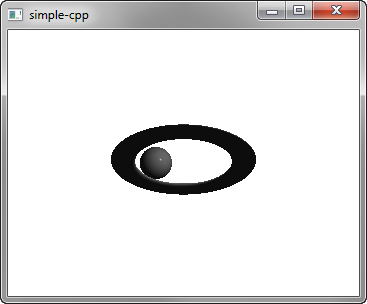
«Simple» muestra cómo renderizar una escena en Qt 3D.
Ejecución del ejemplo
Puedes ejecutar el ejemplo desde:
- Qt Creator
Abre el modo « Welcome » y selecciona el ejemplo en « Examples ». Para obtener más información, consulta Qt Creator: Tutorial: Compilar y ejecutar.
- Qt Extension for Visual Studio Code
Ejecute el comando « Qt: Open Qt examples » desde Command Palette y seleccione el ejemplo de la lista. Para obtener más información, consulte Qt Extension for Visual Studio Code: Tutorial: Compilar y ejecutar.
Configuración de la escena
Configuramos la escena en el archivo main.cpp.
Para poder utilizar las clases y funciones de los módulos «Q3D Core», «Q3D Render», « Qt 3D Input» y « Qt 3D Extras», debemos incluir las clases:
#include <Qt3DCore/QEntity>
#include <Qt3DRender/QCamera>
#include <Qt3DRender/QCameraLens>
#include <Qt3DCore/QTransform>
#include <Qt3DCore/QAspectEngine>

#include <Qt3DInput/QInputAspect>

#include <Qt3DRender/QRenderAspect>
#include <Qt3DRender/QGeometryRenderer>
#include <Qt3DExtras/QForwardRenderer>
#include <Qt3DExtras/QPhongMaterial>
#include <Qt3DExtras/QSphereMesh>
#include <Qt3DExtras/QTorusMesh>
En primer lugar, configuramos la escena y especificamos su entidad raíz:
Especificamos el material que se utilizará para el renderizado Phong:
Qt3DRender::QMaterial *material = new Qt3DExtras::QPhongMaterial(rootEntity);La entidad raíz no es más que una estructura vacía y su comportamiento viene definido por los componentes a los que hace referencia. Especificamos la entidad «torus» y sus componentes de malla, transformación y material:
    Qt3DCore::QEntity *torusEntity = new Qt3DCore::QEntity(rootEntity);
    Qt3DExtras::QTorusMesh *torusMesh = new Qt3DExtras::QTorusMesh;
    torusMesh->setRadius(5);
    torusMesh->setMinorRadius(1);
    torusMesh->setRings(100);
    torusMesh->setSlices(20);

    Qt3DCore::QTransform *torusTransform = new Qt3DCore::QTransform;
    torusTransform->setScale3D(QVector3D(1.5, 1, 0.5));
    torusTransform->setRotation(QQuaternion::fromAxisAndAngle(QVector3D(1, 0, 0), 45.0f));

    torusEntity->addComponent(torusMesh);
    torusEntity->addComponent(torusTransform);
    torusEntity->addComponent(material);
También especificamos una entidad esfera y sus componentes:
    Qt3DCore::QEntity *sphereEntity = new Qt3DCore::QEntity(rootEntity);
    Qt3DExtras::QSphereMesh *sphereMesh = new Qt3DExtras::QSphereMesh;
    sphereMesh->setRadius(3);
    sphereMesh->setGenerateTangents(true);

    Qt3DCore::QTransform *sphereTransform = new Qt3DCore::QTransform;
    OrbitTransformController *controller = new OrbitTransformController(sphereTransform);
    controller->setTarget(sphereTransform);
    controller->setRadius(20.0f);

    QPropertyAnimation *sphereRotateTransformAnimation = new QPropertyAnimation(sphereTransform);
    sphereRotateTransformAnimation->setTargetObject(controller);
    sphereRotateTransformAnimation->setPropertyName("angle");
    sphereRotateTransformAnimation->setStartValue(QVariant::fromValue(0));
    sphereRotateTransformAnimation->setEndValue(QVariant::fromValue(360));
    sphereRotateTransformAnimation->setDuration(10000);
    sphereRotateTransformAnimation->setLoopCount(-1);
    sphereRotateTransformAnimation->start();

    sphereEntity->addComponent(sphereMesh);
    sphereEntity->addComponent(sphereTransform);
    sphereEntity->addComponent(material);
Utilizamos una animación de propiedad para animar la transformación de la esfera.
Por último, inicializamos una aplicación « Qt GUI » que utiliza una ventana « Qt 3D »:
int main(int argc, char* argv[])
{
    QGuiApplication app(argc, argv);
    Qt3DExtras::Qt3DWindow view;

    Qt3DCore::QEntity *scene = createScene();

    // Camera
    Qt3DRender::QCamera *camera = view.camera();
    camera->lens()->setPerspectiveProjection(45.0f, 16.0f/9.0f, 0.1f, 1000.0f);
    camera->setPosition(QVector3D(0, 0, 40.0f));
    camera->setViewCenter(QVector3D(0, 0, 0));

    // For camera controls
    Qt3DExtras::QOrbitCameraController *camController = new Qt3DExtras::QOrbitCameraController(scene);
    camController->setLinearSpeed( 50.0f );
    camController->setLookSpeed( 180.0f );
    camController->setCamera(camera);

    view.setRootEntity(scene);
    view.show();

    return app.exec();
}© 2026 The Qt Company Ltd. Documentation contributions included herein are the copyrights of their respective owners. The documentation provided herein is licensed under the terms of the GNU Free Documentation License version 1.3 as published by the Free Software Foundation. Qt and respective logos are trademarks of The Qt Company Ltd. in Finland and/or other countries worldwide. All other trademarks are property of their respective owners.
