
Qt Quick 3D - Animación Morphing Personalizada
Demuestra cómo escribir una geometría personalizada en C++ con un objetivo morph.
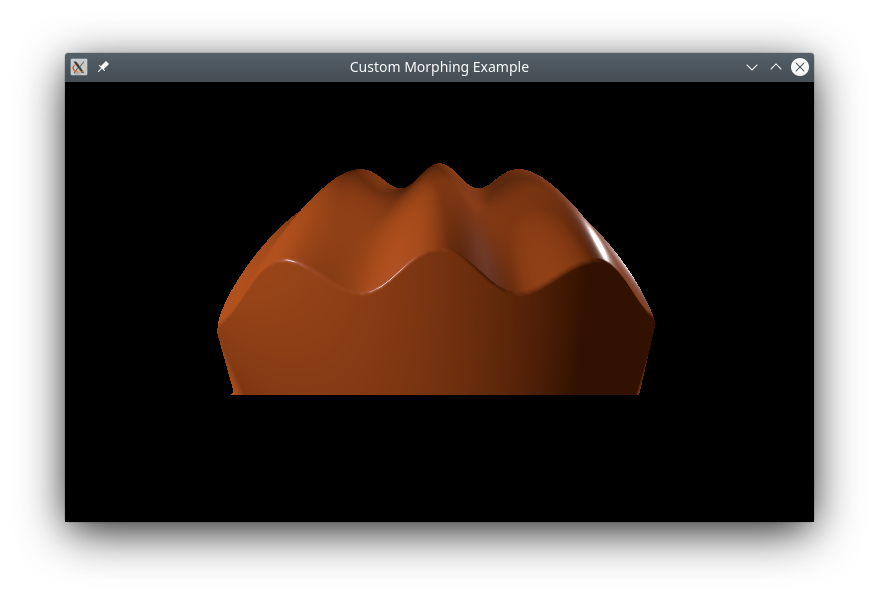
Este ejemplo muestra cómo definir una geometría personalizada compleja en C++ que contiene una forma base y un objetivo morph, con vectores normales para ambos.
Geometría personalizada
La parte principal de este ejemplo es la creación de una geometría personalizada con un objetivo morph. Hacemos esto subclasificando QQuick3DGeometry:
class MorphGeometry : public QQuick3DGeometry
{
    Q_OBJECT
    QML_NAMED_ELEMENT(MorphGeometry)
    Q_PROPERTY(int gridSize READ gridSize WRITE setGridSize NOTIFY gridSizeChanged)

public:
    MorphGeometry(QQuick3DObject *parent = nullptr);

    int gridSize() { return m_gridSize; }
    void setGridSize(int gridSize);

signals:
    void gridSizeChanged();

private:
    void calculateGeometry();
    void updateData();

    QList<QVector3D> m_positions;
    QList<QVector3D> m_normals;
    QList<QVector4D> m_colors;

    QList<QVector3D> m_targetPositions;
    QList<QVector3D> m_targetNormals;
    QList<QVector4D> m_targetColors;

    QList<quint32> m_indexes;

    QByteArray m_vertexBuffer;
    QByteArray m_indexBuffer;
    QByteArray m_targetBuffer;

    int m_gridSize = 50;
    QVector3D boundsMin;
    QVector3D boundsMax;
};
El constructor define la disposición de los datos de la malla:
MorphGeometry::MorphGeometry(QQuick3DObject *parent)
    : QQuick3DGeometry(parent)
{
    updateData();
}
La función updateData realiza la carga real de la geometría de la malla:
void MorphGeometry::updateData()
{
    clear();
    calculateGeometry();

    addAttribute(QQuick3DGeometry::Attribute::PositionSemantic, 0,
                 QQuick3DGeometry::Attribute::ComponentType::F32Type);
    addAttribute(QQuick3DGeometry::Attribute::NormalSemantic, 3 * sizeof(float),
                 QQuick3DGeometry::Attribute::ComponentType::F32Type);
    addAttribute(QQuick3DGeometry::Attribute::ColorSemantic, 6 * sizeof(float),
                 QQuick3DGeometry::Attribute::ComponentType::F32Type);

    addTargetAttribute(0, QQuick3DGeometry::Attribute::PositionSemantic, 0);
    addTargetAttribute(0, QQuick3DGeometry::Attribute::NormalSemantic, m_targetPositions.size() * sizeof(float) * 3);
    addTargetAttribute(0, QQuick3DGeometry::Attribute::ColorSemantic,
                       m_targetPositions.size() * sizeof(float) * 3 + m_targetNormals.size() * sizeof(float) * 3);
    addAttribute(QQuick3DGeometry::Attribute::IndexSemantic, 0,
                 QQuick3DGeometry::Attribute::ComponentType::U32Type);

    const int numVertexes = m_positions.size();
    m_vertexBuffer.resize(numVertexes * sizeof(Vertex));
    Vertex *vert = reinterpret_cast<Vertex *>(m_vertexBuffer.data());

    for (int i = 0; i < numVertexes; ++i) {
        Vertex &v = vert[i];
        v.position = m_positions[i];
        v.normal = m_normals[i];
        v.color = m_colors[i];
    }
    m_targetBuffer.append(QByteArray(reinterpret_cast<char *>(m_targetPositions.data()), m_targetPositions.size() * sizeof(QVector3D)));
    m_targetBuffer.append(QByteArray(reinterpret_cast<char *>(m_targetNormals.data()), m_targetNormals.size() * sizeof(QVector3D)));
    m_targetBuffer.append(QByteArray(reinterpret_cast<char *>(m_targetColors.data()), m_targetColors.size() * sizeof(QVector4D)));

    setStride(sizeof(Vertex));
    setVertexData(m_vertexBuffer);
    setTargetData(m_targetBuffer);
    setPrimitiveType(QQuick3DGeometry::PrimitiveType::Triangles);
    setBounds(boundsMin, boundsMax);

    m_indexBuffer = QByteArray(reinterpret_cast<char *>(m_indexes.data()), m_indexes.size() * sizeof(quint32));
    setIndexData(m_indexBuffer);
}
Llamamos a updateData desde el constructor, y cuando una propiedad ha cambiado.
La función calculateGeometry contiene toda la tediosa matemática para calcular las formas y los vectores normales. Es específica para este ejemplo, y el código no se explicará en detalle. En general: para implementar un sombreado suave, es necesario calcular el vector normal para cada vértice. Matemáticamente, el vector normal puede calcularse a partir de las derivadas parciales de la función que describe el plano:
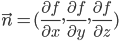
En este ejemplo, lo simplificamos utilizando una onda coseno para la forma base, sabiendo que su derivada es una función seno.
En la práctica, los vectores normales pueden determinarse a menudo por razonamiento geométrico. Para el objetivo morph, utilizamos el hecho de que cualquier vector desde el centro de una esfera a la superficie será normal a la esfera en ese punto. Tenga en cuenta que los vectores normales en QtQuick3D deben tener longitud unitaria, lo que puede hacerse utilizando QVector3D::normalized().
Parte QML
Definimos un objetivo morph que se corresponda con el que creamos en la geometría personalizada, y hacemos una animación sobre el peso, para que vaya ciclando entre las dos formas:
MorphTarget {
    id: morphtarget
    attributes: MorphTarget.Position | MorphTarget.Normal | MorphTarget.Color
    SequentialAnimation on weight {
        PauseAnimation { duration: 1000 }
        NumberAnimation { from: 0; to: 1; duration: 4000 }
        PauseAnimation { duration: 1000 }
        NumberAnimation { from: 1; to: 0; duration: 4000 }
        loops: Animation.Infinite
    }
}
Finalmente, creamos un modelo usando nuestra geometría personalizada, y le aplicamos el objetivo morph:
Model {
    y: -1
    geometry: MorphGeometry {}
    morphTargets: [ morphtarget ]
    materials: [ material ]
}
© 2026 The Qt Company Ltd. Documentation contributions included herein are the copyrights of their respective owners. The documentation provided herein is licensed under the terms of the GNU Free Documentation License version 1.3 as published by the Free Software Foundation. Qt and respective logos are trademarks of The Qt Company Ltd. in Finland and/or other countries worldwide. All other trademarks are property of their respective owners.
