Qt Quick Física 3D - Ejemplo de formas personalizadas
Demuestra el uso de diferentes formas.
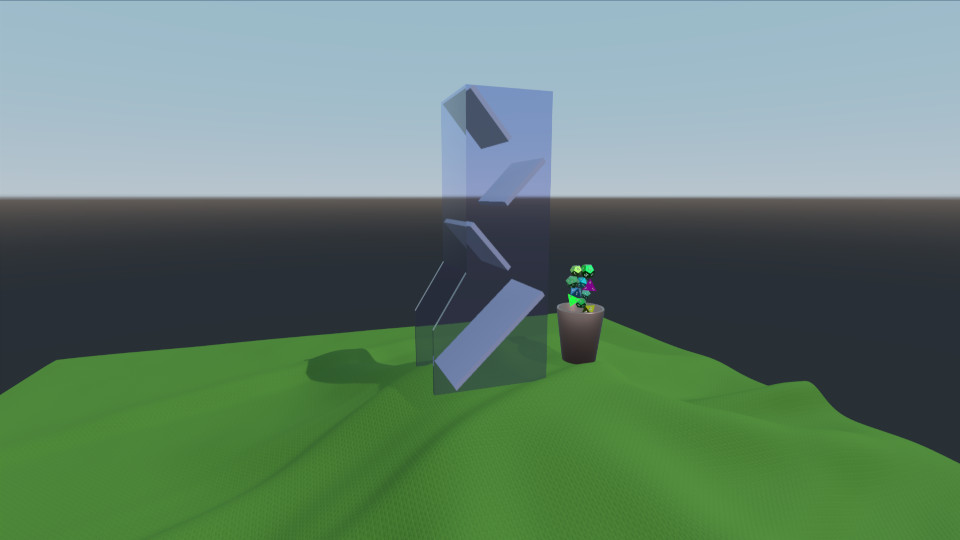
Este ejemplo demuestra la carga y generación de varias mallas de cuerpo rígido, así como su animación. La escena consiste en una torre de dados, un mantel, un cubilete y un puñado de dados. El cubilete se anima para recoger los dados y colocarlos en la torre de dados. A continuación, los dados ruedan por el mantel.
Entorno
Como de costumbre tenemos un PhysicsWorld y un View3D. En el View3D tenemos nuestro entorno que configura una sonda de luz:
environment: SceneEnvironment {
    clearColor: "white"
    backgroundMode: SceneEnvironment.SkyBox
    antialiasingMode: SceneEnvironment.MSAA
    antialiasingQuality: SceneEnvironment.High
    lightProbe: proceduralSky
}
Texturas
Definimos cuatro texturas que se utilizarán para el skybox, el mantel y los números de los dados:
Texture {
    id: proceduralSky
    textureData: ProceduralSkyTextureData {
        sunLongitude: -115
    }
}

Texture {
    id: weaveNormal
    source: "maps/weave.png"
    scaleU: 200
    scaleV: 200
    generateMipmaps: true
    mipFilter: Texture.Linear
}

Texture {
    id: numberNormal
    source: "maps/numbers-normal.png"
}

Texture {
    id: numberFill
    source: "maps/numbers.png"
    generateMipmaps: true
    mipFilter: Texture.Linear
}
Escena
Tenemos un Nodo que contiene nuestra escena con la cámara y una luz direccional:
id: scene
scale: Qt.vector3d(2, 2, 2)
PerspectiveCamera {
    id: camera
    position: Qt.vector3d(-45, 25, 60)
    eulerRotation: Qt.vector3d(-6, -33, 0)
    clipFar: 1000
    clipNear: 0.1
}

DirectionalLight {
    eulerRotation: Qt.vector3d(-45, 25, 0)
    castsShadow: true
    brightness: 1
    shadowMapQuality: Light.ShadowMapQualityHigh
    pcfFactor: 0.1
    shadowBias: 1
}
Mantel
Añadimos el mantel que es un StaticRigidBody que consiste en un modelo con una textura de tejido y un HeightFieldShape para colisión.
StaticRigidBody {
    position: Qt.vector3d(-15, -8, 0)
    id: tablecloth

    Model {
        geometry: HeightFieldGeometry {
            id: tableclothGeometry
            extents: Qt.vector3d(150, 20, 150)
            source: "maps/cloth-heightmap.png"
            smoothShading: false
        }
        materials: PrincipledMaterial {
            baseColor: "#447722"
            roughness: 0.8
            normalMap: weaveNormal
            normalStrength: 0.7
        }
    }

    collisionShapes: HeightFieldShape {
        id: hfShape
        extents: tableclothGeometry.extents
        source: "maps/cloth-heightmap.png"
    }
}
Taza
Definimos la taza como un DynamicRigidBody con un Modelo y un TriangleMeshShape como forma de colisión. Tiene un Comportamiento en las propiedades eulerRotation y position ya que estas son parte de una animación.
DynamicRigidBody {
    id: diceCup
    isKinematic: true
    mass: 0
    property vector3d bottomPos: Qt.vector3d(11, 6, 0)
    property vector3d topPos: Qt.vector3d(11, 45, 0)
    property vector3d unloadPos: Qt.vector3d(0, 45, 0)
    position: bottomPos
    kinematicPivot: Qt.vector3d(0, 6, 0)
    kinematicPosition: bottomPos
    collisionShapes: TriangleMeshShape {
        id: cupShape
        source: "meshes/simpleCup.mesh"
    }
    Model {
        source: "meshes/cup.mesh"
        materials: PrincipledMaterial {
            baseColor: "#cc9988"
            roughness: 0.3
            metalness: 1
        }
    }
}
Torre
La torre es simplemente un StaticRigidBody con un Modelo y un TriangleMeshShape para colisión.
StaticRigidBody {
    id: diceTower
    x: -4
    Model {
        id: testModel
        source: "meshes/tower.mesh"
        materials: [
            PrincipledMaterial {
                baseColor: "#ccccce"
                roughness: 0.3
            },
            PrincipledMaterial {
                id: glassMaterial
                baseColor: "#aaaacc"
                transmissionFactor: 0.95
                thicknessFactor: 1
                roughness: 0.05
            }
        ]
    }
    collisionShapes: TriangleMeshShape {
        id: triShape
        source: "meshes/tower.mesh"
    }
}
Dados
Para generar los dados utilizamos un Componente y un Repeater3D. El Componente contiene un DynamicRigidBody con un ConvexMeshShape y un Modelo. La posición, el color, la escala y el origen de la malla se generan aleatoriamente para cada dado.
Component {
    id: diceComponent

    DynamicRigidBody {
        id: thisBody
        function randomInRange(min, max) {
            return Math.random() * (max - min) + min
        }

        function restore() {
            reset(initialPosition, eulerRotation)
        }

        scale: Qt.vector3d(scaleFactor, scaleFactor, scaleFactor)
        eulerRotation: Qt.vector3d(randomInRange(0, 360),
                                   randomInRange(0, 360),
                                   randomInRange(0, 360))

        property vector3d initialPosition: Qt.vector3d(11 + 1.5 * Math.cos(index/(Math.PI/4)),
                                                       diceCup.bottomPos.y + index * 1.5,
                                                       0)
        position: initialPosition

        property real scaleFactor: randomInRange(0.8, 1.4)
        property color baseCol: Qt.hsla(randomInRange(0, 1),
                                        randomInRange(0.6, 1.0),
                                        randomInRange(0.4, 0.7),
                                        1.0)

        collisionShapes: ConvexMeshShape {
            id: diceShape
            source: Math.random() < 0.25 ? "meshes/icosahedron.mesh"
                  : Math.random() < 0.5 ? "meshes/dodecahedron.mesh"
                  : Math.random() < 0.75 ? "meshes/octahedron.mesh"
                                         : "meshes/tetrahedron.mesh"
        }

        Model {
            id: thisModel
            source: diceShape.source
            receivesShadows: false
            materials: PrincipledMaterial {
                metalness: 1.0
                roughness: randomInRange(0.2, 0.6)
                baseColor: baseCol
                emissiveMap: numberFill
                emissiveFactor: Qt.vector3d(1, 1, 1)
                normalMap: numberNormal
                normalStrength: 0.75
            }
        }
    }
}

Repeater3D {
    id: dicePool
    model: 25
    delegate: diceComponent
    function restore() {
        for (var i = 0; i < count; i++) {
            objectAt(i).restore()
        }
    }
}
Animación
Para hacer que los dados se muevan del cubilete a la torre de dados animamos el cubilete y lo movemos hacia arriba y luego lo volcamos. Para asegurarnos de que la animación se mantiene sincronizada con la simulación física utilizamos un AnimationController que conectamos a la señal onFrameDone en el PhysicsWorld. Después de cada fotograma simulado hacemos avanzar la animación con el paso de tiempo transcurrido.
Connections {
    target: physicsWorld
    property real totalAnimationTime: 7500
    function onFrameDone(timeStep) {
        let progressStep = timeStep / totalAnimationTime
        animationController.progress += progressStep
        if (animationController.progress >= 1) {
            animationController.completeToEnd()
            animationController.reload()
            animationController.progress = 0
        }
    }
}

AnimationController {
    id: animationController
    animation: SequentialAnimation {
        PauseAnimation { duration: 2500 }
        PropertyAnimation {
            target: diceCup
            property: "kinematicPosition"
            to: diceCup.topPos
            duration: 2500
        }
        ParallelAnimation {
            PropertyAnimation {
                target: diceCup
                property: "kinematicEulerRotation.z"
                to: 130
                duration: 1500
            }
            PropertyAnimation {
                target: diceCup
                property: "kinematicPosition"
                to: diceCup.unloadPos
                duration: 1500
            }
        }
        PauseAnimation { duration: 1000 }
        ParallelAnimation {
            PropertyAnimation {
                target: diceCup
                property: "kinematicEulerRotation.z"
                to: 0
                duration: 1500
            }
            PropertyAnimation {
                target: diceCup
                property: "kinematicPosition"
                to: diceCup.topPos
                duration: 1500
            }
        }
        PropertyAnimation { target: diceCup; property: "kinematicPosition"; to: diceCup.bottomPos; duration: 1500 }
        PauseAnimation { duration: 2000 }
        ScriptAction { script: dicePool.restore() }
    }
}
Controlador
Finalmente se añade un WasdController para poder controlar la cámara mediante un teclado:
WasdController {
    keysEnabled: true
    controlledObject: camera
    speed: 0.2
}
Archivos:
- customshapes/CMakeLists.txt
- customshapes/customshapes.pro
- customshapes/main.cpp
- customshapes/main.qml
- customshapes/qml.qrc
- customshapes/resources.qrc
Imágenes:
© 2026 The Qt Company Ltd. Documentation contributions included herein are the copyrights of their respective owners. The documentation provided herein is licensed under the terms of the GNU Free Documentation License version 1.3 as published by the Free Software Foundation. Qt and respective logos are trademarks of The Qt Company Ltd. in Finland and/or other countries worldwide. All other trademarks are property of their respective owners.