
Qt 3D: Exemple simple en C++
Une application C++ qui montre comment afficher une scène dans Qt 3D.
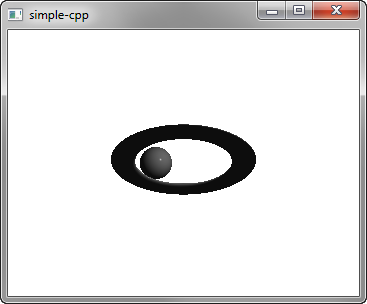
Cet exemplesimple montre comment afficher une scène dans « Qt 3D ».
Exécution de l'exemple
Vous pouvez exécuter l'exemple à partir de :
- Qt Creator
Ouvrez le mode « Welcome » et sélectionnez l’exemple dans « Examples ». Pour plus d’informations, consultez Qt Creator: Tutoriel : Compiler et exécuter.
- Qt Extension for Visual Studio Code
Exécutez la commande « Qt: Open Qt examples » à partir de Command Palette, puis sélectionnez l’exemple dans la liste. Pour plus d’informations, consultez Qt Extension for Visual Studio Code: Tutoriel : Compiler et exécuter.
Configuration de la scène
Nous configurons la scène dans le fichier main.cpp.
Pour pouvoir utiliser les classes et les fonctions des modules Q3D Core, Q3D Render, Qt 3D Input et Qt 3D Extras, nous devons inclure les classes suivantes :
#include <Qt3DCore/QEntity>
#include <Qt3DRender/QCamera>
#include <Qt3DRender/QCameraLens>
#include <Qt3DCore/QTransform>
#include <Qt3DCore/QAspectEngine>

#include <Qt3DInput/QInputAspect>

#include <Qt3DRender/QRenderAspect>
#include <Qt3DRender/QGeometryRenderer>
#include <Qt3DExtras/QForwardRenderer>
#include <Qt3DExtras/QPhongMaterial>
#include <Qt3DExtras/QSphereMesh>
#include <Qt3DExtras/QTorusMesh>
Tout d’abord, nous configurons la scène et spécifions son entité racine :
Nous spécifions le matériau à utiliser pour le rendu Phong :
Qt3DRender::QMaterial *material = new Qt3DExtras::QPhongMaterial(rootEntity);L’entité racine n’est qu’une coquille vide et son comportement est défini par les composants auxquels elle fait référence. Nous spécifions l’entité « torus » ainsi que ses composants « mesh », « transform » et « material » :
    Qt3DCore::QEntity *torusEntity = new Qt3DCore::QEntity(rootEntity);
    Qt3DExtras::QTorusMesh *torusMesh = new Qt3DExtras::QTorusMesh;
    torusMesh->setRadius(5);
    torusMesh->setMinorRadius(1);
    torusMesh->setRings(100);
    torusMesh->setSlices(20);

    Qt3DCore::QTransform *torusTransform = new Qt3DCore::QTransform;
    torusTransform->setScale3D(QVector3D(1.5, 1, 0.5));
    torusTransform->setRotation(QQuaternion::fromAxisAndAngle(QVector3D(1, 0, 0), 45.0f));

    torusEntity->addComponent(torusMesh);
    torusEntity->addComponent(torusTransform);
    torusEntity->addComponent(material);
Nous spécifions également une entité « sphere » et ses composants :
    Qt3DCore::QEntity *sphereEntity = new Qt3DCore::QEntity(rootEntity);
    Qt3DExtras::QSphereMesh *sphereMesh = new Qt3DExtras::QSphereMesh;
    sphereMesh->setRadius(3);
    sphereMesh->setGenerateTangents(true);

    Qt3DCore::QTransform *sphereTransform = new Qt3DCore::QTransform;
    OrbitTransformController *controller = new OrbitTransformController(sphereTransform);
    controller->setTarget(sphereTransform);
    controller->setRadius(20.0f);

    QPropertyAnimation *sphereRotateTransformAnimation = new QPropertyAnimation(sphereTransform);
    sphereRotateTransformAnimation->setTargetObject(controller);
    sphereRotateTransformAnimation->setPropertyName("angle");
    sphereRotateTransformAnimation->setStartValue(QVariant::fromValue(0));
    sphereRotateTransformAnimation->setEndValue(QVariant::fromValue(360));
    sphereRotateTransformAnimation->setDuration(10000);
    sphereRotateTransformAnimation->setLoopCount(-1);
    sphereRotateTransformAnimation->start();

    sphereEntity->addComponent(sphereMesh);
    sphereEntity->addComponent(sphereTransform);
    sphereEntity->addComponent(material);
Nous utilisons une animation de propriété pour animer la transformation de la sphère.
Enfin, nous initialisons une application « Qt GUI » qui utilise une fenêtre « Qt 3D » :
int main(int argc, char* argv[])
{
    QGuiApplication app(argc, argv);
    Qt3DExtras::Qt3DWindow view;

    Qt3DCore::QEntity *scene = createScene();

    // Camera
    Qt3DRender::QCamera *camera = view.camera();
    camera->lens()->setPerspectiveProjection(45.0f, 16.0f/9.0f, 0.1f, 1000.0f);
    camera->setPosition(QVector3D(0, 0, 40.0f));
    camera->setViewCenter(QVector3D(0, 0, 0));

    // For camera controls
    Qt3DExtras::QOrbitCameraController *camController = new Qt3DExtras::QOrbitCameraController(scene);
    camController->setLinearSpeed( 50.0f );
    camController->setLookSpeed( 180.0f );
    camController->setCamera(camera);

    view.setRootEntity(scene);
    view.show();

    return app.exec();
}© 2026 The Qt Company Ltd. Documentation contributions included herein are the copyrights of their respective owners. The documentation provided herein is licensed under the terms of the GNU Free Documentation License version 1.3 as published by the Free Software Foundation. Qt and respective logos are trademarks of The Qt Company Ltd. in Finland and/or other countries worldwide. All other trademarks are property of their respective owners.
