
Qt Quick 3D - Animation de morphing personnalisée
Illustre la création d'une géométrie personnalisée en C++ avec une cible de morphing.
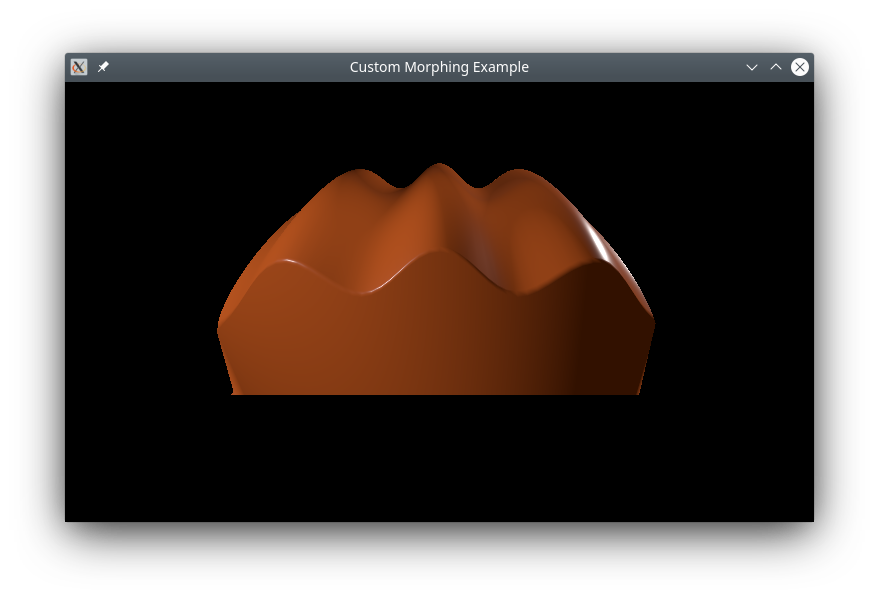
Cet exemple montre comment définir en C++ une géométrie personnalisée complexe comprenant une forme de base et une cible de morphing, avec des vecteurs normaux pour chacune d'elles.
Géométrie personnalisée
L'élément central de cet exemple consiste à créer une géométrie personnalisée avec une cible de morphing. Pour ce faire, nous créons une sous-classe de ` QQuick3DGeometry` :
class MorphGeometry : public QQuick3DGeometry
{
    Q_OBJECT
    QML_NAMED_ELEMENT(MorphGeometry)
    Q_PROPERTY(int gridSize READ gridSize WRITE setGridSize NOTIFY gridSizeChanged)

public:
    MorphGeometry(QQuick3DObject *parent = nullptr);

    int gridSize() { return m_gridSize; }
    void setGridSize(int gridSize);

signals:
    void gridSizeChanged();

private:
    void calculateGeometry();
    void updateData();

    QList<QVector3D> m_positions;
    QList<QVector3D> m_normals;
    QList<QVector4D> m_colors;

    QList<QVector3D> m_targetPositions;
    QList<QVector3D> m_targetNormals;
    QList<QVector4D> m_targetColors;

    QList<quint32> m_indexes;

    QByteArray m_vertexBuffer;
    QByteArray m_indexBuffer;
    QByteArray m_targetBuffer;

    int m_gridSize = 50;
    QVector3D boundsMin;
    QVector3D boundsMax;
};
Le constructeur définit la structure des données du maillage :
MorphGeometry::MorphGeometry(QQuick3DObject *parent)
    : QQuick3DGeometry(parent)
{
    updateData();
}
La fonction ` updateData ` effectue le chargement proprement dit de la géométrie du maillage :
void MorphGeometry::updateData()
{
    clear();
    calculateGeometry();

    addAttribute(QQuick3DGeometry::Attribute::PositionSemantic, 0,
                 QQuick3DGeometry::Attribute::ComponentType::F32Type);
    addAttribute(QQuick3DGeometry::Attribute::NormalSemantic, 3 * sizeof(float),
                 QQuick3DGeometry::Attribute::ComponentType::F32Type);
    addAttribute(QQuick3DGeometry::Attribute::ColorSemantic, 6 * sizeof(float),
                 QQuick3DGeometry::Attribute::ComponentType::F32Type);

    addTargetAttribute(0, QQuick3DGeometry::Attribute::PositionSemantic, 0);
    addTargetAttribute(0, QQuick3DGeometry::Attribute::NormalSemantic, m_targetPositions.size() * sizeof(float) * 3);
    addTargetAttribute(0, QQuick3DGeometry::Attribute::ColorSemantic,
                       m_targetPositions.size() * sizeof(float) * 3 + m_targetNormals.size() * sizeof(float) * 3);
    addAttribute(QQuick3DGeometry::Attribute::IndexSemantic, 0,
                 QQuick3DGeometry::Attribute::ComponentType::U32Type);

    const int numVertexes = m_positions.size();
    m_vertexBuffer.resize(numVertexes * sizeof(Vertex));
    Vertex *vert = reinterpret_cast<Vertex *>(m_vertexBuffer.data());

    for (int i = 0; i < numVertexes; ++i) {
        Vertex &v = vert[i];
        v.position = m_positions[i];
        v.normal = m_normals[i];
        v.color = m_colors[i];
    }
    m_targetBuffer.append(QByteArray(reinterpret_cast<char *>(m_targetPositions.data()), m_targetPositions.size() * sizeof(QVector3D)));
    m_targetBuffer.append(QByteArray(reinterpret_cast<char *>(m_targetNormals.data()), m_targetNormals.size() * sizeof(QVector3D)));
    m_targetBuffer.append(QByteArray(reinterpret_cast<char *>(m_targetColors.data()), m_targetColors.size() * sizeof(QVector4D)));

    setStride(sizeof(Vertex));
    setVertexData(m_vertexBuffer);
    setTargetData(m_targetBuffer);
    setPrimitiveType(QQuick3DGeometry::PrimitiveType::Triangles);
    setBounds(boundsMin, boundsMax);

    m_indexBuffer = QByteArray(reinterpret_cast<char *>(m_indexes.data()), m_indexes.size() * sizeof(quint32));
    setIndexData(m_indexBuffer);
}
Nous appelons ` updateData ` depuis le constructeur, ainsi que lorsqu’une propriété a été modifiée.
La fonction ` calculateGeometry ` contient tous les calculs mathématiques fastidieux nécessaires au calcul des formes et des vecteurs normaux. Elle est spécifique à cet exemple, et le code ne sera pas expliqué en détail. En général : pour implémenter un ombrage lisse, il est nécessaire de calculer le vecteur normal pour chaque sommet. Mathématiquement, le vecteur normal peut être calculé à partir des dérivées partielles de la fonction décrivant le plan :
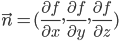
Dans cet exemple, nous simplifions les choses en utilisant une onde cosinusoïdale pour la forme de base, sachant que sa dérivée est une fonction sinus.
En pratique, les vecteurs normaux peuvent souvent être déterminés par un raisonnement géométrique. Pour la cible de morphing, nous utilisons le fait que tout vecteur allant du centre d’une sphère vers sa surface sera normal à la sphère en ce point. Notez que les vecteurs normaux dans ` QtQuick3D ` doivent avoir une longueur unitaire, ce qui peut être obtenu en utilisant ` QVector3D::normalized()`.
Partie QML
Nous définissons une cible de morphing qui correspond à celle que nous avons créée dans la géométrie personnalisée, et nous appliquons une animation au poids, afin qu’elle alterne entre les deux formes :
MorphTarget {
    id: morphtarget
    attributes: MorphTarget.Position | MorphTarget.Normal | MorphTarget.Color
    SequentialAnimation on weight {
        PauseAnimation { duration: 1000 }
        NumberAnimation { from: 0; to: 1; duration: 4000 }
        PauseAnimation { duration: 1000 }
        NumberAnimation { from: 1; to: 0; duration: 4000 }
        loops: Animation.Infinite
    }
}
Enfin, nous créons un modèle à l'aide de notre géométrie personnalisée et lui appliquons la cible de morphing :
Model {
    y: -1
    geometry: MorphGeometry {}
    morphTargets: [ morphtarget ]
    materials: [ material ]
}© 2026 The Qt Company Ltd. Documentation contributions included herein are the copyrights of their respective owners. The documentation provided herein is licensed under the terms of the GNU Free Documentation License version 1.3 as published by the Free Software Foundation. Qt and respective logos are trademarks of The Qt Company Ltd. in Finland and/or other countries worldwide. All other trademarks are property of their respective owners.
