
Qt Quick 3D - Exemple de shaders personnalisés
Illustre l'utilisation de shaders de sommets et de fragments personnalisés.
Cet exemple montre comment utiliser un matériau avec un code de shader de sommet et de fragment entièrement personnalisé.
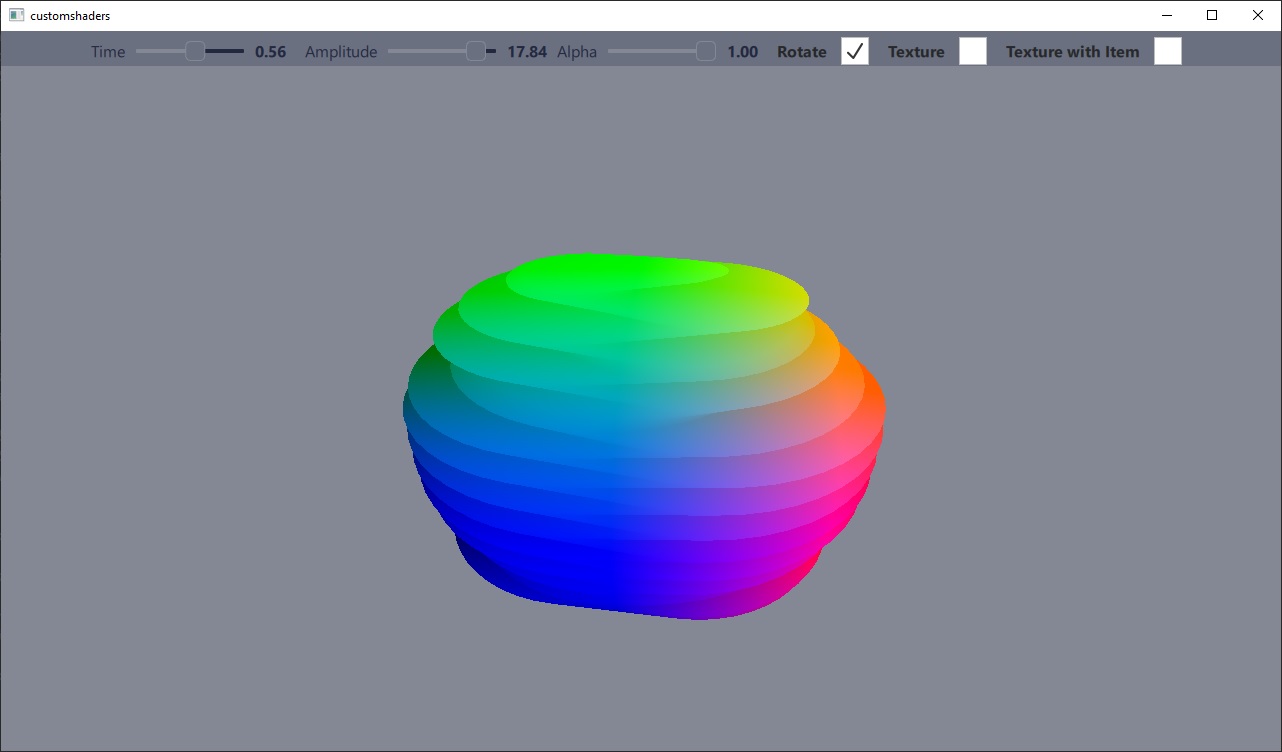
Cet exemple est le pendant de l’exemple « custommaterials », qui illustre l’autre catégorie de matériaux personnalisés : les matériaux « shaded », dans lesquels l’extrait de code de shader vient compléter un « PrincipledMaterial » plutôt que de le remplacer.
Implémentation d’un matériau personnalisé
Dans cet exemple, un maillage est déformé par le shader de sommets selon une fonction sinusoïdale. Le résultat final est contrôlé par deux curseurs correspondant aux valeurs de temps et d’amplitude de la fonction sinusoïdale.
Le shader de fragment est utilisé pour colorer le maillage en fonction des valeurs de position des sommets. Deux shaders de fragment sont fournis : l’un avec texturation et l’autre sans. La version texturée échantillonne une texture provenant soit d’un fichier image, soit d’un calque d’ Qt Quick en temps réel.
Le matériau ne participe pas au système d’éclairage ou d’ombrage par défaut ; sa propriété « shadingMode » est donc définie sur « CustomMaterial.Unshaded ».
Consultez la section « CustomMaterial » pour une description détaillée des fonctionnalités des matériaux personnalisés.
CustomMaterial {
    id: root
    property real time: 0.0
    property real amplitude: 5.0
    property real alpha: 1.0

    property bool texturing: false
    property bool textureFromItem: false
    property Item texSrc
    Texture {
        id: texFromFile
        source: "qt_logo.png"
    }
    Texture {
        id: texFromItem
        sourceItem: root.texSrc
    }
    property TextureInput tex: TextureInput {
        enabled: root.texturing
        texture: root.textureFromItem ? texFromItem : texFromFile
    }

    shadingMode: CustomMaterial.Unshaded
    sourceBlend: root.alpha < 1.0 ? CustomMaterial.SrcAlpha : CustomMaterial.NoBlend
    destinationBlend: root.alpha < 1.0 ? CustomMaterial.OneMinusSrcAlpha : CustomMaterial.NoBlend
    cullMode: CustomMaterial.BackFaceCulling

    vertexShader: "example.vert"
    fragmentShader: root.texturing ? "example_tex.frag" : "example.frag"
}
Utilisation d’un matériau personnalisé
Un matériau personnalisé utilisant des shaders personnalisés s’utilise de la même manière que n’importe quel autre matériau. Les variables uniformes du shader peuvent être facilement mises à jour via des liaisons de propriétés QML.
Model {
    position: Qt.vector3d(0, 0, 0)
    NumberAnimation on eulerRotation.y {
        from: 0
        to: 360
        duration: 3000
        loops: -1
        running: control.animateRotation
    }
    scale: Qt.vector3d(2, 2, 2)
    source: "#Sphere"
    materials: [
        ExampleMaterial {
            id: exampleMaterial
            time: control.time
            amplitude: control.amplitude
            alpha: control.alpha
            texturing: control.texturing
            textureFromItem: control.textureFromItem
            texSrc: Rectangle {
                layer.enabled: true
                layer.textureMirroring: ShaderEffectSource.NoMirroring
                visible: false
                SequentialAnimation on color {
                    ColorAnimation { from: "black"; to: "yellow"; duration: 2000 }
                    ColorAnimation { from: "yellow"; to: "cyan"; duration: 1000 }
                    ColorAnimation { from: "cyan"; to: "black"; duration: 500 }
                    loops: -1
                }
                width: 512
                height: 512
                Image {
                    source: "qt_logo.png"
                    anchors.centerIn: parent
                }
            }
        }
    ]
}© 2026 The Qt Company Ltd. Documentation contributions included herein are the copyrights of their respective owners. The documentation provided herein is licensed under the terms of the GNU Free Documentation License version 1.3 as published by the Free Software Foundation. Qt and respective logos are trademarks of The Qt Company Ltd. in Finland and/or other countries worldwide. All other trademarks are property of their respective owners.
