
Qt Quick 3D - Exemple de texture procédurale
Cet exemple montre comment fournir des données de texture personnalisées à partir de C++ ou de QML.
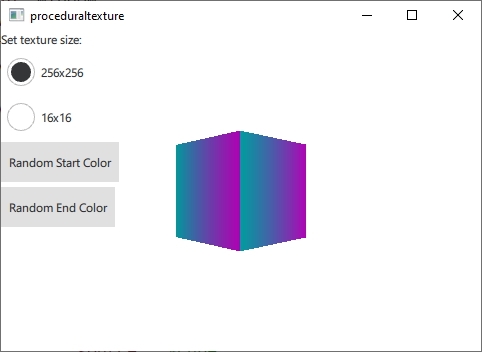
Cet exemple illustre les différentes façons de fournir des données de texture générées dynamiquement lors de l'exécution, plutôt que de les charger à partir d'une ressource statique. À des fins de démonstration, cet exemple génère des textures à dégradé vertical à partir des couleurs de départ et d'arrivée fournies.
Nous commençons par définir une classe C++ pour nos données de texture. Nous en faisons une sous-classe de ` QQuick3DTextureData`. Ce n’est pas strictement nécessaire, puisqu’il n’y a pas de fonctions virtuelles, mais il est bien plus pratique de tout regrouper dans une seule classe. Nous définissons les propriétés que nous allons utiliser, puis ajoutons ` QML_NAMED_ELEMENT ` pour les rendre accessibles depuis QML :
class GradientTexture : public QQuick3DTextureData
{
    Q_OBJECT
    Q_PROPERTY(int height READ height WRITE setHeight NOTIFY heightChanged)
    Q_PROPERTY(int width READ width WRITE setWidth NOTIFY widthChanged)
    Q_PROPERTY(QColor startColor READ startColor WRITE setStartColor NOTIFY startColorChanged)
    Q_PROPERTY(QColor endColor READ endColor WRITE setEndColor NOTIFY endColorChanged)
    QML_NAMED_ELEMENT(GradientTexture)
    ...
Nous ajoutons une fonction pour mettre à jour la texture. Elle utilise `setSize` et `setFormat` pour configurer la texture, ainsi que `setTextureData` pour définir les données d’image :
void GradientTexture::updateTexture()
{
    setSize(QSize(m_width, m_height));
    setFormat(QQuick3DTextureData::RGBA8);
    setHasTransparency(false);
    setTextureData(generateTexture());
}
La fonction ` generateTexture ` crée une ` QByteArray ` de la taille appropriée et la remplit avec les données d’image :
QByteArray GradientTexture::generateTexture()
{
    QByteArray imageData;
    // Create a horizontal gradient between startColor and endColor

    // Create a single scanline and reuse that data for each
    QByteArray gradientScanline;
    gradientScanline.resize(m_width * 4); // RGBA8

    for (int x = 0; x < m_width; ++x) {
        QColor color = linearInterpolate(m_startColor, m_endColor, x / float(m_width));
        int offset = x * 4;
        gradientScanline.data()[offset + 0] = char(color.red());
        gradientScanline.data()[offset + 1] = char(color.green());
        gradientScanline.data()[offset + 2] = char(color.blue());
        gradientScanline.data()[offset + 3] = char(255);
    }

    for (int y = 0; y < m_height; ++y)
        imageData += gradientScanline;

    return imageData;
}
Nous appelons ` updateTexture ` chaque fois qu’une propriété est modifiée :
void GradientTexture::setStartColor(QColor startColor)
{
    if (m_startColor == startColor)
        return;

    m_startColor = startColor;
    emit startColorChanged(m_startColor);
    updateTexture();
}
Enfin, nous pouvons utiliser notre nouvelle texture depuis QML :
Texture {
    id: textureFromCpp

    minFilter: applicationState.filterMode
    magFilter: applicationState.filterMode
    textureData: gradientTexture

    GradientTexture {
        id: gradientTexture
        startColor: applicationState.startColor
        endColor: applicationState.endColor
        width: applicationState.size
        height: width
    }
}
Il est également possible de générer les mêmes données de texture en QML. Dans ce cas, nous utilisons le composant ` ProceduralTextureData ` :
Texture {
    id: textureFromQML
    minFilter: applicationState.filterMode
    magFilter: applicationState.filterMode
    textureData: gradientTextureDataQML

    ProceduralTextureData {
        id: gradientTextureDataQML

        property color startColor: applicationState.startColor
        property color endColor: applicationState.endColor
        width: applicationState.size
        height: width
        textureData: generateTextureData()

        function linearInterpolate(startColor : color, endColor : color, fraction : real) : color{
            return Qt.rgba(
                        startColor.r + (endColor.r - startColor.r) * fraction,
                        startColor.g + (endColor.g - startColor.g) * fraction,
                        startColor.b + (endColor.b - startColor.b) * fraction,
                        startColor.a + (endColor.a - startColor.a) * fraction
                        );
        }

        function generateTextureData() {
            let dataBuffer = new ArrayBuffer(width * height * 4)
            let data = new Uint8Array(dataBuffer)

            let gradientScanline = new Uint8Array(width * 4);

            for (let x = 0; x < width; ++x) {
                let color = linearInterpolate(startColor, endColor, x / width);
                let offset = x * 4;
                gradientScanline[offset + 0] = color.r * 255;
                gradientScanline[offset + 1] = color.g * 255;
                gradientScanline[offset + 2] = color.b * 255;
                gradientScanline[offset + 3] = color.a * 255;
            }

            for (let y = 0; y < height; ++y) {
                data.set(gradientScanline, y * width * 4);
            }

            return dataBuffer;
        }
    }
}
Tout comme en C++, nous remplissons un ` QByteArray ` avec des données d’image qui reflètent la taille et le format de la texture. Lorsque vous effectuez cette opération depuis QML, utilisez le type `ArrayBuffer` pour éviter toute conversion de type inutile.
Dans les deux exemples précédents, toutes les données de la texture sont générées côté CPU, puis transférées vers le GPU pour y être utilisées comme données de texture. Il est également possible de générer les données de texture directement sur le GPU. Dans ce cas, on utilise plutôt une sous-classe de ` QQuick3DTextureProviderExtension `.
class GradientTextureProvider : public QQuick3DTextureProviderExtension
{
    Q_OBJECT
    Q_PROPERTY(int height READ height WRITE setHeight NOTIFY heightChanged)
    Q_PROPERTY(int width READ width WRITE setWidth NOTIFY widthChanged)
    Q_PROPERTY(QColor startColor READ startColor WRITE setStartColor NOTIFY startColorChanged)
    Q_PROPERTY(QColor endColor READ endColor WRITE setEndColor NOTIFY endColorChanged)
    QML_ELEMENT
QQuick3DTextureProviderExtension Les classes dérivées de ` QSSGRenderExtension ` définissent des extensions de rendu à l’aide de l’API Qt RHI. La sous-classe doit renvoyer un objet dérivé de ` ` lorsque la méthode ` QQuick3DTextureProviderExtension::updateSpatialNode()` est appelée.
QSSGRenderGraphObject *GradientTextureProvider::updateSpatialNode(QSSGRenderGraphObject *node)
{
    if (!node)
        node = new GradientTextureProviderNode(this);

    // Update the state of the backend node
    auto gradientNode = static_cast<GradientTextureProviderNode *>(node);
    gradientNode->m_isDirty = true;
    gradientNode->m_width = m_width;
    gradientNode->m_height = m_height;
    gradientNode->m_startColor = m_startColor;
    gradientNode->m_endColor = m_endColor;

    return node;
}
Ce qui est effectivement rendu est défini par cette sous-classe de ` QSSGRenderExtension ` :
class GradientTextureProviderNode : public QSSGRenderTextureProviderExtension
{
public:
    explicit GradientTextureProviderNode(GradientTextureProvider *ext);
    ~GradientTextureProviderNode() override;
    bool prepareData(QSSGFrameData &data) override;
    void prepareRender(QSSGFrameData &data) override;
    void render(QSSGFrameData &data) override;
    void resetForFrame() override;

    bool m_isDirty = false;

    // state
    int m_width = 256;
    int m_height = 256;
    QColor m_startColor = QColor(Qt::red);
    QColor m_endColor = QColor(Qt::blue);

private:

    QPointer<GradientTextureProvider> m_ext;
    QSSGExtensionId extensionId {};

    std::unique_ptr<QRhiBuffer> quadGeometryVertexBuffer;
    std::unique_ptr<QRhiBuffer> quadGeometryIndexBuffer;

    //
    std::unique_ptr<QRhiTexture> outputTexture; // the final output texture
    std::unique_ptr<QRhiTextureRenderTarget> outputTextureRenderTarget;
    std::unique_ptr<QRhiRenderPassDescriptor> ouputTextureRenderPassDescriptor;

    std::unique_ptr<QRhiBuffer> gradientTextureUniformBuffer;
    std::unique_ptr<QRhiShaderResourceBindings> gradientTextureShaderResouceBindings;
    std::unique_ptr<QRhiGraphicsPipeline> gradientTexture2dPipeline;
};
En implémentant les interfaces de ` QSSGRenderExtension`, l’extension peut afficher les données de texture directement sur le GPU. L’implémentation de `prepareDate` garantit que la texture de sortie est créée avec la taille et le format corrects, et enregistre la texture de sortie comme étant la texture fournie.
bool GradientTextureProviderNode::prepareData(QSSGFrameData &data)
{
    if (!m_isDirty)
        return false;

    const auto &ctxIfx = data.contextInterface();
    const auto &rhiCtx = ctxIfx->rhiContext();
    QRhi *rhi = rhiCtx->rhi();

    // If there is no available rhi context, then we can't create the texture
    if (!rhiCtx)
        return false;

    extensionId = m_ext ? QQuick3DExtensionHelpers::getExtensionId(*m_ext) : QSSGExtensionId{};
    if (QQuick3DExtensionHelpers::isNull(extensionId))
        return false;

    // Make sure that the output texture is created and registered as the texture provider
    if (!outputTexture ||
        outputTexture->pixelSize().width() != m_width ||
        outputTexture->pixelSize().height() != m_height) {
        outputTexture.reset(rhi->newTexture(QRhiTexture::Format::RGBA8, QSize(m_width, m_height), 1, QRhiTexture::RenderTarget | QRhiTexture::sRGB));
        outputTexture->create();

        outputTextureRenderTarget.reset(rhi->newTextureRenderTarget({ outputTexture.get() }));
        ouputTextureRenderPassDescriptor.reset(outputTextureRenderTarget->newCompatibleRenderPassDescriptor());
        outputTextureRenderTarget->setRenderPassDescriptor(ouputTextureRenderPassDescriptor.get());
        outputTextureRenderTarget->create();

        // Register the output as the texture provider
        QSSGRenderExtensionHelpers::registerRenderResult(data, extensionId, outputTexture.get());

        gradientTexture2dPipeline.reset();
    }

    // If m_isDirty is true than prepareRender and render will actually get called.
    return m_isDirty;
}
C’est dans la méthode `prepareRender` que les pipelines sont créés et que les tampons uniformes sont mis à jour.
void GradientTextureProviderNode::prepareRender(QSSGFrameData &data)
{
    const auto &ctxIfx = data.contextInterface();
    const auto &rhiCtx = ctxIfx->rhiContext();
    if (!rhiCtx)
        return;

    QRhi *rhi = rhiCtx->rhi();
    QRhiCommandBuffer *cb = rhiCtx->commandBuffer();
    QRhiResourceUpdateBatch *resourceUpdates = rhi->nextResourceUpdateBatch();

    // Create the pipeline if necessary
    if (!gradientTexture2dPipeline) {
        // 1 quad (2 trianges), pos + uv.  4 vertices, 5 values each (x, y, z, u, v)
        quadGeometryVertexBuffer.reset(rhi->newBuffer(QRhiBuffer::Immutable, QRhiBuffer::VertexBuffer, 5 * 4 * sizeof(float)));
        quadGeometryVertexBuffer->create();

        // 6 indexes (2 triangles)
        quadGeometryIndexBuffer.reset(rhi->newBuffer(QRhiBuffer::Immutable, QRhiBuffer::IndexBuffer, 6 * sizeof(uint16_t)));
        quadGeometryIndexBuffer->create();

        // Uniform buffer: packed into 2 * vec4 (2 RGBA colors)
        const size_t uBufSize = (sizeof(float) * 4) * 2;
        gradientTextureUniformBuffer.reset(rhi->newBuffer(QRhiBuffer::Dynamic, QRhiBuffer::UniformBuffer, uBufSize));
        gradientTextureUniformBuffer->create();

        // Uniform buffer is only bound/used in Fragment Shader
        gradientTextureShaderResouceBindings.reset(rhi->newShaderResourceBindings());
        gradientTextureShaderResouceBindings->setBindings({
                QRhiShaderResourceBinding::uniformBuffer(0, QRhiShaderResourceBinding::FragmentStage, gradientTextureUniformBuffer.get()),
        });
        gradientTextureShaderResouceBindings->create();

        gradientTexture2dPipeline.reset(rhi->newGraphicsPipeline());
        gradientTexture2dPipeline->setShaderStages({
                { QRhiShaderStage::Vertex, getShader(QLatin1String(":/shaders/gradient.vert.qsb")) },
                { QRhiShaderStage::Fragment, getShader(QLatin1String(":/shaders/gradient.frag.qsb")) }
        });
        // 2 Attributes, Position (vec3) + UV (vec2)
        QRhiVertexInputLayout inputLayout;
        inputLayout.setBindings({
                { 5 * sizeof(float) }
        });
        inputLayout.setAttributes({
                { 0, 0, QRhiVertexInputAttribute::Float3, 0 },
                { 0, 1, QRhiVertexInputAttribute::Float2, 3 * sizeof(float) }
        });
        gradientTexture2dPipeline->setVertexInputLayout(inputLayout);
        gradientTexture2dPipeline->setShaderResourceBindings(gradientTextureShaderResouceBindings.get());
        gradientTexture2dPipeline->setRenderPassDescriptor(ouputTextureRenderPassDescriptor.get());
        gradientTexture2dPipeline->create();

        // Upload the static quad geometry part
        resourceUpdates->uploadStaticBuffer(quadGeometryVertexBuffer.get(), g_vertexData);
        resourceUpdates->uploadStaticBuffer(quadGeometryIndexBuffer.get(), g_indexData);
    }

    // Upload the uniform buffer data
    const float colorData[8] = {
        m_startColor.redF(), m_startColor.greenF(), m_startColor.blueF(), m_startColor.alphaF(),
        m_endColor.redF(), m_endColor.greenF(), m_endColor.blueF(), m_endColor.alphaF()
    };
    resourceUpdates->updateDynamicBuffer(gradientTextureUniformBuffer.get(), 0, sizeof(colorData), colorData);

    cb->resourceUpdate(resourceUpdates);
    m_isDirty = false;
}
Le rendu proprement dit de ce passe est défini dans la fonction de rendu.
void GradientTextureProviderNode::render(QSSGFrameData &data)
{
    const auto &ctxIfx = data.contextInterface();
    const auto &rhiCtx = ctxIfx->rhiContext();
    if (!rhiCtx)
        return;

    QRhiCommandBuffer *cb = rhiCtx->commandBuffer();

    // Render the quad with our pipeline to the outputTexture
    cb->beginPass(outputTextureRenderTarget.get(), Qt::black, { 1.0f, 0 }, nullptr, rhiCtx->commonPassFlags());
    cb->setViewport(QRhiViewport(0, 0, m_width, m_height));
    cb->setGraphicsPipeline(gradientTexture2dPipeline.get());
    cb->setShaderResources(gradientTextureShaderResouceBindings.get());
    QRhiCommandBuffer::VertexInput vb(quadGeometryVertexBuffer.get(), 0);
    cb->setVertexInput(0, 1, &vb, quadGeometryIndexBuffer.get(), QRhiCommandBuffer::IndexFormat::IndexUInt16);
    cb->drawIndexed(6);
    cb->endPass();
}
L'exemple utilise le fournisseur de textures dans QML comme suit :
Texture {
    id: textureFromGPU
    minFilter: applicationState.filterMode
    magFilter: applicationState.filterMode
    textureProvider: GradientTextureProvider {
        startColor: applicationState.startColor
        endColor: applicationState.endColor
        width: applicationState.size
        height: width
    }
}© 2026 The Qt Company Ltd. Documentation contributions included herein are the copyrights of their respective owners. The documentation provided herein is licensed under the terms of the GNU Free Documentation License version 1.3 as published by the Free Software Foundation. Qt and respective logos are trademarks of The Qt Company Ltd. in Finland and/or other countries worldwide. All other trademarks are property of their respective owners.
