
Qt Quick 3D - Exemple View3D
Illustre l'utilisation d'View3D pour afficher une scène à partir de plusieurs caméras.
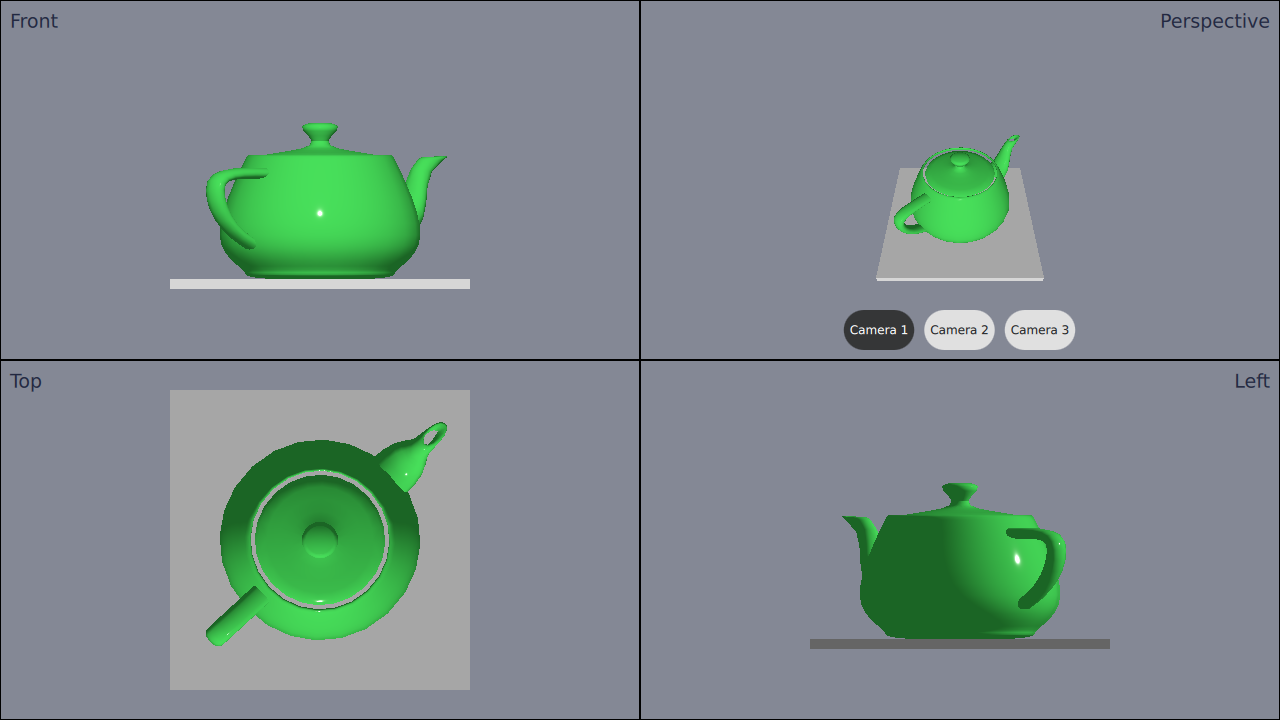
Cet exemple montre comment utiliser quatre objets ` View3D` distincts avec différentes caméras dans une application.
Définition des caméras
Nous définissons d'abord l'cameras. Nous allons définir plusieurs caméras différentes, même si nous n'ajouterons que 4 vues. Nous procédons ainsi car nous souhaitons pouvoir changer de caméra dans l'une des vues.
Les caméras doivent être définies à l’intérieur de l’ Node racine. Voici comment définir les caméras :
Node {
    id: standAloneScene
    ...
// The predefined cameras. They have to be part of the scene, i.e. inside the root node.
// Animated perspective camera
Node {
    PerspectiveCamera {
        id: cameraPerspectiveOne
        z: 600
    }

    PropertyAnimation on eulerRotation.x {
        loops: Animation.Infinite
        duration: 5000
        to: -360
        from: 0
    }
}

// Stationary perspective camera
PerspectiveCamera {
    id: cameraPerspectiveTwo
    z: 600
}
    ...
    // Stationary orthographic camera viewing from left
    OrthographicCamera {
        id: cameraOrthographicLeft
        x: -600
        eulerRotation.y: -90
    }
}
Ajout des vues
Une fois les caméras définies, nous pouvons ajouter les vues d’ views. Nous divisons l’écran en quatre parties et ajoutons les vues une par une comme suit :
// The views
Rectangle {
    id: topLeft
    anchors.top: parent.top
    anchors.left: parent.left
    width: parent.width * 0.5
    height: parent.height * 0.5
    color: "#848895"
    border.color: "black"

    View3D {
        id: topLeftView
        anchors.fill: parent
        importScene: standAloneScene
        camera: cameraOrthographicFront
    }

    Label {
        text: "Front"
        anchors.top: parent.top
        anchors.left: parent.left
        anchors.margins: 10
        color: "#222840"
        font.pointSize: 14
    }
}
    ...
La vue en haut à droite comporte trois boutons. Ces boutons permettent de changer à la volée la caméra utilisée dans cette vue. Pour cela, il suffit de définir la propriété de la caméra :
RoundButton {
    text: "Camera 1"
    highlighted: topRightView.camera == cameraPerspectiveOne
    implicitWidth: controlsContainer.buttonWidth
    onClicked: {
        topRightView.camera = cameraPerspectiveOne
    }
}
...© 2026 The Qt Company Ltd. Documentation contributions included herein are the copyrights of their respective owners. The documentation provided herein is licensed under the terms of the GNU Free Documentation License version 1.3 as published by the Free Software Foundation. Qt and respective logos are trademarks of The Qt Company Ltd. in Finland and/or other countries worldwide. All other trademarks are property of their respective owners.
