
QCanvasGridPattern Class
QCanvasGridPattern は、グリッドパターンを描画するためのブラシです。詳細...
| ヘッダー: | #include <QCanvasGridPattern> |
| CMake: | find_package(Qt6 REQUIRED COMPONENTS CanvasPainter) target_link_libraries(mytarget PRIVATE Qt6::CanvasPainter) |
| 以下より: | Qt 6.11 |
パブリック関数
| QCanvasGridPattern(QPointF startPosition, QSizeF cellSize) | |
| QCanvasGridPattern(qreal startX, qreal startY, qreal cellWidth, qreal cellHeight) | |
| QCanvasGridPattern(const QCanvasGridPattern &) | |
| QCanvasGridPattern(QCanvasGridPattern &&) | |
| QColor | backgroundColor() const |
| QSizeF | cellSize() const |
| qreal | feather() const |
| QColor | lineColor() const |
| qreal | lineWidth() const |
| qreal | rotation() const |
| void | setBackgroundColor(QColor color) |
| void | setCellSize(qreal width, qreal height) |
| void | setCellSize(QSizeF size) |
| void | setFeather(qreal feather) |
| void | setLineColor(QColor color) |
| void | setLineWidth(qreal width) |
| void | setRotation(qreal rotation) |
| void | setStartPosition(qreal x, qreal y) |
| void | setStartPosition(QPointF point) |
| QPointF | startPosition() const |
| operator QVariant() const |
関連する非メンバー
| bool | operator!=(const QCanvasGridPattern &lhs, const QCanvasGridPattern &rhs) |
| QDataStream & | operator<<(QDataStream &stream, const QCanvasGridPattern &pattern) |
| bool | operator==(const QCanvasGridPattern &lhs, const QCanvasGridPattern &rhs) |
| QDataStream & | operator>>(QDataStream &stream, QCanvasGridPattern &pattern) |
詳細な説明
QCanvasGridPattern は、グリッドやバーのパターンを描画するためのブラシです。
以下に簡単な例を示します。
// Rotated grid into background
QRectF rect(20, 20, 180, 180);
QCanvasGridPattern gp1(rect.topLeft(), QSizeF(16, 16));
gp1.setLineColor("#DBEB00");
gp1.setBackgroundColor("#373F26");
gp1.setLineWidth(2.0);
gp1.setRotation(M_PI / 4);
gp1.setFeather(5.0);
painter.setFillStyle(gp1);
painter.fillRect(rect);
// Rounded rectangle, stroked with
// grid pattern for dashes.
qreal strokeW = 10;
QRectF rect2(40, 40, 140, 140);
QCanvasGridPattern gp2;
gp2.setLineColor(Qt::transparent);
gp2.setBackgroundColor(Qt::white);
gp2.setStartPosition(rect2.x() - strokeW,
                     rect2.y() - strokeW);
gp2.setCellSize(40, 40);
gp2.setLineWidth(strokeW);
painter.setLineWidth(8);
painter.setStrokeStyle(gp2);
painter.beginPath();
painter.roundRect(rect2, 10);
painter.stroke();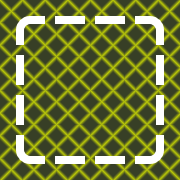
メンバ関数のドキュメント
QCanvasGridPattern::QCanvasGridPattern(QPointF startPosition, QSizeF cellSize)
startPosition から始まるグリッドパターンを構築し、各セルのサイズはcellSize です。
setStartPosition() およびsetCellSize()も参照してください 。
QCanvasGridPattern::QCanvasGridPattern(qreal startX, qreal startY, qreal cellWidth, qreal cellHeight)
startX 、startY を起点として、1 セルあたりのサイズをcellWidth 、cellHeight とするグリッドパターンを構築します。
setLineColor()、setBackgroundColor()、setLineWidth()、setFeather()、およびsetRotation()も参照してください 。
QCanvasGridPattern::QCanvasGridPattern(const QCanvasGridPattern &)
格子模様を消去します。
[constexpr noexcept default] QCanvasGridPattern::QCanvasGridPattern(QCanvasGridPattern &&)
QCanvasGridPattern のインスタンスをMoveコンストラクタで生成します。
QColor QCanvasGridPattern::backgroundColor() const
パターン・グリッドの背景色を返します。
setBackgroundColor()も参照してください 。
QSizeF QCanvasGridPattern::cellSize() const
グリッドパターンにおける単一セルのサイズを返します。
setCellSize()も参照してください 。
qreal QCanvasGridPattern::feather() const
パターン「feather」をピクセル単位で返します。
setFeather()も参照してください 。
QColor QCanvasGridPattern::lineColor() const
パターン用グリッド線の色を返します。
setLineColor()も参照してください 。
qreal QCanvasGridPattern::lineWidth() const
グリッドパターンのストローク線の幅を返します。
setLineWidth()も参照してください 。
qreal QCanvasGridPattern::rotation() const
パターンの回転角度をラジアン単位で返します。
setRotation()も参照してください 。
void QCanvasGridPattern::setBackgroundColor(QColor color)
パターングリッドの背景色を `color` に設定します。デフォルト値は黒です。
backgroundColor()も参照してください 。
void QCanvasGridPattern::setCellSize(qreal width, qreal height)
グリッドパターンの1つのセルのサイズを、width 、height に設定します。widthが0 の場合、水平のバーは描画されません。heightが0 の場合、垂直のバーは描画されません。デフォルト値は(10, 10) です。
cellSize()も参照してください 。
void QCanvasGridPattern::setCellSize(QSizeF size)
グリッドパターンの1つのセルのサイズをsize に設定します。widthが0 の場合、水平のバーは描画されません。heightが0 の場合、垂直のバーは描画されません。デフォルト値は(10, 10) です。
これはオーバーロードされた関数です。
void QCanvasGridPattern::setFeather(qreal feather)
パターンのフェザーをfeather ピクセルに設定します。デフォルト値は1.0 で、これは1ピクセルのアンチエイリアシングを意味します。
feather()も参照してください 。
void QCanvasGridPattern::setLineColor(QColor color)
パターンのグリッド線の色を `color` に設定します。デフォルト値は白です。
lineColor()も参照してください 。
void QCanvasGridPattern::setLineWidth(qreal width)
グリッドパターンのストローク線の幅をwidth に設定します。デフォルト値は1.0 です。
lineWidth()も参照してください 。
void QCanvasGridPattern::setRotation(qreal rotation)
パターンの回転をラジアン単位でrotation に設定します。回転は、グリッドstartPosition()を中心に実行されます。デフォルト値は0.0 であり、これはグリッドが回転されていないことを意味します。
rotation()も参照してください 。
void QCanvasGridPattern::setStartPosition(qreal x, qreal y)
グリッドパターンの開始点を (x,y) に設定します。開始位置とは、パターン内のグリッドの左上隅を指します。その後、パターンはここからすべての位置へと拡張されます。デフォルト値は(0.0, 0.0) です。
startPosition()も参照してください 。
void QCanvasGridPattern::setStartPosition(QPointF point)
グリッドパターンの開始点をpoint に設定します。開始位置とは、パターンにおけるグリッドの左上隅を指します。その後、パターンはここからすべての位置へと拡張されます。デフォルト値は(0.0, 0.0) です。
これはオーバーロードされた関数です。
QPointF QCanvasGridPattern::startPosition() const
グリッドパターンの開始点を返します。
setStartPosition()も参照してください 。
QCanvasGridPattern::operator QVariant() const
グリッドパターンをQVariant として返します。
関連する非メンバー
[noexcept] bool operator!=(const QCanvasGridPattern &lhs, const QCanvasGridPattern &rhs)
グリッドパターン `lhs ` が `rhs` と異なる場合は `true ` を返し、それ以外の場合は `false ` を返します。
operator==()も参照してください 。
QDataStream &operator<<(QDataStream &stream, const QCanvasGridPattern &pattern)
指定されたpattern を、指定されたstream に書き込み、stream への参照を返します。
「Qt データ型のシリアル化」も参照してください 。
[noexcept] bool operator==(const QCanvasGridPattern &lhs, const QCanvasGridPattern &rhs)
グリッドパターン `lhs ` が `rhs` と等しい場合は `true ` を返し、それ以外の場合は `false ` を返します。
operator!=()も参照してください 。
QDataStream &operator>>(QDataStream &stream, QCanvasGridPattern &pattern)
指定された `stream ` から指定された `pattern ` を読み取り、`stream` への参照を返します。
「Qtデータ型のシリアライズ」も参照してください 。
© 2026 The Qt Company Ltd. Documentation contributions included herein are the copyrights of their respective owners. The documentation provided herein is licensed under the terms of the GNU Free Documentation License version 1.3 as published by the Free Software Foundation. Qt and respective logos are trademarks of The Qt Company Ltd. in Finland and/or other countries worldwide. All other trademarks are property of their respective owners.
