
MenuSeparator QML Type
メニュー内の項目のグループを、隣接する項目から区切ります。詳細...
| Import Statement: | import QtQuick.Controls |
| Inherits: |
詳細な説明
MenuSeparatorは、メニュー内の項目グループを線で区切ることで、視覚的に区別するために使用されます。
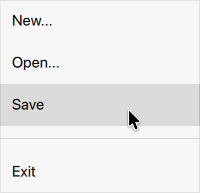
import QtQuick
import QtQuick.Controls.Basic

Menu {
    id: menu
    MenuItem {
        text: qsTr("New...")
    }
    MenuItem {
        text: qsTr("Open...")
    }
    MenuItem {
        text: qsTr("Save")
    }

    MenuSeparator {
        padding: 0
        topPadding: 12
        bottomPadding: 12
        contentItem: Rectangle {
            implicitWidth: 200
            implicitHeight: 1
            color: "#1E000000"
        }
    }

    MenuItem {
        text: qsTr("Exit")
    }
}「メニューのカスタマイズ」、「Menu 」、および「セパレータ・コントロール」も参照してください 。
© 2026 The Qt Company Ltd. Documentation contributions included herein are the copyrights of their respective owners. The documentation provided herein is licensed under the terms of the GNU Free Documentation License version 1.3 as published by the Free Software Foundation. Qt and respective logos are trademarks of The Qt Company Ltd. in Finland and/or other countries worldwide. All other trademarks are property of their respective owners.
