
Page QML Type
ヘッダーとフッターに対応したスタイル付きページコントロール。詳細...
| Import Statement: | import QtQuick.Controls |
| Inherits: |
プロパティ
- footer : Item
- header : Item
- implicitFooterHeight : real
(since QtQuick.Controls 2.5 (Qt 5.12)) - implicitFooterWidth : real
(since QtQuick.Controls 2.5 (Qt 5.12)) - implicitHeaderHeight : real
(since QtQuick.Controls 2.5 (Qt 5.12)) - implicitHeaderWidth : real
(since QtQuick.Controls 2.5 (Qt 5.12)) - title : string
詳細説明
Pageは、ページにheader およびfooter のアイテムを簡単に追加できるコンテナコントロールです。
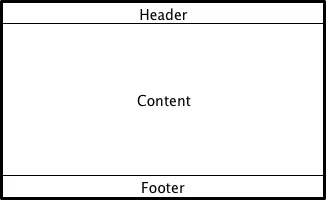
Pageの子として宣言されたアイテムは、
- 自動的にPageのcontentItemの子として設定されます。動的に作成されたアイテムは、明示的にcontentItemの子として設定する必要があります。
- 自動的に配置やサイズ変更は行われません。
次のサンプルスニペットは、ページ固有のツールバーヘッダーと、アプリケーション全体のタブバーフッターの使用方法を示しています。
import QtQuick.Controls
import QtQuick.Layouts

ApplicationWindow {
    visible: true

    StackView {
        anchors.fill: parent

        initialItem: Page {
            header: ToolBar {
                // ...
            }

            ColumnLayout {
                anchors.fill: parent
                // ...
            }
        }
    }

    footer: TabBar {
        // ...
    }
}
『 ApplicationWindow』 、『コンテナ コントロール』、および『 Qt Quick コントロールにおけるフォーカス管理』も参照してください 。
プロパティのドキュメント
footer : Item
このプロパティは、ページのフッター項目を保持します。フッター項目はページの下部に配置され、ページの幅に合わせてサイズが調整されます。デフォルト値は `null` です。
注: ページフッターに `ToolBar`、`TabBar`、または `DialogButtonBox `を割り当てると 、それぞれ対応する `ToolBar::position`、`TabBar::position`、または `DialogButtonBox::position ` プロパティが自動的に `Footer` に設定されます。
header およびApplicationWindow::footerも参照してください 。
header : Item
このプロパティは、ページヘッダー項目を保持します。ヘッダー項目はページの上部に配置され、ページの幅に合わせてサイズが調整されます。デフォルト値はnull です。
注: ページヘッダーとして `ToolBar`、`TabBar`、または `DialogButtonBox `を指定すると 、それぞれに対応する `ToolBar::position`、`TabBar::position`、または `DialogButtonBox::position ` プロパティが自動的に `Header` に設定されます。
footer およびApplicationWindow::headerも参照してください 。
implicitFooterHeight : real [read-only, since QtQuick.Controls 2.5 (Qt 5.12)]
このプロパティは、暗黙的なフッターの高さを保持します。
値は `footer && footer.visible ? footer.implicitHeight : 0` に等しくなります。
このプロパティは、QtQuick.Controls 2.5 (Qt 5.12) で導入されました。
implicitFooterWidth およびimplicitHeaderHeightも参照してください 。
implicitFooterWidth : real [read-only, since QtQuick.Controls 2.5 (Qt 5.12)]
このプロパティは、暗黙的なフッターの幅を保持します。
値は `footer && footer.visible ? footer.implicitWidth : 0` に等しくなります。
このプロパティは、QtQuick.Controls 2.5 (Qt 5.12) で導入されました。
implicitFooterHeight およびimplicitHeaderWidthも参照してください 。
implicitHeaderHeight : real [read-only, since QtQuick.Controls 2.5 (Qt 5.12)]
このプロパティには、暗黙的なヘッダーの高さが格納されます。
その値は `header && header.visible ? header.implicitHeight : 0` に等しくなります。
このプロパティは、QtQuick.Controls 2.5 (Qt 5.12) で導入されました。
implicitHeaderWidth およびimplicitFooterHeightも参照してください 。
implicitHeaderWidth : real [read-only, since QtQuick.Controls 2.5 (Qt 5.12)]
このプロパティは、暗黙的なヘッダーの幅を保持します。
その値は `header && header.visible ? header.implicitWidth : 0` に等しくなります。
このプロパティは、QtQuick.Controls 2.5 (Qt 5.12) で導入されました。
implicitHeaderHeight およびimplicitFooterWidthも参照してください 。
title : string
このプロパティには、ページのタイトルが格納されます。
タイトルは、ユーザーが閲覧しているページに関するコンテキストを提供するために、多くの場合、ページの上部に表示されます。
Page 自体はタイトルをレンダリングせず、代わりにアプリケーションにその処理を委ねます。例:
© 2026 The Qt Company Ltd. Documentation contributions included herein are the copyrights of their respective owners. The documentation provided herein is licensed under the terms of the GNU Free Documentation License version 1.3 as published by the Free Software Foundation. Qt and respective logos are trademarks of The Qt Company Ltd. in Finland and/or other countries worldwide. All other trademarks are property of their respective owners.
