
AxisHelper QML Type
3Dシーン内で3つの軸とグリッドを表示するための視覚的補助ツール。詳細...
| Import Statement: | import QtQuick3D.Helpers |
| Inherits: |
プロパティ
- enableAxisLines : bool
- enableXYGrid : bool
- enableXZGrid : bool
- enableYZGrid : bool
- gridColor : color
- gridOpacity : real
詳細説明
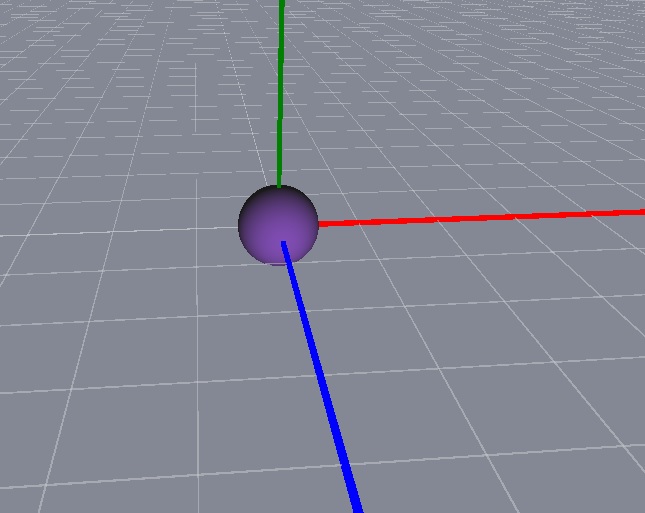
X軸は赤、Y軸は緑、Z軸は青で表示されます。
このサンプルシーンには、座標(0, 0, 0) に配置された「Sphere」と、「AxisHelper」オブジェクトが含まれています。「WasdController 」ヘルパーを使用すると、シーン内を簡単に移動できます。
View3D {
    anchors.fill: parent
    camera: camera

    PerspectiveCamera {
        id: camera
        position: Qt.vector3d(0, 0, 600)
    }

    DirectionalLight {
        position: Qt.vector3d(-500, 500, -100)
        color: Qt.rgba(0.4, 0.2, 0.6, 1.0)
        ambientColor: Qt.rgba(0.1, 0.1, 0.1, 1.0)
    }

    Model {
        source: "#Sphere"
        materials: [ PrincipledMaterial { } ]
    }

    AxisHelper {
    }
}

WasdController {
    controlledObject: camera
}
プロパティのドキュメント
enableAxisLines : bool [default: true]
軸線を表示できるようにします。
enableXYGrid : bool [default: false]
XY平面上のグリッドを表示します。
enableXZGrid : bool
/default true XZ平面上のグリッドを表示します。
enableYZGrid : bool [default: false]
YZ平面上のグリッドを表示します。
gridColor : color [default: Qt.rgba(0.8, 0.8, 0.8, 1)]
グリッドの色を指定します。
gridOpacity : real [default: 0.5]
グリッドの不透明度を指定します。
© 2026 The Qt Company Ltd. Documentation contributions included herein are the copyrights of their respective owners. The documentation provided herein is licensed under the terms of the GNU Free Documentation License version 1.3 as published by the Free Software Foundation. Qt and respective logos are trademarks of The Qt Company Ltd. in Finland and/or other countries worldwide. All other trademarks are property of their respective owners.
