
グラフのカスタマイズ
注:これは 「ウィジェット付きグラフ ギャラリー」のサンプルの一部です。
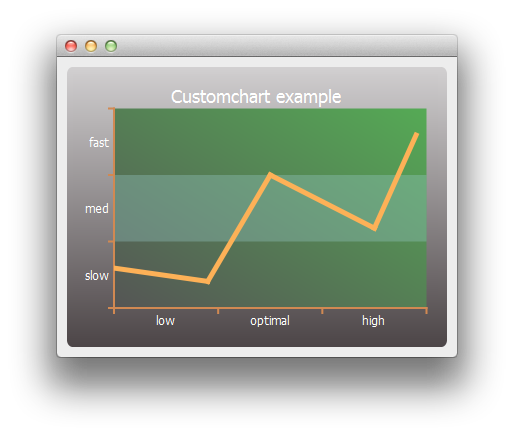
まず、単純な線グラフの系列とチャートオブジェクトを作成します。
auto series = new QLineSeries;
*series << QPointF(0, 6) << QPointF(9, 4) << QPointF(15, 20) << QPointF(25, 12) << QPointF(29, 26);
auto chart = new QChart;
chart->legend()->hide();
chart->addSeries(series);
まず、系列とチャートのタイトル、背景をカスタマイズします。
// Customize series
QPen pen(QRgb(0xfdb157));
pen.setWidth(5);
series->setPen(pen);

// Customize chart title
QFont font;
font.setPixelSize(18);
chart->setTitleFont(font);
chart->setTitleBrush(QBrush(Qt::white));
chart->setTitle("Custom Chart");

// Customize chart background
QLinearGradient backgroundGradient;
backgroundGradient.setStart(QPointF(0, 0));
backgroundGradient.setFinalStop(QPointF(0, 1));
backgroundGradient.setColorAt(0.0, QRgb(0xd2d0d1));
backgroundGradient.setColorAt(1.0, QRgb(0x4c4547));
backgroundGradient.setCoordinateMode(QGradient::ObjectBoundingMode);
chart->setBackgroundBrush(backgroundGradient);

// Customize plot area background
QLinearGradient plotAreaGradient;
plotAreaGradient.setStart(QPointF(0, 1));
plotAreaGradient.setFinalStop(QPointF(1, 0));
plotAreaGradient.setColorAt(0.0, QRgb(0x555555));
plotAreaGradient.setColorAt(1.0, QRgb(0x55aa55));
plotAreaGradient.setCoordinateMode(QGradient::ObjectBoundingMode);
chart->setPlotAreaBackgroundBrush(plotAreaGradient);
chart->setPlotAreaBackgroundVisible(true);
次に、軸をカスタマイズします。
auto axisX = new QCategoryAxis;
auto axisY = new QCategoryAxis;

// Customize axis label font
QFont labelsFont;
labelsFont.setPixelSize(12);
axisX->setLabelsFont(labelsFont);
axisY->setLabelsFont(labelsFont);

// Customize axis colors
QPen axisPen(QRgb(0xd18952));
axisPen.setWidth(2);
axisX->setLinePen(axisPen);
axisY->setLinePen(axisPen);

// Customize axis label colors
QBrush axisBrush(Qt::white);
axisX->setLabelsBrush(axisBrush);
axisY->setLabelsBrush(axisBrush);

// Customize grid lines and shades
axisX->setGridLineVisible(false);
axisY->setGridLineVisible(false);
axisY->setShadesPen(Qt::NoPen);
axisY->setShadesBrush(QBrush(QColor(0x99, 0xcc, 0xcc, 0x55)));
axisY->setShadesVisible(true);
続いて、軸ラベルの値と範囲をカスタマイズします。軸の準備が整ったら、チャートでそれらを使用するように設定します。
axisX->append("low", 10);
axisX->append("optimal", 20);
axisX->append("high", 30);
axisX->setRange(0, 30);

axisY->append("slow", 10);
axisY->append("med", 20);
axisY->append("fast", 30);
axisY->setRange(0, 30);

chart->addAxis(axisX, Qt::AlignBottom);
chart->addAxis(axisY, Qt::AlignLeft);
series->attachAxis(axisX);
series->attachAxis(axisY);
最後に、チャートを含むビューを作成します。
createDefaultChartView(chart);これで、メインウィンドウにグラフを表示する準備が整いました。
© 2026 The Qt Company Ltd. Documentation contributions included herein are the copyrights of their respective owners. The documentation provided herein is licensed under the terms of the GNU Free Documentation License version 1.3 as published by the Free Software Foundation. Qt and respective logos are trademarks of The Qt Company Ltd. in Finland and/or other countries worldwide. All other trademarks are property of their respective owners.
