
Qt Quick 3D - プロシージャルテクスチャの例
C++またはQMLからカスタムテクスチャデータを提供する方法を示します。
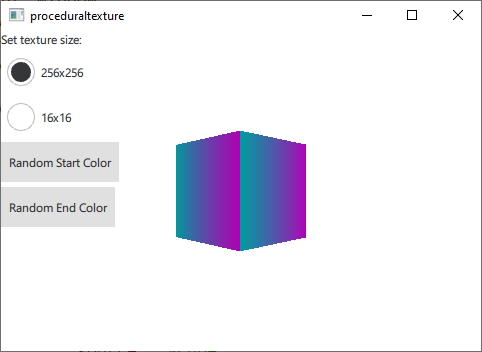
ここでは、静的なアセットから読み込むのではなく、実行時に動的に生成されたテクスチャデータを提供するさまざまな方法を示します。デモの目的上、この例では指定された開始色と終了色から垂直グラデーションのテクスチャを生成します。
まず、テクスチャデータ用のC++クラスを定義します。これをQQuick3DTextureData のサブクラスにします。仮想関数がないため、これは厳密には必須ではありませんが、すべてを1つのクラスにまとめる方がはるかに便利です。使用するプロパティを定義し、QMLから利用できるようにQML_NAMED_ELEMENT を追加します:
class GradientTexture : public QQuick3DTextureData
{
    Q_OBJECT
    Q_PROPERTY(int height READ height WRITE setHeight NOTIFY heightChanged)
    Q_PROPERTY(int width READ width WRITE setWidth NOTIFY widthChanged)
    Q_PROPERTY(QColor startColor READ startColor WRITE setStartColor NOTIFY startColorChanged)
    Q_PROPERTY(QColor endColor READ endColor WRITE setEndColor NOTIFY endColorChanged)
    QML_NAMED_ELEMENT(GradientTexture)
    ...
テクスチャを更新する関数を追加します。この関数では、setSizeおよびsetFormatを使用してテクスチャを設定し、setTextureDataを使用して画像データを設定します:
void GradientTexture::updateTexture()
{
    setSize(QSize(m_width, m_height));
    setFormat(QQuick3DTextureData::RGBA8);
    setHasTransparency(false);
    setTextureData(generateTexture());
}
関数 `generateTexture ` は、適切なサイズの `QByteArray ` を作成し、そこに画像データを格納します:
QByteArray GradientTexture::generateTexture()
{
    QByteArray imageData;
    // Create a horizontal gradient between startColor and endColor

    // Create a single scanline and reuse that data for each
    QByteArray gradientScanline;
    gradientScanline.resize(m_width * 4); // RGBA8

    for (int x = 0; x < m_width; ++x) {
        QColor color = linearInterpolate(m_startColor, m_endColor, x / float(m_width));
        int offset = x * 4;
        gradientScanline.data()[offset + 0] = char(color.red());
        gradientScanline.data()[offset + 1] = char(color.green());
        gradientScanline.data()[offset + 2] = char(color.blue());
        gradientScanline.data()[offset + 3] = char(255);
    }

    for (int y = 0; y < m_height; ++y)
        imageData += gradientScanline;

    return imageData;
}プロパティが変更されるたびに、updateTexture を呼び出します:
void GradientTexture::setStartColor(QColor startColor)
{
    if (m_startColor == startColor)
        return;

    m_startColor = startColor;
    emit startColorChanged(m_startColor);
    updateTexture();
}
最後に、QMLからこの新しいテクスチャを使用できます:
Texture {
    id: textureFromCpp

    minFilter: applicationState.filterMode
    magFilter: applicationState.filterMode
    textureData: gradientTexture

    GradientTexture {
        id: gradientTexture
        startColor: applicationState.startColor
        endColor: applicationState.endColor
        width: applicationState.size
        height: width
    }
}QML内で同じテクスチャデータを生成することも可能です。この場合、ProceduralTextureData コンポーネントを使用します:
Texture {
    id: textureFromQML
    minFilter: applicationState.filterMode
    magFilter: applicationState.filterMode
    textureData: gradientTextureDataQML

    ProceduralTextureData {
        id: gradientTextureDataQML

        property color startColor: applicationState.startColor
        property color endColor: applicationState.endColor
        width: applicationState.size
        height: width
        textureData: generateTextureData()

        function linearInterpolate(startColor : color, endColor : color, fraction : real) : color{
            return Qt.rgba(
                        startColor.r + (endColor.r - startColor.r) * fraction,
                        startColor.g + (endColor.g - startColor.g) * fraction,
                        startColor.b + (endColor.b - startColor.b) * fraction,
                        startColor.a + (endColor.a - startColor.a) * fraction
                        );
        }

        function generateTextureData() {
            let dataBuffer = new ArrayBuffer(width * height * 4)
            let data = new Uint8Array(dataBuffer)

            let gradientScanline = new Uint8Array(width * 4);

            for (let x = 0; x < width; ++x) {
                let color = linearInterpolate(startColor, endColor, x / width);
                let offset = x * 4;
                gradientScanline[offset + 0] = color.r * 255;
                gradientScanline[offset + 1] = color.g * 255;
                gradientScanline[offset + 2] = color.b * 255;
                gradientScanline[offset + 3] = color.a * 255;
            }

            for (let y = 0; y < height; ++y) {
                data.set(gradientScanline, y * width * 4);
            }

            return dataBuffer;
        }
    }
}C++と同様に、QByteArray にテクスチャのサイズとフォーマットに応じた画像データを格納します。QMLからこれを行う際は、不要な型変換を避けるためにArrayBuffer型を使用してください。
前述の2つの例では、テクスチャ用のデータはすべてCPU側で生成され、その後GPUにアップロードされてテクスチャデータとして使用されます。テクスチャデータをGPU上で直接生成することも可能です。この場合、代わりにQQuick3DTextureProviderExtension のサブクラスを使用します。
class GradientTextureProvider : public QQuick3DTextureProviderExtension
{
    Q_OBJECT
    Q_PROPERTY(int height READ height WRITE setHeight NOTIFY heightChanged)
    Q_PROPERTY(int width READ width WRITE setWidth NOTIFY widthChanged)
    Q_PROPERTY(QColor startColor READ startColor WRITE setStartColor NOTIFY startColorChanged)
    Q_PROPERTY(QColor endColor READ endColor WRITE setEndColor NOTIFY endColorChanged)
    QML_ELEMENT
QQuick3DTextureProviderExtension QSSGRenderExtension ベースのクラスは、Qt RHI API を使用してレンダリング拡張機能を定義します。サブクラスは、 () が呼び出された際に、 ベースのオブジェクトを返さなければなりません。QQuick3DTextureProviderExtension::updateSpatialNode
QSSGRenderGraphObject *GradientTextureProvider::updateSpatialNode(QSSGRenderGraphObject *node)
{
    if (!node)
        node = new GradientTextureProviderNode(this);

    // Update the state of the backend node
    auto gradientNode = static_cast<GradientTextureProviderNode *>(node);
    gradientNode->m_isDirty = true;
    gradientNode->m_width = m_width;
    gradientNode->m_height = m_height;
    gradientNode->m_startColor = m_startColor;
    gradientNode->m_endColor = m_endColor;

    return node;
}実際に何がレンダリングされるかは、このQSSGRenderExtension のサブクラスによって定義されます:
class GradientTextureProviderNode : public QSSGRenderTextureProviderExtension
{
public:
    explicit GradientTextureProviderNode(GradientTextureProvider *ext);
    ~GradientTextureProviderNode() override;
    bool prepareData(QSSGFrameData &data) override;
    void prepareRender(QSSGFrameData &data) override;
    void render(QSSGFrameData &data) override;
    void resetForFrame() override;

    bool m_isDirty = false;

    // state
    int m_width = 256;
    int m_height = 256;
    QColor m_startColor = QColor(Qt::red);
    QColor m_endColor = QColor(Qt::blue);

private:

    QPointer<GradientTextureProvider> m_ext;
    QSSGExtensionId extensionId {};

    std::unique_ptr<QRhiBuffer> quadGeometryVertexBuffer;
    std::unique_ptr<QRhiBuffer> quadGeometryIndexBuffer;

    //
    std::unique_ptr<QRhiTexture> outputTexture; // the final output texture
    std::unique_ptr<QRhiTextureRenderTarget> outputTextureRenderTarget;
    std::unique_ptr<QRhiRenderPassDescriptor> ouputTextureRenderPassDescriptor;

    std::unique_ptr<QRhiBuffer> gradientTextureUniformBuffer;
    std::unique_ptr<QRhiShaderResourceBindings> gradientTextureShaderResouceBindings;
    std::unique_ptr<QRhiGraphicsPipeline> gradientTexture2dPipeline;
};
QSSGRenderExtension のインターフェースを実装することで、拡張機能はテクスチャデータをGPU上で直接レンダリングできます。prepareDateの実装により、出力テクスチャが正しいサイズとフォーマットで作成されることが保証されるほか、その出力テクスチャが提供されるテクスチャとして登録されます。
bool GradientTextureProviderNode::prepareData(QSSGFrameData &data)
{
    if (!m_isDirty)
        return false;

    const auto &ctxIfx = data.contextInterface();
    const auto &rhiCtx = ctxIfx->rhiContext();
    QRhi *rhi = rhiCtx->rhi();

    // If there is no available rhi context, then we can't create the texture
    if (!rhiCtx)
        return false;

    extensionId = m_ext ? QQuick3DExtensionHelpers::getExtensionId(*m_ext) : QSSGExtensionId{};
    if (QQuick3DExtensionHelpers::isNull(extensionId))
        return false;

    // Make sure that the output texture is created and registered as the texture provider
    if (!outputTexture ||
        outputTexture->pixelSize().width() != m_width ||
        outputTexture->pixelSize().height() != m_height) {
        outputTexture.reset(rhi->newTexture(QRhiTexture::Format::RGBA8, QSize(m_width, m_height), 1, QRhiTexture::RenderTarget | QRhiTexture::sRGB));
        outputTexture->create();

        outputTextureRenderTarget.reset(rhi->newTextureRenderTarget({ outputTexture.get() }));
        ouputTextureRenderPassDescriptor.reset(outputTextureRenderTarget->newCompatibleRenderPassDescriptor());
        outputTextureRenderTarget->setRenderPassDescriptor(ouputTextureRenderPassDescriptor.get());
        outputTextureRenderTarget->create();

        // Register the output as the texture provider
        QSSGRenderExtensionHelpers::registerRenderResult(data, extensionId, outputTexture.get());

        gradientTexture2dPipeline.reset();
    }

    // If m_isDirty is true than prepareRender and render will actually get called.
    return m_isDirty;
}
`prepareRender` では、パイプラインが作成され、ユニフォームバッファが更新されます。
void GradientTextureProviderNode::prepareRender(QSSGFrameData &data)
{
    const auto &ctxIfx = data.contextInterface();
    const auto &rhiCtx = ctxIfx->rhiContext();
    if (!rhiCtx)
        return;

    QRhi *rhi = rhiCtx->rhi();
    QRhiCommandBuffer *cb = rhiCtx->commandBuffer();
    QRhiResourceUpdateBatch *resourceUpdates = rhi->nextResourceUpdateBatch();

    // Create the pipeline if necessary
    if (!gradientTexture2dPipeline) {
        // 1 quad (2 trianges), pos + uv.  4 vertices, 5 values each (x, y, z, u, v)
        quadGeometryVertexBuffer.reset(rhi->newBuffer(QRhiBuffer::Immutable, QRhiBuffer::VertexBuffer, 5 * 4 * sizeof(float)));
        quadGeometryVertexBuffer->create();

        // 6 indexes (2 triangles)
        quadGeometryIndexBuffer.reset(rhi->newBuffer(QRhiBuffer::Immutable, QRhiBuffer::IndexBuffer, 6 * sizeof(uint16_t)));
        quadGeometryIndexBuffer->create();

        // Uniform buffer: packed into 2 * vec4 (2 RGBA colors)
        const size_t uBufSize = (sizeof(float) * 4) * 2;
        gradientTextureUniformBuffer.reset(rhi->newBuffer(QRhiBuffer::Dynamic, QRhiBuffer::UniformBuffer, uBufSize));
        gradientTextureUniformBuffer->create();

        // Uniform buffer is only bound/used in Fragment Shader
        gradientTextureShaderResouceBindings.reset(rhi->newShaderResourceBindings());
        gradientTextureShaderResouceBindings->setBindings({
                QRhiShaderResourceBinding::uniformBuffer(0, QRhiShaderResourceBinding::FragmentStage, gradientTextureUniformBuffer.get()),
        });
        gradientTextureShaderResouceBindings->create();

        gradientTexture2dPipeline.reset(rhi->newGraphicsPipeline());
        gradientTexture2dPipeline->setShaderStages({
                { QRhiShaderStage::Vertex, getShader(QLatin1String(":/shaders/gradient.vert.qsb")) },
                { QRhiShaderStage::Fragment, getShader(QLatin1String(":/shaders/gradient.frag.qsb")) }
        });
        // 2 Attributes, Position (vec3) + UV (vec2)
        QRhiVertexInputLayout inputLayout;
        inputLayout.setBindings({
                { 5 * sizeof(float) }
        });
        inputLayout.setAttributes({
                { 0, 0, QRhiVertexInputAttribute::Float3, 0 },
                { 0, 1, QRhiVertexInputAttribute::Float2, 3 * sizeof(float) }
        });
        gradientTexture2dPipeline->setVertexInputLayout(inputLayout);
        gradientTexture2dPipeline->setShaderResourceBindings(gradientTextureShaderResouceBindings.get());
        gradientTexture2dPipeline->setRenderPassDescriptor(ouputTextureRenderPassDescriptor.get());
        gradientTexture2dPipeline->create();

        // Upload the static quad geometry part
        resourceUpdates->uploadStaticBuffer(quadGeometryVertexBuffer.get(), g_vertexData);
        resourceUpdates->uploadStaticBuffer(quadGeometryIndexBuffer.get(), g_indexData);
    }

    // Upload the uniform buffer data
    const float colorData[8] = {
        m_startColor.redF(), m_startColor.greenF(), m_startColor.blueF(), m_startColor.alphaF(),
        m_endColor.redF(), m_endColor.greenF(), m_endColor.blueF(), m_endColor.alphaF()
    };
    resourceUpdates->updateDynamicBuffer(gradientTextureUniformBuffer.get(), 0, sizeof(colorData), colorData);

    cb->resourceUpdate(resourceUpdates);
    m_isDirty = false;
}
このパスの実際のレンダリングは、render 関数内で定義されています。
void GradientTextureProviderNode::render(QSSGFrameData &data)
{
    const auto &ctxIfx = data.contextInterface();
    const auto &rhiCtx = ctxIfx->rhiContext();
    if (!rhiCtx)
        return;

    QRhiCommandBuffer *cb = rhiCtx->commandBuffer();

    // Render the quad with our pipeline to the outputTexture
    cb->beginPass(outputTextureRenderTarget.get(), Qt::black, { 1.0f, 0 }, nullptr, rhiCtx->commonPassFlags());
    cb->setViewport(QRhiViewport(0, 0, m_width, m_height));
    cb->setGraphicsPipeline(gradientTexture2dPipeline.get());
    cb->setShaderResources(gradientTextureShaderResouceBindings.get());
    QRhiCommandBuffer::VertexInput vb(quadGeometryVertexBuffer.get(), 0);
    cb->setVertexInput(0, 1, &vb, quadGeometryIndexBuffer.get(), QRhiCommandBuffer::IndexFormat::IndexUInt16);
    cb->drawIndexed(6);
    cb->endPass();
}
この例では、QMLでテクスチャプロバイダを次のように使用しています:
Texture {
    id: textureFromGPU
    minFilter: applicationState.filterMode
    magFilter: applicationState.filterMode
    textureProvider: GradientTextureProvider {
        startColor: applicationState.startColor
        endColor: applicationState.endColor
        width: applicationState.size
        height: width
    }
}© 2026 The Qt Company Ltd. Documentation contributions included herein are the copyrights of their respective owners. The documentation provided herein is licensed under the terms of the GNU Free Documentation License version 1.3 as published by the Free Software Foundation. Qt and respective logos are trademarks of The Qt Company Ltd. in Finland and/or other countries worldwide. All other trademarks are property of their respective owners.
