
Qt Quick 예제 - Window 및 Screen
이 예제는 QML의 Window 및 Screen 유형을 보여줍니다.
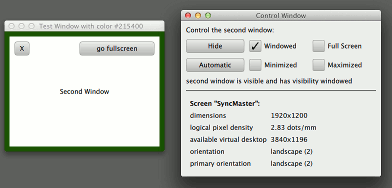
Window 및 Screen을 통해 다음을 수행하는 방법을 보여줍니다:
- QML에서 창 생성하기
- 이를 제어하는 방법 visibility
- 애플리케이션 시작 시 스플래시 화면을 표시하는 방법
- 해당 속성에 접근하는 방법 Screen
또한 QML을 리소스로 패키징하고 아이콘을 제공하여 독립형 QML 데스크톱 애플리케이션을 만드는 방법도 보여줍니다.
예제 실행
다음 위치에서 예제를 실행할 수 있습니다.
- Qt Creator
Welcome 모드를 열고 Examples 에서 예제를 선택합니다. 자세한 내용은 Qt Creator: 튜토리얼: 빌드 및 실행을 참조하십시오.
- Qt Extension for Visual Studio Code
Command Palette 에서 Qt: Open Qt examples 명령을 실행하고, 목록에서 예제를 선택합니다. 자세한 내용은 Qt Extension for Visual Studio Code: 튜토리얼: 빌드 및 실행을 참조하십시오.
창 구현
Qt.SplashScreen 플래그를 사용하여 스플래시 화면을 생성할 수 있으며, 메인 창과의 상호작용을 방지하려면 ApplicationModal 로 설정해야 합니다. 스플래시 창이 투명하고 부분적으로 투명한 이미지를 표시하는 경우, 모양이 있는 창처럼 보입니다.
Window {
    id: splash
    color: "transparent"
    title: "Splash Window"
    modality: Qt.ApplicationModal
    flags: Qt.SplashScreen
    property int timeoutInterval: 2000
    signal timeout
이 예제에서는 Timer 가 스플래시 화면을 자동으로 닫지만, 실제 애플리케이션에서는 초기화가 완료되면 스플래시 화면을 숨기기 위해 애플리케이션 로직의 신호에 연결하고 싶을 수 있습니다.
Timer {
    interval: splash.timeoutInterval; running: splash.visible; repeat: false
    onTriggered: splash.exit()
}
이 예제의 메인 창은 제어 창으로, 보조 창의 상태를 제어하고 피드백을 제공하는 몇 가지 버튼과 체크박스가 있습니다. 각 체크박스는 표시 중인 상태의 속성에 바인딩되어 있으며, 상태를 변경하기 위한 onClicked 핸들러도 가지고 있습니다. 이는 바인딩 루프를 피하면서 양방향 바인딩을 생성하는 일반적인 패턴입니다.
CheckBox {
    text: "Windowed"
    height: showButton.height
    width: col.cellWidth
    Binding on checked { value: root.testWindow.visibility === Window.Windowed }
    onClicked: root.testWindow.visibility = Window.Windowed
}
Screen 에는 화면 방향이 변경될 때 콘텐츠를 회전하거나, 화면에서 창을 배치하거나, 실제 단위를 논리적 픽셀 단위로 변환해야 하는 애플리케이션에 일반적으로 유용한 여러 속성이 있습니다. CurrentScreen.qml(window.qml 내에 인라인으로 표시되거나 qml 도구를 사용하여 단독으로 실행할 수 있음)은 단순히 속성 값을 표시하는 반면, 스플래시 화면은 이 값들을 사용하여 창을 화면 중앙에 배치합니다.
    x: (Screen.width - splashImage.width) / 2
    y: (Screen.height - splashImage.height) / 2
Window 가 Item 또는 다른 Window 내에 중첩된 경우, 내부 창은 외부 창 에 대해 일시적인(transient) 상태가 됩니다(자세한 설명은 Window 참조). 하지만 서로 관련이 없는 동등한 창으로 여러 개의 최상위 창을 생성하려면, 이 예제에서와 같이 비시각적(non-visual) QtObject 루트 항목 내에 생성할 수 있습니다.
© 2026 The Qt Company Ltd. Documentation contributions included herein are the copyrights of their respective owners. The documentation provided herein is licensed under the terms of the GNU Free Documentation License version 1.3 as published by the Free Software Foundation. Qt and respective logos are trademarks of The Qt Company Ltd. in Finland and/or other countries worldwide. All other trademarks are property of their respective owners.
