
Qt Quick 3D - 계단식 섀도 맵 예제
캐스케이드 섀도우 맵을 보여줍니다.
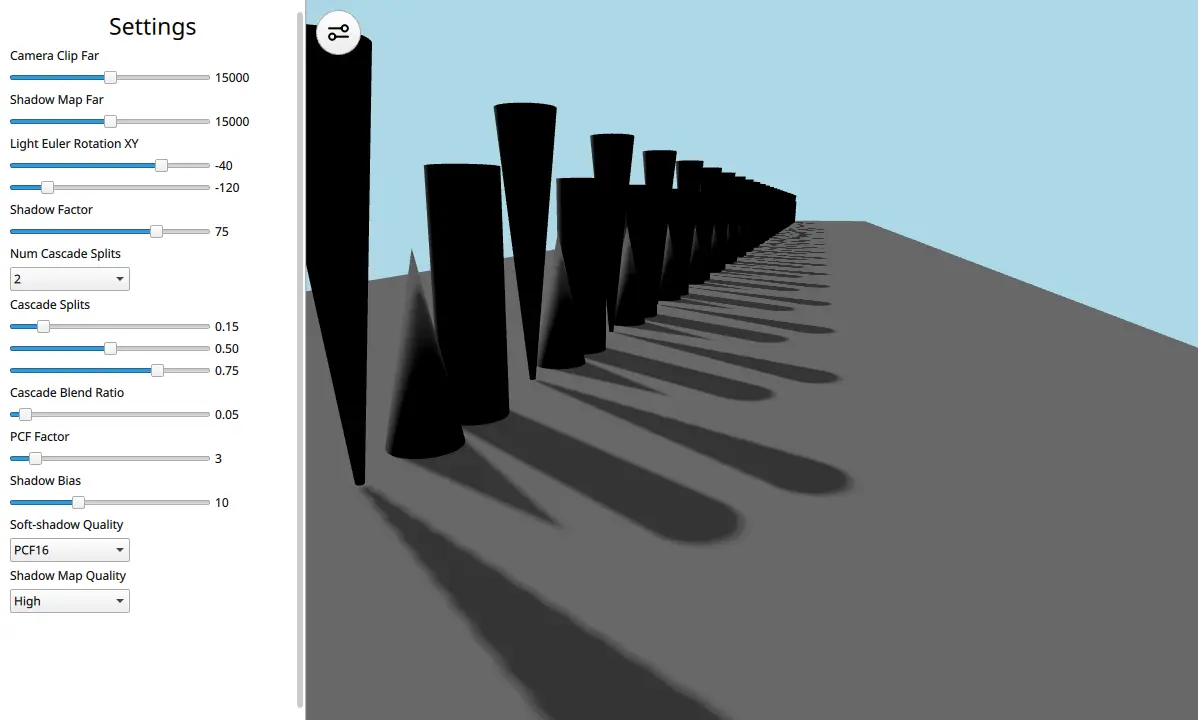
이 예제는 캐스케이드 섀도우 맵을 적용한 DirectionalLight 의 사용 방법을 보여줍니다.
씬의 QML 코드를 살펴보겠습니다:
View3D {
    id: view
    x: settings.viewX
    y: 0
    width: parent.width - settings.viewX
    height: parent.height
    camera: camera
    environment: SceneEnvironment {
        clearColor: "lightblue"
        backgroundMode: SceneEnvironment.Color
        antialiasingMode: SceneEnvironment.MSAA
        antialiasingQuality: SceneEnvironment.High
    }

    PerspectiveCamera {
        id: camera
        position: Qt.vector3d(458, 300, 515)
        eulerRotation: Qt.vector3d(-14, 19, 0)
        clipFar: settings.clipFar
    }

    DirectionalLight {
        visible: true
        castsShadow: true
        shadowFactor: settings.shadowFactor
        eulerRotation: settings.eulerRotation
        csmSplit1: settings.csmSplit1
        csmSplit2: settings.csmSplit2
        csmSplit3: settings.csmSplit3
        csmNumSplits: settings.csmNumSplits
        shadowMapQuality: settings.shadowMapQuality
        csmBlendRatio: settings.csmBlendRatio
        shadowBias: settings.shadowBias
        pcfFactor: settings.pcfFactor
        softShadowQuality: settings.softShadowQuality
        shadowMapFar: settings.shadowMapFar
        lockShadowmapTexels: settings.lockShadowmapTexels
    }

    Model {
        id: ground
        source: "#Cube"
        scale: Qt.vector3d(25, 0.01, 135)
        z: -5500
        materials: PrincipledMaterial {
            baseColor: "gray"
        }
        castsShadows: false
    }

    Node {
        id: shapeSpawner
        Component.onCompleted: {
            var conesAndCylinderTrio = Qt.createComponent("ConesAndCylinderTrio.qml")
            var z_pos = 0
            for (var i = 0; i < 25; i++) {
                conesAndCylinderTrio.incubateObject(shapeSpawner, {
                                                    "z_positions": [
                                                            z_pos,
                                                            z_pos - 125,
                                                            z_pos - 250
                                                        ]})
                z_pos -= 450
            }
        }
    }

    MouseArea {
        anchors.fill: parent
        acceptedButtons: Qt.LeftButton
        propagateComposedEvents: true
        onClicked: {
            settings.drawerVisible = false
            wasd.forceActiveFocus() // focus WASD controller for keyboard input
        }
    }
}
이 씬은 DirectionalLight, PerspectiveCamera, 바닥 Model, 그리고 원뿔과 원통 Model로 구성된 긴 배열로 이루어져 있습니다. 이 긴 배열은 캐스케이드가 씬의 그래픽 품질을 높이는 데 어떻게 도움이 되는지 보여주기 위해 이와 같이 배치되었습니다. 섀도우 맵을 하나만 사용하면 아티팩트가 발생하지만, 캐스케이드를 사용하면 이를 해결할 수 있습니다. DirectionalLight 에는 UI의 설정 패널을 통해 조정할 수 있는 다양한 속성이 포함되어 있습니다.
각 속성에 대한 자세한 내용은 ‘섀도 매핑 ( Shadow Mapping )’ 문서를 참고하시고, 예제를 직접 실행하여 속성들이 서로 어떻게 상호작용하는지 확인해 보시기 바랍니다.
© 2026 The Qt Company Ltd. Documentation contributions included herein are the copyrights of their respective owners. The documentation provided herein is licensed under the terms of the GNU Free Documentation License version 1.3 as published by the Free Software Foundation. Qt and respective logos are trademarks of The Qt Company Ltd. in Finland and/or other countries worldwide. All other trademarks are property of their respective owners.
