
构建单体项目
本教程将指导您为 Qt 示例应用程序构建一个 INTEGRITY 单体项目。您可以选择任何使用受支持 Qt 模块的 Qt 示例应用程序。
在构建 monolith INTEGRITY 项目之前,请运行setEnvironment.sh 脚本来准备您的构建环境。有关该脚本的更多信息,请参阅《创建环境设置 shell 脚本》。
source ~/setEnvironment.sh构建 Qt 应用程序
CMake工具要使用 CMake 基于 Qt6 构建该应用程序,请在终端中运行以下命令:
<Qt installation path>/bin/qt-cmake <Qt example application path>/CMakeLists.txt
cmake --build .
其中,
qt-cmake是一个包装脚本,用于调用 CMake 并为您的项目配置适当的包含路径。qmake工具若要使用 qmake 基于 Qt6 构建应用程序,请在终端中运行以下命令:
<Qt installation path>/bin/qmake <Qt example application path>/application.pro
make
构建单体项目
高通骁龙 8155P 开发板的板级支持包 (BSP) 提供了一个构建脚本,用于为开发板分区生成一组镜像:
/work/ghs/sa8155/es7/es7_dev_env/hlos_dev_boot/apps/ghs_apps_proc/build_ghs.sh将 Qt 应用程序添加到构建中,方法是将其添加到monolith-service.int文件中:
- 启动 MULTI Launcher。
- 选择“Components ” > “Open Project Manager ”。
- 在/work/ghs/sa8155/es7/es7_dev_env/hlos_dev_boot/apps/ghs_apps_proc/qc_bsp目录下选择项目文件default.gpj:
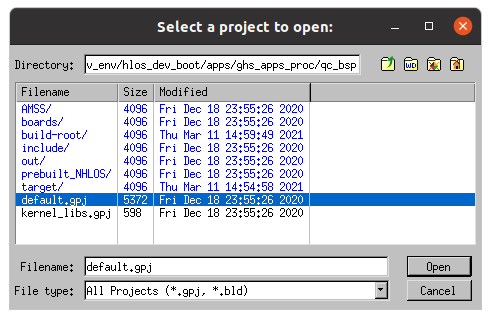
MULTI 应用程序将显示一个窗口,其中列出了所选文件夹中的项目文件列表。
- 选择“Open ”。
在 MULTI 项目管理器视图中,您应能看到已打开项目的树形结构。
浏览“default.gpj ”子项目:
- 依次选择target.auto vmm-adp-no-gvm-sa8155.gpj>vvm-adp-gvm-ref.gpj>monolith-service.gpj。您可以查看项目结构并编辑项目中的文件。
- 选择monolith-service.int
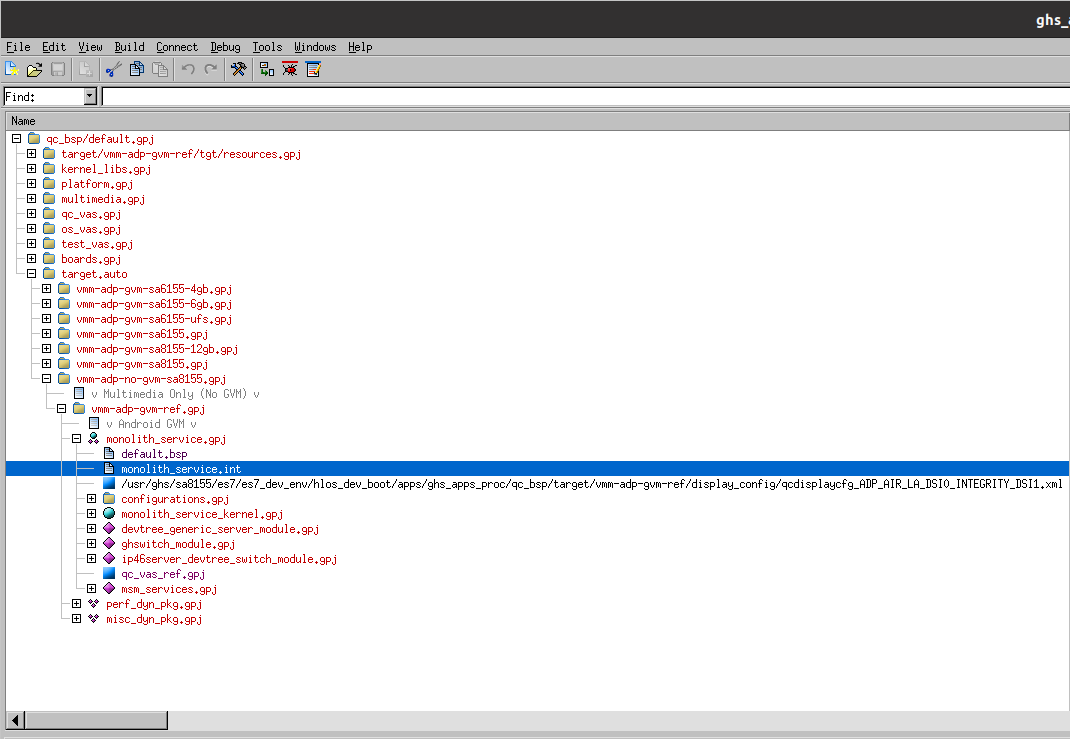
所选的monolith-service.int文件在项目树中被高亮显示。
- 右键单击该文件,然后从上下文菜单中选择“Edit ”。
- 在文件末尾添加以下几行代码。
AddressSpace
Name    myappname
Filename    /path/to/your/app/executable
MemoryPoolSize 0x2700000
Language    C++
HeapSize    0x90000

Task Initial
StackSize    0x80000
StartIt    false
EndTask
Extendedmemorypoolsize 0x300000
EndAddressSpace
注意:请将 </path/to/your/app/executable>替换 为您的应用程序可执行文件的路径。
- 运行构建脚本。
bash /work/ghs/sa8155/es7/es7_dev_env/hlos_dev_boot/apps/ghs_apps_proc/build_ghs.sh
您的单体项目现已准备就绪,可以刷写到开发板上。
© 2026 The Qt Company Ltd. Documentation contributions included herein are the copyrights of their respective owners. The documentation provided herein is licensed under the terms of the GNU Free Documentation License version 1.3 as published by the Free Software Foundation. Qt and respective logos are trademarks of The Qt Company Ltd. in Finland and/or other countries worldwide. All other trademarks are property of their respective owners.
