
QCategoryAxis Class
QCategoryAxis 类用于在坐标轴上放置命名区间。更多内容...
| Header: | #include <QCategoryAxis> |
| In QML: | CategoryAxis |
| Inherits: | QValueAxis |
| Status: | Deprecated |
该类已弃用。我们强烈建议不要在新代码中使用它。
公共类型
| enum | AxisLabelsPosition { AxisLabelsPositionCenter, AxisLabelsPositionOnValue } |
属性
- categoriesLabels : QStringList
- count : int
- labelsPosition : AxisLabelsPosition
- startValue : qreal
公共函数
| QCategoryAxis(QObject *parent = nullptr) | |
| virtual | ~QCategoryAxis() |
| void | append(const QString &categoryLabel, qreal categoryEndValue) |
| QStringList | categoriesLabels() |
| int | count() const |
| qreal | endValue(const QString &categoryLabel) const |
| QCategoryAxis::AxisLabelsPosition | labelsPosition() const |
| void | remove(const QString &categoryLabel) |
| void | replaceLabel(const QString &oldLabel, const QString &newLabel) |
| void | setLabelsPosition(QCategoryAxis::AxisLabelsPosition position) |
| void | setStartValue(qreal min) |
| qreal | startValue(const QString &categoryLabel = QString()) const |
重新实现的公共函数
| virtual QAbstractAxis::AxisType | type() const override |
信号
| void | categoriesChanged() |
| void | labelsPositionChanged(QCategoryAxis::AxisLabelsPosition position) |
详细说明
该类可通过添加带标签的类别来解释底层数据。与QBarCategoryAxis 不同,QCategoryAxis允许自由指定类别范围的宽度。
关于如何使用 QCategoryAxis 的示例代码:
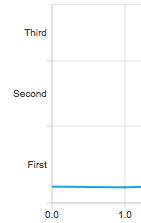
QChartView *chartView = new QChartView;
QLineSeries *series = new QLineSeries;
// ...
chartView->chart()->addSeries(series);

QCategoryAxis *axisY = new QCategoryAxis;
axisY->setMin(0);
axisY->setMax(52);
axisY->setStartValue(15);
axisY->append("First", 20);
axisY->append("Second", 37);
axisY->append("Third", 52);
chartView->chart()->setAxisY(axisY, series);
成员类型文档
enum QCategoryAxis::AxisLabelsPosition
此枚举描述了类别标签的位置。
| 常量 | 值 | 描述 |
|---|---|---|
QCategoryAxis::AxisLabelsPositionCenter | 0x0 | 标签居中显示在类别上。 |
QCategoryAxis::AxisLabelsPositionOnValue | 0x1 | 标签位于类别的上边缘。 |
属性文档
[read-only] categoriesLabels : QStringList
该属性将类别标签作为字符串列表存储。
访问函数:
| QStringList | categoriesLabels() |
[read-only] count : int
该属性存储类别数量。
访问函数:
| int | count() const |
labelsPosition : AxisLabelsPosition
该属性用于指定类别标签的位置。当轴上的标签设置为“值”位置时,轴的起始端和末端的标签可能会与其他轴的标签重叠。
访问函数:
| QCategoryAxis::AxisLabelsPosition | labelsPosition() const |
| void | setLabelsPosition(QCategoryAxis::AxisLabelsPosition position) |
通知信号:
| void | labelsPositionChanged(QCategoryAxis::AxisLabelsPosition position) |
startValue : qreal
该属性确定了坐标轴上第一类别的下限。
访问函数:
| qreal | startValue(const QString &categoryLabel = QString()) const |
| void | setStartValue(qreal min) |
成员函数文档
[explicit] QCategoryAxis::QCategoryAxis(QObject *parent = nullptr)
创建一个作为parent 子节点的坐标轴对象。
[virtual noexcept] QCategoryAxis::~QCategoryAxis()
销毁该对象。
void QCategoryAxis::append(const QString &categoryLabel, qreal categoryEndValue)
向坐标轴添加一个新类别,其标签为categoryLabel 。类别标签必须是唯一的。categoryEndValue 指定了该类别的高端限值。该值必须大于前一个类别的高端限值。否则,该方法将返回,且不会添加新类别。
[signal] void QCategoryAxis::categoriesChanged()
当坐标轴的类别发生变化时,会发出此信号。
QStringList QCategoryAxis::categoriesLabels()
返回类别标签的列表。
注意: 这是 properties 属性 categoriesLabels的获取函数 。
int QCategoryAxis::count() const
返回类别数量。
注意: 这是属性 count 的获取器 函数。
qreal QCategoryAxis::endValue(const QString &categoryLabel) const
返回由 `categoryLabel` 指定的类别的高端上限。
void QCategoryAxis::remove(const QString &categoryLabel)
从坐标轴中删除由标签categoryLabel 指定的类别。
void QCategoryAxis::replaceLabel(const QString &oldLabel, const QString &newLabel)
将由 `oldLabel ` 指定的现有类别标签替换为 `newLabel`。如果旧标签不存在,则该方法不进行任何更改并返回。
void QCategoryAxis::setStartValue(qreal min)
将 `min ` 设置为该轴上第一个区间的下限。如果该轴上已添加了区间,则传入的值必须小于已定义的第一个区间范围的上限。否则不执行任何操作。
注意: 这是startValue 属性的设置 函数。
另请参阅 startValue()。
qreal QCategoryAxis::startValue(const QString &categoryLabel = QString()) const
返回由 `categoryLabel` 指定的类别的下限。
注意: 这是 startValue 属性的获取 函数。
另请参阅 setStartValue()。
[override virtual] QAbstractAxis::AxisType QCategoryAxis::type() const
重写了:QValueAxis::type() const。
返回轴的类型。
© 2026 The Qt Company Ltd. Documentation contributions included herein are the copyrights of their respective owners. The documentation provided herein is licensed under the terms of the GNU Free Documentation License version 1.3 as published by the Free Software Foundation. Qt and respective logos are trademarks of The Qt Company Ltd. in Finland and/or other countries worldwide. All other trademarks are property of their respective owners.
