
QDialogButtonBox Class
QDialogButtonBox 类是一个小部件,它会根据当前小部件样式,以合适的布局显示按钮。更多内容...
| 头文件: | #include <QDialogButtonBox> |
| CMake: | find_package(Qt6 REQUIRED COMPONENTS Widgets) target_link_libraries(mytarget PRIVATE Qt6::Widgets) |
| qmake: | QT += widgets |
| 继承自: | QWidget |
公共类型
| enum | ButtonLayout { WinLayout, MacLayout, KdeLayout, GnomeLayout, AndroidLayout } |
| enum | ButtonRole { InvalidRole, AcceptRole, RejectRole, DestructiveRole, ActionRole, …, ResetRole } |
| enum | StandardButton { Ok, Open, Save, Cancel, Close, …, NoButton } |
| flags | StandardButtons |
属性
- centerButtons : bool
- orientation : Qt::Orientation
- standardButtons : StandardButtons
公共函数
| QDialogButtonBox(QWidget *parent = nullptr) | |
| QDialogButtonBox(QDialogButtonBox::StandardButtons buttons, QWidget *parent = nullptr) | |
| QDialogButtonBox(Qt::Orientation orientation, QWidget *parent = nullptr) | |
| QDialogButtonBox(QDialogButtonBox::StandardButtons buttons, Qt::Orientation orientation, QWidget *parent = nullptr) | |
| virtual | ~QDialogButtonBox() |
| QPushButton * | addButton(QDialogButtonBox::StandardButton button) |
| void | addButton(QAbstractButton *button, QDialogButtonBox::ButtonRole role) |
| QPushButton * | addButton(const QString &text, QDialogButtonBox::ButtonRole role) |
| QPushButton * | button(QDialogButtonBox::StandardButton which) const |
| QDialogButtonBox::ButtonRole | buttonRole(QAbstractButton *button) const |
| QList<QAbstractButton *> | buttons() const |
| bool | centerButtons() const |
| void | clear() |
| Qt::Orientation | orientation() const |
| void | removeButton(QAbstractButton *button) |
| void | setCenterButtons(bool center) |
| void | setOrientation(Qt::Orientation orientation) |
| void | setStandardButtons(QDialogButtonBox::StandardButtons buttons) |
| QDialogButtonBox::StandardButton | standardButton(QAbstractButton *button) const |
| QDialogButtonBox::StandardButtons | standardButtons() const |
信号
| void | accepted() |
| void | clicked(QAbstractButton *button) |
| void | helpRequested() |
| void | rejected() |
静态公共成员
(since 6.12) QKeySequence | standardButtonShortcut(QDialogButtonBox::StandardButton button) |
(since 6.12) QString | standardButtonText(QDialogButtonBox::StandardButton button) |
重新实现的受保护函数
| virtual void | changeEvent(QEvent *event) override |
| virtual bool | event(QEvent *event) override |
详细说明
对话框和消息框通常会按照该平台的界面指南,以特定布局呈现按钮。不同平台的对话框布局必然各不相同。QDialogButtonBox 允许开发者向其中添加按钮,并会自动采用适合用户桌面环境的布局。
对话框中的大多数按钮都遵循特定的角色。这些角色包括:
- 接受或拒绝对话框。
- 请求帮助。
- 对对话框本身执行操作(例如重置字段或应用更改)。
此外,还可能存在其他关闭对话框的方式,这些方式可能会导致破坏性后果。
大多数对话框中的按钮几乎可以被视为标准按钮(例如OK 和Cancel 按钮)。有时采用标准方式创建这些按钮会比较方便。
使用 QDialogButtonBox 有几种方法。一种方法是自行创建按钮(或按钮文本),并将其添加到按钮框中,同时指定其角色。
QDialogButtonBox *buttonBox = new QDialogButtonBox(Qt::Vertical);
buttonBox->addButton(findButton, QDialogButtonBox::ActionRole);
buttonBox->addButton(moreButton, QDialogButtonBox::ActionRole);
此外,QDialogButtonBox 还提供了一些可用的标准按钮(例如“确定”、“取消”、“保存”)。这些按钮以标志的形式存在,因此您可以在构造函数中将它们进行按位或运算。
    buttonBox = new QDialogButtonBox(QDialogButtonBox::Ok
                                     | QDialogButtonBox::Cancel);

    connect(buttonBox, &QDialogButtonBox::accepted, this, &QDialog::accept);
    connect(buttonBox, &QDialogButtonBox::rejected, this, &QDialog::reject);
您可以混合使用普通按钮和标准按钮。
目前,如果按钮框为水平布局,按钮的排列方式如下:
 GnomeLayout 水平 GnomeLayout 水平 | 按钮框以水平方式布局GnomeLayout |
 KdeLayout 水平 KdeLayout 水平 | 按钮框采用水平布局KdeLayout |
 MacLayout 水平 MacLayout 水平 | 按键框采用水平布局MacLayout |
 WinLayout 水平 WinLayout 水平 | 按键框采用水平布局WinLayout |
如果按钮框为垂直布局,则按钮的排列方式如下:
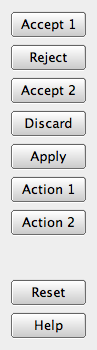
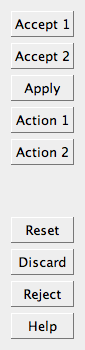
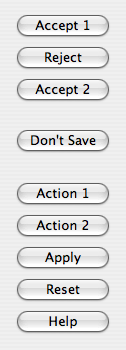
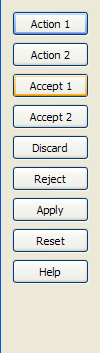
此外,仅包含ActionRole 或HelpRole 属性按钮的按钮框可视为无模式按钮框,在macOS上会呈现不同的外观:
 无模式水平布局的截图
 无模式垂直布局的截图
当点击按钮框中的某个按钮时,系统会为被按下的实际按钮发出clicked() 信号。为了方便起见,如果该按钮具有AcceptRole 、RejectRole 或HelpRole ,则会分别发出accepted()、rejected() 或helpRequested() 信号。
若要将特定按钮设为默认按钮,需自行调用该按钮的QPushButton::setDefault()方法。但是,如果未设置默认按钮,且在使用QPushButton::autoDefault 属性时需在不同平台间保持默认按钮的一致性,则在显示QDialogButtonBox时,第一个具有accept角色的按钮将被设为默认按钮,
另请参阅 QMessageBox 、QPushButton 和QDialog 。
成员类型文档
enum QDialogButtonBox::ButtonLayout
此枚举描述了在排列按钮框中包含的按钮时所采用的布局策略。
| 常量 | 值 | 描述 |
|---|---|---|
QDialogButtonBox::WinLayout | 0 | 使用适用于 Windows 应用程序的布局策略。 |
QDialogButtonBox::MacLayout | 1 | 使用适用于 macOS 应用程序的布局策略。 |
QDialogButtonBox::KdeLayout | 2 | 使用适用于 KDE 上应用程序的策略。 |
QDialogButtonBox::GnomeLayout | 3 | 使用适用于 GNOME 应用程序的策略。 |
QDialogButtonBox::AndroidLayout | 4 | 使用适用于 Android 应用程序的策略。此枚举值是在 Qt 5.10 中添加的。 |
按钮布局由current style 指定。但在 X11 平台上,它可能会受到桌面环境的影响。
enum QDialogButtonBox::ButtonRole
此枚举描述了可用于描述按钮框中按钮的角色。这些角色的组合作为标志,用于描述按钮行为的不同方面。
| 常量 | 值 | 描述 |
|---|---|---|
QDialogButtonBox::InvalidRole | -1 | 该按钮无效。 |
QDialogButtonBox::AcceptRole | 0 | 单击该按钮将导致对话框被接受(例如“确定”)。 |
QDialogButtonBox::RejectRole | 1 | 单击该按钮将导致对话框被拒绝(例如“取消”)。 |
QDialogButtonBox::DestructiveRole | 2 | 单击该按钮会引发破坏性更改(例如“丢弃更改”),并关闭对话框。 |
QDialogButtonBox::ActionRole | 3 | 单击该按钮将导致对话框内元素发生更改。 |
QDialogButtonBox::HelpRole | 4 | 单击该按钮可请求帮助。 |
QDialogButtonBox::YesRole | 5 | 该按钮是一个类似“是”的按钮。 |
QDialogButtonBox::NoRole | 6 | 该按钮是“否”类按钮。 |
QDialogButtonBox::ApplyRole | 8 | 该按钮将应用当前更改。 |
QDialogButtonBox::ResetRole | 7 | 该按钮将对话框中的字段重置为默认值。 |
另请参阅 StandardButton 。
enum QDialogButtonBox::StandardButton
flags QDialogButtonBox::StandardButtons
这些枚举描述了标准按钮的标志。每个按钮都有一个定义好的ButtonRole 。
| 常量 | 值 | 描述 |
|---|---|---|
QDialogButtonBox::Ok | 0x00000400 | 使用AcceptRole 定义的“确定”按钮。 |
QDialogButtonBox::Open | 0x00002000 | 使用AcceptRole 定义的“打开”按钮。 |
QDialogButtonBox::Save | 0x00000800 | 使用AcceptRole 定义的“保存”按钮。 |
QDialogButtonBox::Cancel | 0x00400000 | 使用RejectRole 定义的“取消”按钮。 |
QDialogButtonBox::Close | 0x00200000 | 使用RejectRole 定义的“关闭”按钮。 |
QDialogButtonBox::Discard | 0x00800000 | 一个“放弃”或“不保存”按钮(具体名称取决于平台),使用DestructiveRole 定义。 |
QDialogButtonBox::Apply | 0x02000000 | 使用ApplyRole 定义的“应用”按钮。 |
QDialogButtonBox::Reset | 0x04000000 | 使用ResetRole 定义的“重置”按钮。 |
QDialogButtonBox::RestoreDefaults | 0x08000000 | 使用ResetRole 定义的“恢复默认值”按钮。 |
QDialogButtonBox::Help | 0x01000000 | 使用HelpRole 定义的“帮助”按钮。 |
QDialogButtonBox::SaveAll | 0x00001000 | 使用AcceptRole 定义的“全部保存”按钮。 |
QDialogButtonBox::Yes | 0x00004000 | 使用YesRole 定义的“是”按钮。 |
QDialogButtonBox::YesToAll | 0x00008000 | 使用YesRole 定义的“全部是”按钮。 |
QDialogButtonBox::No | 0x00010000 | 使用NoRole 定义的“否”按钮。 |
QDialogButtonBox::NoToAll | 0x00020000 | 使用NoRole 定义的“全部否”按钮。 |
QDialogButtonBox::Abort | 0x00040000 | 使用RejectRole 定义的“中止”按钮。 |
QDialogButtonBox::Retry | 0x00080000 | 使用AcceptRole 定义的“重试”按钮。 |
QDialogButtonBox::Ignore | 0x00100000 | 使用AcceptRole 定义的“忽略”按钮。 |
QDialogButtonBox::NoButton | 0x00000000 | 一个无效的按钮。 |
StandardButtons 类型是QFlags<StandardButton> 的 typedef。它存储 StandardButton 值的按“或”运算组合。
另请参阅 ButtonRole 和standardButtons 。
属性文档
centerButtons : bool
该属性控制按钮框中的按钮是否居中
默认情况下,此属性为false 。这种行为适用于大多数类型的对话框。一个值得注意的例外是大多数平台(例如 Windows)上的消息框,其中按钮框在水平方向上居中。
访问函数:
| bool | centerButtons() const |
| void | setCenterButtons(bool center) |
另请参阅 QMessageBox 。
orientation : Qt::Orientation
该属性用于指定按钮框的布局方向
默认情况下,布局方向为水平(即按钮并排排列)。可选的布局方向包括Qt::Horizontal 和Qt::Vertical 。
访问函数:
| Qt::Orientation | orientation() const |
| void | setOrientation(Qt::Orientation orientation) |
standardButtons : StandardButtons
按钮框中的标准按钮集合
此属性控制按钮框使用哪些标准按钮。
访问函数:
| QDialogButtonBox::StandardButtons | standardButtons() const |
| void | setStandardButtons(QDialogButtonBox::StandardButtons buttons) |
另请参阅 addButton()。
成员函数文档
QDialogButtonBox::QDialogButtonBox(QWidget *parent = nullptr)
根据给定的parent ,构建一个空的、水平排列的按钮框。
另请参阅 orientation 和addButton()。
[explicit] QDialogButtonBox::QDialogButtonBox(QDialogButtonBox::StandardButtons buttons, QWidget *parent = nullptr)
根据给定的parent 构建一个水平按钮框,其中包含由buttons 指定的标准按钮。
另请参阅 orientation 和addButton()。
QDialogButtonBox::QDialogButtonBox(Qt::Orientation orientation, QWidget *parent = nullptr)
根据给定的orientation 和parent 构建一个空的按钮框。
另请参阅 orientation 和addButton()。
QDialogButtonBox::QDialogButtonBox(QDialogButtonBox::StandardButtons buttons, Qt::Orientation orientation, QWidget *parent = nullptr)
根据给定的orientation 和parent 构建一个按钮框,其中包含由buttons 指定的标准按钮。
另请参阅 orientation 和addButton()。
[virtual noexcept] QDialogButtonBox::~QDialogButtonBox()
摧毁按钮盒。
[signal] void QDialogButtonBox::accepted()
当按钮框内的某个按钮被点击时,如果该按钮是通过 `AcceptRole ` 或 `YesRole` 定义的,则会触发此信号。
另请参阅 rejected()、clicked() 和helpRequested()。
QPushButton *QDialogButtonBox::addButton(QDialogButtonBox::StandardButton button)
如果操作有效,则将标准button 添加到按钮框中,并返回一个按钮。如果button 无效,则不会将其添加到按钮框中,并返回零。
另请参阅 removeButton() 和clear()。
void QDialogButtonBox::addButton(QAbstractButton *button, QDialogButtonBox::ButtonRole role)
将给定的button 添加到具有指定role 的按钮框中。如果角色无效,则不会添加该按钮。
如果该按钮已被添加,则将其移除,并使用新角色重新添加。
注意:按钮框 将拥有该按钮的所有权。
另请参阅 removeButton() 和clear()。
QPushButton *QDialogButtonBox::addButton(const QString &text, QDialogButtonBox::ButtonRole role)
创建一个带有给定text 的按钮,将其添加到指定role 的按钮框中,并返回相应的按钮。如果role 无效,则不创建按钮,并返回零。
另请参阅 removeButton() 和clear()。
QPushButton *QDialogButtonBox::button(QDialogButtonBox::StandardButton which) const
返回与标准按钮which 对应的QPushButton ,如果该标准按钮在此按钮框中不存在,则返回nullptr 。
另请参阅 standardButton()、standardButtons() 和buttons()。
QDialogButtonBox::ButtonRole QDialogButtonBox::buttonRole(QAbstractButton *button) const
返回指定button 的按钮角色。如果button 的nullptr 为真,或者该对象尚未被添加到按钮框中,则该函数返回InvalidRole 。
QList<QAbstractButton *> QDialogButtonBox::buttons() const
返回已添加到按钮框中的所有按钮的列表。
另请参阅 buttonRole()、addButton() 和removeButton()。
[override virtual protected] void QDialogButtonBox::changeEvent(QEvent *event)
重写了:QWidget::changeEvent(QEvent *event)。
void QDialogButtonBox::clear()
清空按钮框,删除其中的所有按钮。
另请参阅 removeButton() 和addButton()。
[signal] void QDialogButtonBox::clicked(QAbstractButton *button)
当按钮框内的某个按钮被点击时,会触发此信号。被点击的具体按钮由 `button` 指定。
另请参阅 accepted()、rejected() 和helpRequested()。
[override virtual protected] bool QDialogButtonBox::event(QEvent *event)
重写了:QWidget::event(QEvent *event)。
[signal] void QDialogButtonBox::helpRequested()
当按钮框内的某个按钮被点击时,只要该按钮是在HelpRole 中定义的,就会触发此信号。
另请参阅 accepted()、rejected() 和clicked()。
[signal] void QDialogButtonBox::rejected()
当按钮框内的某个按钮被点击时,如果该按钮是通过 `RejectRole ` 或 `NoRole` 定义的,就会触发此信号。
另请参阅 accepted()、helpRequested() 和clicked()。
void QDialogButtonBox::removeButton(QAbstractButton *button)
将button 从按钮框中移出(但不删除该元素),并将它的父元素设置为零。
另请参阅 clear()、buttons() 和addButton()。
QDialogButtonBox::StandardButton QDialogButtonBox::standardButton(QAbstractButton *button) const
返回与给定的button 相对应的标准按钮枚举值;如果给定的button 不是标准按钮,则返回NoButton 。
另请参阅 button()、buttons(),以及standardButtons()。
[static, since 6.12] QKeySequence QDialogButtonBox::standardButtonShortcut(QDialogButtonBox::StandardButton button)
返回标准button 的键盘快捷键。该快捷键因平台而异。如果button 没有关联的快捷键,或者不是被识别的标准按钮,则返回空的QKeySequence 。
该函数在 Qt 6.12 中引入。
另请参阅 ` standardButtonText()` 和 `StandardButton`。
[static, since 6.12] QString QDialogButtonBox::standardButtonText(QDialogButtonBox::StandardButton button)
返回标准button 的显示文本,即按钮标签上显示的内容。该文本取决于平台和区域设置。
如果button 不是被识别的标准按钮,则返回空字符串。
该函数于 Qt 6.12 中引入。
另请参阅 standardButtonShortcut() 和StandardButton 。
© 2026 The Qt Company Ltd. Documentation contributions included herein are the copyrights of their respective owners. The documentation provided herein is licensed under the terms of the GNU Free Documentation License version 1.3 as published by the Free Software Foundation. Qt and respective logos are trademarks of The Qt Company Ltd. in Finland and/or other countries worldwide. All other trademarks are property of their respective owners.
