
QLine Class
QLine 类提供了一个采用整数精度的二维向量。更多内容...
| 头文件: | #include <QLine> |
| CMake: | find_package(Qt6 REQUIRED COMPONENTS Core) target_link_libraries(mytarget PRIVATE Qt6::Core) |
| qmake: | QT += core |
- 所有成员的列表,包括继承的成员
- QLine 属于绘图类。
QLine 比较
| 类别 | 可比较类型 |
|---|---|
| 相等性 | QLine |
| 相等性 | QLineF. |
公共函数
| QLine() | |
| QLine(const QPoint &p1, const QPoint &p2) | |
| QLine(int x1, int y1, int x2, int y2) | |
| QPoint | p1() const |
| QPoint | p2() const |
| int | x1() const |
| int | x2() const |
| int | y1() const |
| int | y2() const |
| QPoint | center() const |
| int | dx() const |
| int | dy() const |
| bool | isNull() const |
| void | setP1(const QPoint &p1) |
| void | setP2(const QPoint &p2) |
| void | setLine(int x1, int y1, int x2, int y2) |
| void | setPoints(const QPoint &p1, const QPoint &p2) |
(since 6.4) QLineF | toLineF() const |
| void | translate(const QPoint &offset) |
| void | translate(int dx, int dy) |
| QLine | translated(const QPoint &offset) const |
| QLine | translated(int dx, int dy) const |
相关非成员
| bool | operator!=(const QLine &lhs, const QLine &rhs) |
| QDataStream & | operator<<(QDataStream &stream, const QLine &line) |
| bool | operator==(const QLine &lhs, const QLine &rhs) |
| QDataStream & | operator>>(QDataStream &stream, QLine &line) |
详细说明
QLine 描述了二维平面上的一条有限长度的直线(或线段)。直线的起始点和终点通过整数精度坐标来指定。使用QLineF 构造函数可获取浮点数格式的副本。
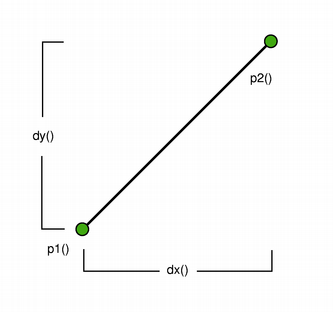 | 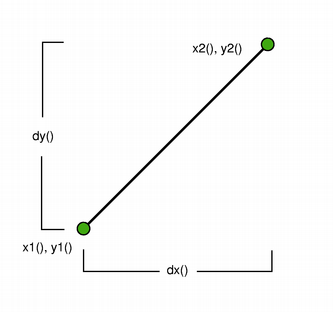 |
可以通过p1()、x1()、y1()、p2()、x2()和y2()函数获取直线的起始点和终点位置。dx()和dy()函数分别返回直线的水平分量和垂直分量。使用isNull()可判断QLine是否表示一条有效直线或空直线。
最后,可以使用translate() 函数将该线段平移指定偏移量。
另请参阅 QLineF 、QPolygon 和QRect 。
成员函数文档
[constexpr] QLine::QLine()
构造一条虚线。
[constexpr] QLine::QLine(const QPoint &p1, const QPoint &p2)
创建一个线段对象,表示p1 与p2 之间的线段。
[constexpr] QLine::QLine(int x1, int y1, int x2, int y2)
构建一个线段对象,该对象表示连接 (x1,y1) 与 (x2,y2) 之间的线段。
[constexpr] QPoint QLine::p1() const
返回该行的起始点。
另请参阅 setP1()、x1()、y1() 以及p2()。
[constexpr] QPoint QLine::p2() const
返回该线的端点。
另请参阅 setP2()、x2()、y2() 以及p1()。
[constexpr] int QLine::x1() const
返回直线的起点的 x 坐标。
另请参阅 p1()。
[constexpr] int QLine::x2() const
返回直线的端点的 x 坐标。
另请参阅 p2()。
[constexpr] int QLine::y1() const
返回直线的起点的 y 坐标。
另请参阅 p1()。
[constexpr] int QLine::y2() const
返回直线的端点的 y 坐标。
另请参阅 p2()。
[constexpr] QPoint QLine::center() const
返回该线的中心点。这等同于 (p1()) +p2() ) / 2,只不过它绝不会发生溢出。
[constexpr] int QLine::dx() const
返回直线的向量的水平分量。
另请参阅 dy()。
[constexpr] int QLine::dy() const
返回直线的向量的垂直分量。
另请参阅 dx()。
[constexpr] bool QLine::isNull() const
如果该线段没有明确的起始点和终点,则返回true ;否则返回false 。
void QLine::setP1(const QPoint &p1)
将该线的起始点设置为p1 。
void QLine::setP2(const QPoint &p2)
将该线的端点设置为p2 。
void QLine::setLine(int x1, int y1, int x2, int y2)
将该行设为x1 、y1 中的起始行,以及x2 、y2 中的结束行。
另请参阅 setP1()、setP2()、p1() 和p2()。
void QLine::setPoints(const QPoint &p1, const QPoint &p2)
将该行的起始点设置为p1 ,将该行的结束点设置为p2 。
另请参阅 setP1()、setP2()、p1() 以及p2()。
[constexpr noexcept, since 6.4] QLineF QLine::toLineF() const
将该行作为具有浮点精度的行返回。
该函数在 Qt 6.4 中引入。
另请参阅 QLineF::toLine()。
[constexpr] void QLine::translate(const QPoint &offset)
使用给定的offset 对这一行进行翻译。
[constexpr] void QLine::translate(int dx, int dy)
将该行按dx 和dy 中指定的距离进行平移。
这是一个重载函数。
[constexpr] QLine QLine::translated(const QPoint &offset) const
返回由给定的offset 翻译后的该行内容。
[constexpr] QLine QLine::translated(int dx, int dy) const
返回将该行按dx 和dy 中指定的距离进行平移后的结果。
这是一个重载函数。
相关的非成员
[constexpr noexcept] bool operator!=(const QLine &lhs, const QLine &rhs)
如果行lhs 与行rhs 不相同,则返回true 。
若两条线段的起点或终点中有任何一个不同,或者点之间的内部顺序不同,则认为这两条线段不同。
QDataStream &operator<<(QDataStream &stream, const QLine &line)
将给定的line 写入给定的stream ,并返回该流的引用。
另请参阅 《Qt 数据类型的序列化》。
[constexpr noexcept] bool operator==(const QLine &lhs, const QLine &rhs)
如果行lhs 与行rhs 相同,则返回true 。
若两条线的起始点和终点相同,且点之间的内部顺序也相同,则这两条线被视为相同。
QDataStream &operator>>(QDataStream &stream, QLine &line)
从给定的stream 中读取一行内容到给定的line 中,并返回该流的引用。
另请参阅 《Qt 数据类型的序列化》。
© 2026 The Qt Company Ltd. Documentation contributions included herein are the copyrights of their respective owners. The documentation provided herein is licensed under the terms of the GNU Free Documentation License version 1.3 as published by the Free Software Foundation. Qt and respective logos are trademarks of The Qt Company Ltd. in Finland and/or other countries worldwide. All other trademarks are property of their respective owners.
