
QML 高级教程
本教程将分步指导您使用 QML 创建一个完整的应用程序。本教程假设您已经掌握了 QML 的基础知识(例如,通过阅读简单教程)。
在本教程中,我们将基于声明式examples 目录中包含的“Same Game”应用程序编写一款名为“Same Game”的游戏,该应用程序如下所示:
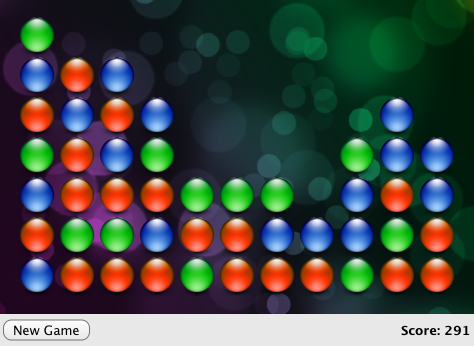
我们将介绍开发一个功能完整的应用程序所需的概念,包括 JavaScript 集成、使用 QML Qt Quick States 和Behaviors 来管理组件并增强界面,以及存储持久化应用程序数据。
了解 JavaScript 有助于理解本教程的部分内容,但即使您不熟悉 JavaScript,仍可了解如何集成后端逻辑来创建和控制 QML 类型。
教程章节:
本教程中的所有代码均位于 Qt XML 的examples/quick/tutorials/samegame 目录下。
© 2026 The Qt Company Ltd. Documentation contributions included herein are the copyrights of their respective owners. The documentation provided herein is licensed under the terms of the GNU Free Documentation License version 1.3 as published by the Free Software Foundation. Qt and respective logos are trademarks of The Qt Company Ltd. in Finland and/or other countries worldwide. All other trademarks are property of their respective owners.
