
CheckBox QML Type
可切换开启或关闭的复选框。更多...
| Import Statement: | import QtQuick.Controls |
| Inherits: |
属性
- checkState : enumeration
- nextCheckState : function
(since QtQuick.Controls 2.4 (Qt 5.11)) - tristate : bool
详细说明
CheckBox 提供了一个可切换为“选中”(勾选)或“未选中”(未勾选)状态的选项按钮。复选框通常用于从一组选项中选择一个或多个选项。对于选项集较多的情况(例如列表中的选项),建议改用CheckDelegate 。
CheckBox 继承自AbstractButton 的 API。例如,可通过checked 属性设置复选框的状态。
除了已选中和未选中状态外,还有第三种状态:部分选中。可通过tristate 属性启用部分选中状态。该状态表示无法确定常规的已选中/未选中状态;通常是因为存在其他状态影响了复选框。例如,当树视图中选中了多个子节点时,此状态就非常有用。
ColumnLayout {
    CheckBox {
        checked: true
        text: qsTr("First")
    }
    CheckBox {
        text: qsTr("Second")
    }
    CheckBox {
        checked: true
        text: qsTr("Third")
    }
}
可以通过非排他性的 `ButtonGroup` 来管理分层复选框组。
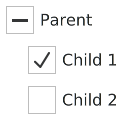
以下示例演示了如何将子节点的组合选中状态绑定到父级复选框的选中状态:
Column {
    ButtonGroup {
        id: childGroup
        exclusive: false
        checkState: parentBox.checkState
    }

    CheckBox {
        id: parentBox
        text: qsTr("Parent")
        checkState: childGroup.checkState
    }

    CheckBox {
        checked: true
        text: qsTr("Child 1")
        leftPadding: indicator.width
        ButtonGroup.group: childGroup
    }

    CheckBox {
        text: qsTr("Child 2")
        leftPadding: indicator.width
        ButtonGroup.group: childGroup
    }
}
另请参阅 《自定义 CheckBox、ButtonGroup 和Button 控件》。
属性文档
checkState : enumeration
此属性保存复选框的选中状态。
可用状态:
| 常量 | 描述 |
|---|---|
Qt.Unchecked | 复选框未被选中。 |
Qt.PartiallyChecked | 复选框处于部分选中状态。此状态仅在启用tristate 时使用。 |
Qt.Checked | 复选框已被选中。 |
nextCheckState : function [since QtQuick.Controls 2.4 (Qt 5.11)]
该属性保存一个回调函数,当用户通过触摸、鼠标或键盘交互式地切换复选框状态时,该函数会被调用以确定下一个复选状态。
默认情况下,普通复选框会在Qt.Unchecked 和Qt.Checked 状态之间循环切换,而三态复选框则会在Qt.Unchecked 、Qt.PartiallyChecked 和Qt.Checked 状态之间循环切换。
nextCheckState 回调函数可以覆盖默认行为。以下示例实现了一个三态复选框,它可以根据外部条件呈现部分选中状态,但在用户交互式切换时绝不会切换到部分选中状态。
CheckBox {
    tristate: true
    checkState: allChildrenChecked ? Qt.Checked :
                   anyChildChecked ? Qt.PartiallyChecked : Qt.Unchecked

    nextCheckState: function() {
        if (checkState === Qt.Checked)
            return Qt.Unchecked
        else
            return Qt.Checked
    }
}
该属性在 QtQuick.Controls 2.4(Qt 5.11)中引入。
tristate : bool
该属性用于指定复选框是否为三态复选框。
在下面的动画中,第一个复选框是三态复选框:
默认值为false ,即该复选框只有两种状态。
© 2026 The Qt Company Ltd. Documentation contributions included herein are the copyrights of their respective owners. The documentation provided herein is licensed under the terms of the GNU Free Documentation License version 1.3 as published by the Free Software Foundation. Qt and respective logos are trademarks of The Qt Company Ltd. in Finland and/or other countries worldwide. All other trademarks are property of their respective owners.
