
MonthGrid QML Type
一个日历月的日期网格。更多...
| Import Statement: | import QtQuick.Controls |
| Inherits: |
属性
信号
- clicked(date date)
- pressAndHold(date date)
- pressed(date date)
- released(date date)
详细说明
MonthGrid 以网格形式展示日历月。其内容是根据给定的month 和year ,并使用指定的locale 进行计算得出的。
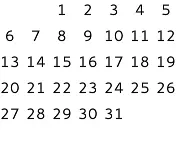
MonthGrid {
    month: Calendar.December
    year: 2015
    locale: Qt.locale("en_US")
}
MonthGrid 可以作为独立控件使用,但通常与DayOfWeekRow 和WeekNumberColumn 配合使用。无论使用场景如何,网格的位置均由用户自行决定。
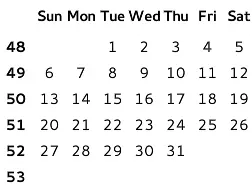
GridLayout {
    columns: 2

    DayOfWeekRow {
        locale: grid.locale

        Layout.column: 1
        Layout.fillWidth: true
    }

    WeekNumberColumn {
        month: grid.month
        year: grid.year
        locale: grid.locale

        Layout.fillHeight: true
    }

    MonthGrid {
        id: grid
        month: Calendar.December
        year: 2015
        locale: Qt.locale("en_US")

        Layout.fillWidth: true
        Layout.fillHeight: true
    }
}通过实现custom delegate ,可以更改 MonthGrid 的视觉外观。
在查看任意给定月份时,MonthGrid 会显示上个月和下个月的日期。这意味着它始终显示六行,即使第一行或最后一行完全位于相邻月份内也是如此。
日期本地化
要对日期进行本地化,请使用 `Locale.toString()`。例如,要在阿拉伯语区域设置中显示日期编号:
MonthGrid {
    id: monthGrid
    month: Calendar.December
    year: 2015
    locale: Qt.locale("ar")
    delegate: Text {
        horizontalAlignment: Text.AlignHCenter
        verticalAlignment: Text.AlignVCenter
        opacity: model.month === monthGrid.month ? 1 : 0
        text: monthGrid.locale.toString(model.date, "d")
        font: monthGrid.font

        required property var model
    }
}
另请参阅 DayOfWeekRow 、WeekNumberColumn 、CalendarModel 以及Qt Quick Controls - 事件日历。
属性文档
delegate : Component
该属性存储用于可视化每一天的项目委托。
除了index 属性外,每个委托的上下文中还提供了一系列模型数据角色:
| model.date: 日期 | 单元格的日期 |
| model.day: int | 当天序号 |
| model.today: bool | 该委托是否代表今天 |
| model.weekNumber: int | 本周序号 |
| model.month: int | 月份编号 |
| model.year: int | 年份 |
以下代码片段展示了项委托的默认实现。它可作为实现自定义委托的起点。
MonthGrid 不会获取该委托的所有权。
delegate: Text {
    horizontalAlignment: Text.AlignHCenter
    verticalAlignment: Text.AlignVCenter
    opacity: model.month === control.month ? 1 : 0
    text: model.day
    font: control.font
    color: control.palette.text

    required property var model
}
month : int
该属性存储月份的编号。默认值为当前月份。
日历相关的类型在 Qt Quick Controls 采用以0为起点的月份编号,与JavaScript的Date对象类似。但这与QDate 不同,后者采用从1开始的月份编号。
为避免混淆,您可以使用以下枚举值:
| 常量 | 描述 |
|---|---|
Calendar.January | 一月 (0) |
Calendar.February | 二月 (1) |
Calendar.March | 3月 (2) |
Calendar.April | 4月 (3) |
Calendar.May | 5月 (4) |
Calendar.June | 6月 (5) |
Calendar.July | 7月 (6) |
Calendar.August | 8月 (7) |
Calendar.September | 9月 (8) |
Calendar.October | 10月 (9) |
Calendar.November | 11月 (10) |
Calendar.December | 12月 (11) |
另请参阅 Calendar 。
title : string
该属性用于存储日历的标题。
提供此属性仅为方便起见。MonthGrid 本身不会显示该标题。默认值由月份名称(使用locale 进行格式化)和年份数字组成。
year : int
该属性存储年份的数字。
该值必须在-271820 到275759 之间。默认值为当前年份。
Signal 文档
clicked(date date)
点击date 时会触发此信号。
注意: 相应的处理程序 是onClicked 。
pressAndHold(date date)
当长按date 时,会发出此信号。
注意: 对应的处理程序 是onPressAndHold 。
pressed(date date)
按下date 时会发出此信号。
注意: 相应的处理程序 是onPressed 。
released(date date)
当释放date 时,会触发此信号。
注意: 相应的处理程序 为onReleased 。
© 2026 The Qt Company Ltd. Documentation contributions included herein are the copyrights of their respective owners. The documentation provided herein is licensed under the terms of the GNU Free Documentation License version 1.3 as published by the Free Software Foundation. Qt and respective logos are trademarks of The Qt Company Ltd. in Finland and/or other countries worldwide. All other trademarks are property of their respective owners.
