
Control QML Type
提供所有控件共有的功能的抽象基类。更多...
| Import Statement: | import QtQuick.Controls |
| Inherits: | |
| Inherited By: | 52 typesAbstractButton, BusyIndicator, Button, CheckBox, CheckDelegate, ComboBox, Container, DayOfWeekRow, DelayButton, Dial, DialogButtonBox, DoubleSpinBox, Frame, GroupBox, HorizontalHeaderViewDelegate, ItemDelegate, MenuBar, MenuBarItem, MenuItem, MenuSeparator, MonthGrid, Page, PageIndicator, Pane, ProgressBar, RadioButton, RadioDelegate, RangeSlider, RoundButton, ScrollBar, ScrollIndicator, ScrollView, SearchField, SelectionRectangle, Slider, SpinBox, SplitView, StackView, SwipeDelegate, SwipeView, Switch, SwitchDelegate, TabBar, TabButton, TableViewDelegate, ToolBar, ToolButton, ToolSeparator, TreeViewDelegate, Tumbler, VerticalHeaderViewDelegate, and WeekNumberColumn |
属性
- availableHeight : real
- availableWidth : real
- background : Item
- bottomInset : real
(since QtQuick.Controls 2.5 (Qt 5.12)) - bottomPadding : real
- contentItem : Item
- focusReason : enumeration
- font : font
- horizontalPadding : real
(since QtQuick.Controls 2.5 (Qt 5.12)) - hoverEnabled : bool
- hovered : bool
- implicitBackgroundHeight : real
(since QtQuick.Controls 2.5 (Qt 5.12)) - implicitBackgroundWidth : real
(since QtQuick.Controls 2.5 (Qt 5.12)) - implicitContentHeight : real
(since QtQuick.Controls 2.5 (Qt 5.12)) - implicitContentWidth : real
(since QtQuick.Controls 2.5 (Qt 5.12)) - leftInset : real
(since QtQuick.Controls 2.5 (Qt 5.12)) - leftPadding : real
- locale : Locale
- mirrored : bool
- padding : real
- rightInset : real
(since QtQuick.Controls 2.5 (Qt 5.12)) - rightPadding : real
- spacing : real
- topInset : real
(since QtQuick.Controls 2.5 (Qt 5.12)) - topPadding : real
- verticalPadding : real
(since QtQuick.Controls 2.5 (Qt 5.12)) - visualFocus : bool
- wheelEnabled : bool
详细说明
控件是用户界面控件的基础类型。它接收来自窗口系统的输入事件,并在屏幕上绘制自身的表示。
控件布局
下图说明了一个典型控件的布局:
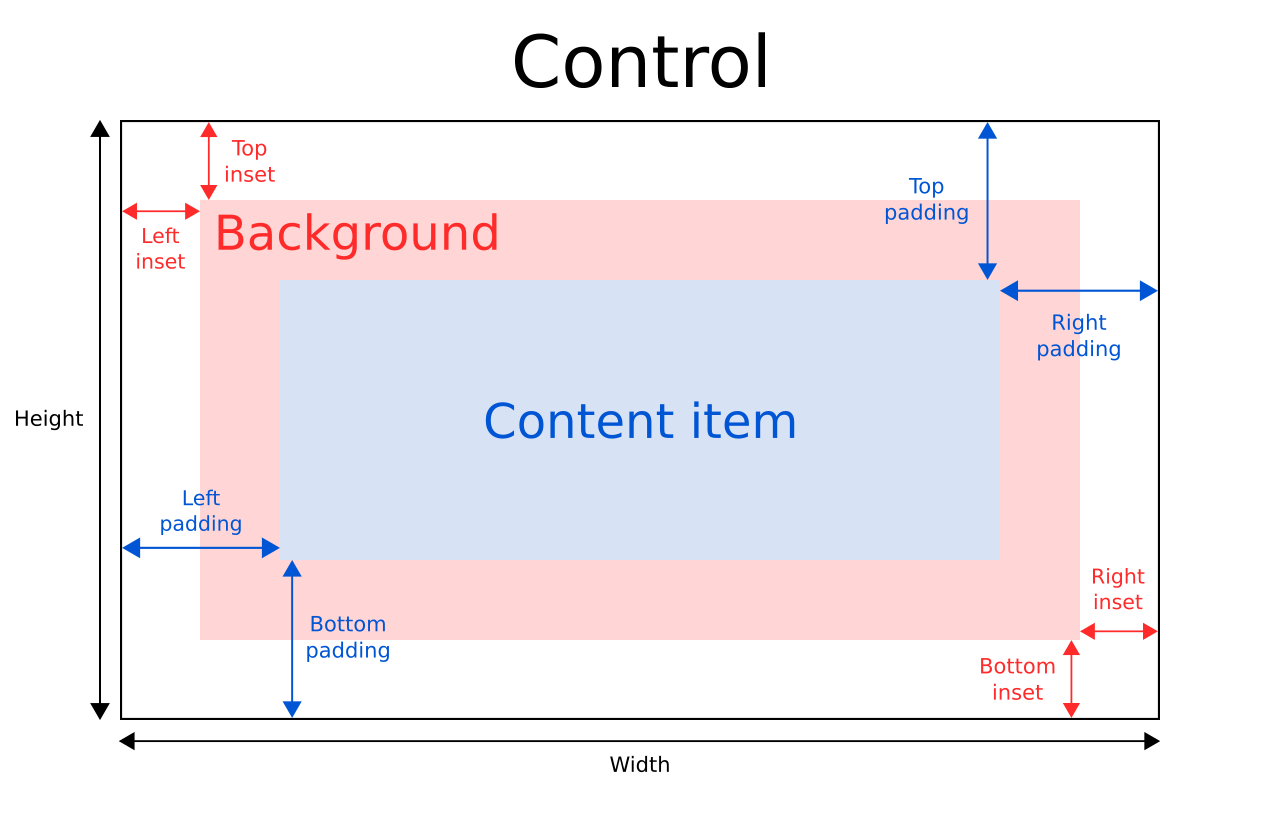
控件的implicitWidth 和implicitHeight 通常基于背景和内容项的隐式尺寸,再加上任何insets和padding。当未显式指定width 或height 时,这些属性决定了控件的大小。
contentItem 的几何形状由 padding 决定。以下示例在控件边界与其内容之间预留了 10px 的 padding:
除非为其指定了内边距或显式尺寸,否则background 项将填满控件的整个宽度和高度。 背景内边距(insets)可用于扩展控件的可触摸/交互区域,同时不影响其视觉尺寸。这在触控设备上经常被使用,以确保控件不会因过小而无法被用户操作。内边距会影响控件的尺寸,因此也会影响其在布局中占用的空间,例如。
负内边距可用于使背景比控件更大。以下示例使用负内边距在控件边界外放置一个阴影:
Control {
    topInset: -2
    leftInset: -2
    rightInset: -6
    bottomInset: -6

    background: BorderImage {
        source: ":/images/shadowed-background.png"
    }
}
事件处理
除非交互式指示器外,所有控件均不会将点击和触摸操作传递给其下方的元素。例如,当点击 Pane 时,下面的示例中的console.log() 调用将永远不会被执行,因为MouseArea 在场景中位于其下方:
MouseArea {
    anchors.fill: parent
    onClicked: console.log("MouseArea was clicked")

    Pane {
        anchors.fill: parent
    }
}
如果 `wheelEnabled ` 的值为 `true`,则滚轮事件将由控件捕获。
另请参阅 ApplicationWindow 、Container 以及 Using Qt Quick Controls types in property declarations。
属性文档
availableHeight : real [read-only]
该属性表示从控件的height 中扣除垂直填充后,contentItem 可用的高度。
另请参阅 Control Layout 、padding 、topPadding 以及bottomPadding 。
availableWidth : real [read-only]
该属性表示从控件的width 中扣除水平内边距后,contentItem 可用的宽度。
另请参阅 Control Layout 、padding 、leftPadding 和rightPadding 。
background : Item
该属性用于存储背景项。
Button {
    id: control
    text: qsTr("Button")
    background: Rectangle {
        implicitWidth: 100
        implicitHeight: 40
        opacity: enabled ? 1 : 0.3
        color: control.down ? "#d0d0d0" : "#e0e0e0"
    }
}
注意:如果 未显式指定背景项的大小,它将自动采用控件的大小。在大多数情况下,无需为背景项指定宽度或高度。
注意:大多数控件 会使用背景项的隐式大小来计算控件本身的隐式大小。如果您将背景项替换为自定义项,则应考虑为其提供一个合理的隐式大小(除非该项是Image 这类具有自身隐式大小的项)。
另请参阅 Control Layout 。
bottomInset : real [since QtQuick.Controls 2.5 (Qt 5.12)]
该属性用于设置背景的底部内距。
该属性在 QtQuick.Controls 2.5(Qt 5.12)中引入。
另请参阅 Control Layout 和topInset 。
bottomPadding : real
该属性用于设置底部内边距。除非显式设置,否则其值默认为verticalPadding 。
另请参阅 Control Layout 、padding 、topPadding 、verticalPadding 以及availableHeight 。
contentItem : Item
该属性用于存储可视化内容项。
Button {
    id: control
    text: qsTr("Button")
    contentItem: Label {
        text: control.text
        verticalAlignment: Text.AlignVCenter
    }
}注意:大多数 控件会使用内容项的隐式大小来计算控件本身的隐式大小。如果您将内容项替换为自定义内容项,还应考虑为其提供一个合理的隐式大小(除非该项是像Text 那样具有自身隐式大小的内容项)。
另请参阅 Control Layout 和padding 。
focusReason : enumeration
该属性保存了上次焦点变化的原因。
每当焦点转移时,Qt 会自动更新该属性的值,您通常无需手动设置此属性。
注意:该 属性并不表示该项目是否具有active focus ,而是表示该项目获得或失去焦点的理由。
| 常量 | 描述 |
|---|---|
Qt.MouseFocusReason | 发生了鼠标操作。 |
Qt.TabFocusReason | 按下了 Tab 键。 |
Qt.BacktabFocusReason | 发生了“后退 Tab”操作。此操作的输入可能包括 Shift 或 Control 键;例如 Shift+Tab。 |
Qt.ActiveWindowFocusReason | 窗口系统使该窗口处于活动或非活动状态。 |
Qt.PopupFocusReason | 应用程序打开/关闭了一个弹出窗口,该窗口抢占/释放了键盘焦点。 |
Qt.ShortcutFocusReason | 用户输入了标签的“伙伴”快捷键 |
Qt.MenuBarFocusReason | 菜单栏获得了焦点。 |
Qt.OtherFocusReason | 其他原因,通常与特定应用程序相关。 |
另请参阅 Item::activeFocus 和visualFocus 。
font : font
该属性保存当前为控件设置的字体。
该属性描述了控件请求的字体。该字体在渲染标准组件时由控件样式使用,并可作为一种手段,确保自定义控件能够与原生平台的原生外观和感觉保持一致。通常情况下,不同的平台或不同的样式会为应用程序定义不同的字体。
默认字体取决于系统环境。`ApplicationWindow ` 维护着一个系统/主题字体,作为所有控件的默认字体。某些类型的控件可能还有特殊的默认字体。您还可以通过以下任一方式为控件设置默认字体:
- 在加载 QML 之前,将自定义字体传递给 `QGuiApplication::setFont()`;或者
- 在qtquickcontrols2.conf 文件中指定字体。
最后,系统会将该字体与 Qt 的字体数据库进行比对,以找到最匹配的字体。
控件会将显式字体属性从父控件传播到子控件。如果您更改了控件字体上的某个特定属性,该属性将传播到该控件的所有子控件,并覆盖该属性对应的任何系统默认值。
Page {
    font.family: "Courier"

    Column {
        Label {
            text: qsTr("This will use Courier...")
        }

        Switch {
            text: qsTr("... and so will this")
        }
    }
}有关可用字体属性的完整列表,请参阅font QML Value Type 文档。
horizontalPadding : real [since QtQuick.Controls 2.5 (Qt 5.12)]
该属性用于设置水平内边距。除非显式设置,否则其值默认为padding 。
该属性在 QtQuick.Controls 2.5(Qt 5.12)中引入。
另请参阅 Control Layout 、padding 、leftPadding 、rightPadding 以及verticalPadding 。
hoverEnabled : bool
此属性用于确定控件是否接受悬停事件。默认值为Application.styleHints.useHoverEffects 。
设置此属性会将该值传播给所有未显式设置hoverEnabled 的子控件。
您还可以通过设置QT_QUICK_CONTROLS_HOVER_ENABLED 环境变量,为所有Qt Quick Controls 应用程序启用或禁用悬停效果。
另请参阅 hovered 。
hovered : bool [read-only]
该属性用于指示鼠标是否悬停在控件上。
另请参阅 hoverEnabled 。
implicitBackgroundHeight : real [read-only, since QtQuick.Controls 2.5 (Qt 5.12)]
该属性存储隐式背景高度。
该值等于background ? background.implicitHeight : 0 。
通常,该属性会与implicitContentHeight 配合使用,以计算implicitHeight :
Control {
    implicitHeight: Math.max(implicitBackgroundHeight + topInset + bottomInset,
                             implicitContentHeight + topPadding + bottomPadding)
}
该属性在 QtQuick.Controls 2.5(Qt 5.12)中引入。
另请参阅 implicitBackgroundWidth 和implicitContentHeight 。
implicitBackgroundWidth : real [read-only, since QtQuick.Controls 2.5 (Qt 5.12)]
该属性存储隐式背景宽度。
该值等于background ? background.implicitWidth : 0 。
通常,该属性会与implicitContentWidth 结合使用,以计算implicitWidth :
Control {
    implicitWidth: Math.max(implicitBackgroundWidth + leftInset + rightInset,
                            implicitContentWidth + leftPadding + rightPadding)
}
该属性在 QtQuick.Controls 2.5(Qt 5.12)中引入。
另请参阅 implicitBackgroundHeight 和implicitContentWidth 。
implicitContentHeight : real [read-only, since QtQuick.Controls 2.5 (Qt 5.12)]
该属性存储隐式内容高度。
对于基本控件,该值等于 `contentItem ? contentItem.implicitHeight : 0`。对于继承自 `Container` 或 `Pane` 的类型,该值将根据内容子元素计算得出。
通常将其与 `implicitBackgroundHeight` 结合使用,以计算 `implicitHeight`:
Control {
    implicitHeight: Math.max(implicitBackgroundHeight + topInset + bottomInset,
                             implicitContentHeight + topPadding + bottomPadding)
}
该属性在 QtQuick.Controls 2.5(Qt 5.12)中引入。
另请参阅 implicitContentWidth 和implicitBackgroundHeight 。
implicitContentWidth : real [read-only, since QtQuick.Controls 2.5 (Qt 5.12)]
该属性存储隐式内容宽度。
对于基本控件,该值等于contentItem ? contentItem.implicitWidth : 0 。对于继承自Container或Pane的类型,该值将根据内容子元素进行计算。
通常,该属性会与 `implicitBackgroundWidth` 结合使用,以计算 `implicitWidth`:
Control {
    implicitWidth: Math.max(implicitBackgroundWidth + leftInset + rightInset,
                            implicitContentWidth + leftPadding + rightPadding)
}
该属性在 QtQuick.Controls 2.5(Qt 5.12)中引入。
另请参阅 implicitContentHeight 和implicitBackgroundWidth 。
leftInset : real [since QtQuick.Controls 2.5 (Qt 5.12)]
该属性用于设置背景的左内边距。
该属性在 QtQuick.Controls 2.5(Qt 5.12)中引入。
另请参阅 Control Layout 和rightInset 。
leftPadding : real
该属性用于指定左侧内边距。除非显式设置,否则其值默认为horizontalPadding 。
另请参阅 Control Layout 、padding 、rightPadding 、horizontalPadding 以及availableWidth 。
locale : Locale
该属性存储控件的区域设置。
它包含用于格式化数据和数字的特定于区域设置的属性。除非已设置了特殊的区域设置,否则该属性要么是父控件的区域设置,要么是默认区域设置。
控件会将区域设置从父控件传播到子控件。如果更改控件的区域设置,该区域设置将传播到该控件的所有子控件,并覆盖系统的默认区域设置。
另请参阅 mirrored 。
mirrored : bool [read-only]
该属性用于指定控件是否为镜像模式。
提供此属性仅为方便起见。当控件的视觉布局方向为从右到左时,即当LayoutMirroring.enabled 为true 时,该控件被视为已镜像。
从 Qt 6.2 开始,locale 属性不再影响此属性。
另请参阅 LayoutMirroring 和从右到左的用户界面。
padding : real
此属性用于设置默认内边距。
内边距会在内容项的各边与背景项之间增加一个间距,从而有效控制内容项的大小。若要为控件的特定边指定内边距值,请设置其相关属性:
注意:不同的 样式可能以不同的方式为某些控件指定默认内边距,而且随着样式所依据的设计指南不断演变,这些方式可能会随时间而改变。为确保这些变化不会影响您已指定的内边距值,最好使用可用的最具体属性。例如,与其设置 padding 属性:
padding: 0请分别设置相应的具体属性:
leftPadding: 0
rightPadding: 0
topPadding: 0
bottomPadding: 0
另请参阅 Control Layout 、availableWidth 、availableHeight 、topPadding 、leftPadding 、rightPadding 以及bottomPadding 。
rightInset : real [since QtQuick.Controls 2.5 (Qt 5.12)]
该属性用于指定背景的右内边距。
该属性在 QtQuick.Controls 2.5(Qt 5.12)中引入。
另请参阅 Control Layout 和leftInset 。
rightPadding : real
该属性控制右侧填充。除非显式设置,否则其值默认为horizontalPadding 。
另请参阅 Control Layout 、padding 、leftPadding 、horizontalPadding 以及availableWidth 。
spacing : real
此属性用于控制间距。
间距对于包含多个或重复构建块的控件非常有用。例如,某些样式会使用间距来确定CheckBox 中文本与指示器之间的距离。Control 不会强制执行间距设置,因此每个样式可能对其有不同的解释,有些样式甚至可能完全忽略它。
topInset : real [since QtQuick.Controls 2.5 (Qt 5.12)]
该属性用于设置背景的顶部内边距。
该属性在 QtQuick.Controls 2.5(Qt 5.12)中引入。
另请参阅 Control Layout 和bottomInset 。
topPadding : real
该属性控制顶部内边距。除非显式设置,否则其值默认为 `verticalPadding`。
另请参阅 Control Layout 、padding 、bottomPadding 、verticalPadding 以及availableHeight 。
verticalPadding : real [since QtQuick.Controls 2.5 (Qt 5.12)]
该属性控制垂直填充。除非显式设置,否则其值默认为padding 。
该属性在 QtQuick.Controls 2.5(Qt 5.12)中引入。
另请参阅 Control Layout 、padding 、topPadding 、bottomPadding 以及horizontalPadding 。
visualFocus : bool [read-only]
该属性表示控件是否具有视觉焦点。当控件具有活动焦点,且焦点原因属于以下情况之一时,该属性值为true :Qt.TabFocusReason 、Qt.BacktabFocusReason 或Qt.ShortcutFocusReason 。
通常,在可视化键盘焦点时,建议优先使用该属性而非Item::activeFocus 。这可确保仅在通过键盘交互时才显示键盘焦点,而在通过触摸或鼠标交互时则不显示。
另请参阅 focusReason 和Item::activeFocus 。
wheelEnabled : bool
此属性用于确定控件是否处理滚轮事件。默认值为false 。
注意: 为Flickable 等可滚动项中的控件启用滚轮事件时需格外谨慎 ,因为该控件会捕获这些事件,从而中断 的滚动。
© 2026 The Qt Company Ltd. Documentation contributions included herein are the copyrights of their respective owners. The documentation provided herein is licensed under the terms of the GNU Free Documentation License version 1.3 as published by the Free Software Foundation. Qt and respective logos are trademarks of The Qt Company Ltd. in Finland and/or other countries worldwide. All other trademarks are property of their respective owners.
