
TreeViewDelegate QML Type
| Import Statement: | import QtQuick.Controls |
| Since: | Qt 6.3 |
| Inherits: |
属性
- current : bool
- depth : int
- editing : bool
(since 6.5) - expanded : bool
- hasChildren : bool
- indentation : real
- isTreeNode : bool
- leftMargin : real
- rightMargin : real
- selected : bool
- treeView : TreeView
详细说明
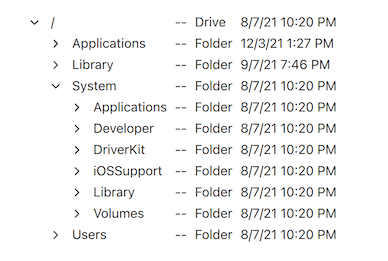
TreeViewDelegate 是一种可分配给TreeView 的delegate property 的委托。它会使用应用程序样式在视图中渲染树以及其他列。
TreeView {
    anchors.fill: parent
    delegate: TreeViewDelegate {}
    // The model needs to be a QAbstractItemModel
    // model: yourTreeModel
}
TreeViewDelegate 继承自ItemDelegate ,这意味着它由三个项目组成:background 、contentItem 和indicator 。TreeViewDelegate 会根据内容项(contentItem)和指示器(indicator)在树中的位置,负责对其进行indenting 处理。只有当委托项位于tree column 内时,指示器才会显示,并渲染模型项with children 。
如果您更改指示器,它默认将不再缩进。相反,您需要通过设置指示器的x position 来手动对其进行缩进,同时需考虑depth 和indentation 。以下是一个示例:
TreeViewDelegate {
    indicator: Item {
        x: leftMargin + (depth * indentation)
    }
}
contentItem 的位置由 `padding` 控制。这意味着您可以修改 contentItem 而无需处理缩进问题。但这也意味着您应避免将 `padding` 改为其他值,因为这样会导致缩进消失。 指示器左侧的间距由 `leftMargin` 控制。指示器与 `contentItem` 之间的间距由 `spacing` 控制。而 `contentItem` 右侧的间距则由 `rightMargin` 控制。
与指针的交互
TreeViewDelegate 继承自ItemDelegate 。这意味着当用户点击该委托时,它会发出诸如clicked 之类的信号。如有需要,您可以连接该信号以实现应用程序特有的功能,作为默认展开/折叠行为的补充(甚至可以将pointerNavigationEnabled 设置为false ,以禁用默认行为)。
但ItemDelegate API 不会提供有关点击位置或按下的修饰键的信息。如果需要这些信息,更好的方法是使用指针处理程序,例如:
TreeView {
    id: treeView
    delegate: TreeViewDelegate {
        TapHandler {
            acceptedButtons: Qt.RightButton
            onTapped: someContextMenu.open()
        }

        TapHandler {
            acceptedModifiers: Qt.ControlModifier
            onTapped: {
                if (treeView.isExpanded(row))
                    treeView.collapseRecursively(row)
                else
                    treeView.expandRecursively(row)
            }
        }
    }
}
注意:若要 禁用用户点击委托时触发的默认行为(如更改当前索引),可将 `pointerNavigationEnabled ` 设置为 `false`。
编辑树中的节点
TreeViewDelegate 已分配了默认的edit delegate 。如果TreeView 的edit triggers 属性已设置,且model 支持editing model items 方法,则用户可以触发任何编辑触发器来编辑current 树节点的文本。
默认编辑委托将尝试使用Qt.EditRole 从model 读取和写入数据。如果QAbstractItemModel::data() 对于此角色返回空字符串,则将改用Qt.DisplayRole 。
如果您有超出默认编辑委托功能范围的需求,可以随时将自定义的编辑委托分配给TableView.editDelegate 。
另请参阅 TreeView 。
属性文档
current : bool
如果该委托在selection model 中代表current index ,则此属性成立。
depth : int
该属性保存由委托绘制的模型项的深度。模型项的深度即其在模型中拥有的祖先项的数量。
editing : bool [since 6.5]
如果委托正在被edited.
该属性在 Qt 6.5 中引入。
expanded : bool
如果委托方绘制的模型项在视图中被展开,则该属性为true 。
hasChildren : bool
如果委托方绘制的模型项在模型中具有子项,则该属性为true 。
indentation : real
该属性表示子元素相对于其父元素的水平缩进量。
isTreeNode : bool
如果委托项在树中绘制了一个节点,则该属性为true 。视图中仅会使用一列来绘制树,因此只有该列中的委托项才会将此属性设置为true 。
树中的节点根据其depth 值被视为indented ,并且当hasChildren 为true 时,会显示indicator 。其他列中的委托项将把此属性设置为false 。
leftMargin : real
该属性表示视图左边缘与指示器左边缘之间的间距(不包括缩进)。如果未显示指示器,则该间距为视图左边缘与内容项左边缘之间的距离。
另请参阅 rightMargin 、indentation 以及spacing 。
rightMargin : real
该属性表示视图右边缘与内容项右边缘之间的间距。
另请参阅 leftMargin 、indentation 以及spacing 。
selected : bool
如果该委托在selection model 中表示一个selected index ,则此属性成立。
treeView : TreeView
该属性指向包含委托项的TreeView 。
© 2026 The Qt Company Ltd. Documentation contributions included herein are the copyrights of their respective owners. The documentation provided herein is licensed under the terms of the GNU Free Documentation License version 1.3 as published by the Free Software Foundation. Qt and respective logos are trademarks of The Qt Company Ltd. in Finland and/or other countries worldwide. All other trademarks are property of their respective owners.
