
LayoutItemProxy QML Type
LayoutItemProxy 类在布局中为QQuickItem提供了占位符。更多内容...
| Import Statement: | import QtQuick.Layouts |
| Since: | QtQuick.Layouts 6.6 |
| Inherits: |
属性
- target : Item
详细说明
某些响应式布局需要针对不同的屏幕尺寸采用不同的布局层次结构,但布局层次结构与QML结构相同,因此无法在运行时进行更改。LayoutItemProxy通过在布局中表示target 项来克服这一限制。target 项本身可以在QML层级结构的任意位置进行定义。这使得可以声明多个包含相同内容项的布局,并通过显示或隐藏这些布局在它们之间进行切换。
如果该项为“visible ”,LayoutItemProxy将尝试接管该target 项。接管后,target 项的位置和大小将调整为与LayoutItemProxy的位置和大小相匹配。此外,LayoutItemProxy会将自身设为target 的父项(以确保事件传递和合理的绘制顺序),并将可见性设置为true 。 多个 LayoutItemProxy 可以target 同一项,但同一时间只有一个 LayoutItemProxy 可以控制该项。因此,同一时间仅应显示一个针对同一项的代理。如果多个代理针对同一项,但每个代理的可见性均设置为 false,则该项也将不可见。
target 的所有Layout 附加属性,以及target 的QQuickItem::implicitWidth 和QQuickItem::implicitHeight 属性,均由LayoutItemProxy进行转发。LayoutItemProxy将在Layout 属性及尺寸方面尽可能精确地模拟target 。Layout 附加属性也可在LayoutItemProxy上显式设置,此举将停止target 属性的转发。
用法示例
这是一个简化的示例,通过代理在两个布局之间切换,以便两个布局使用相同的项。填充布局的项可以在 QML 结构中的任意位置进行定义。
Rectangle {
    id: rectangle1
    color: "tomato"
    Layout.fillHeight: true
    Layout.fillWidth: true
}

Rectangle {
    id: rectangle2
    color: "lightskyblue"
    Layout.fillHeight: true
    Layout.fillWidth: true
}
然后,我们可以使用 LayoutItemProxy 定义布局
GridLayout {
    id: l1
    columns: 1
    visible: false
    anchors.fill: parent
    LayoutItemProxy { target: rectangle1 }
    LayoutItemProxy { target: rectangle2 }
}

GridLayout {
    id: l2
    columns: 2
    visible: true
    anchors.fill: parent
    LayoutItemProxy { target: rectangle1 }
    LayoutItemProxy { target: rectangle2 }
}
现在,我们可以根据自选条件,通过切换布局的可见性来在布局之间进行切换。
onWidthChanged: {
    if (width < 300) {
        l2.visible = false
        l1.visible = true
    } else {
        l1.visible = false
        l2.visible = true
    }
}
最终生成的两个布局如下所示:
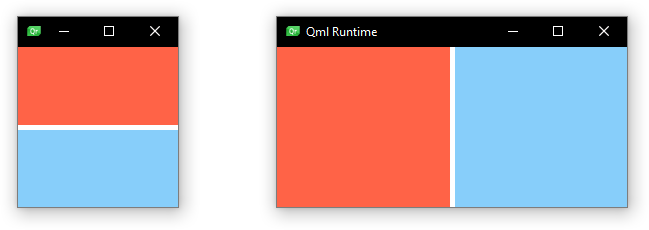
LayoutItemProxy 也可以在不使用布局的情况下使用,例如将其锚定到不同的项目上。同时,混合使用真正的 `Items ` 和代理项目也是可行的,布局和项目的嵌套结构同样可以实现。
警告: LayoutItemProxy 会将其目标的父项设置为自身。在引用目标项的父项时,请务必注意这一点。
另请参阅 Item 、GridLayout 、RowLayout 以及ColumnLayout 。
属性文档
target : Item
© 2026 The Qt Company Ltd. Documentation contributions included herein are the copyrights of their respective owners. The documentation provided herein is licensed under the terms of the GNU Free Documentation License version 1.3 as published by the Free Software Foundation. Qt and respective logos are trademarks of The Qt Company Ltd. in Finland and/or other countries worldwide. All other trademarks are property of their respective owners.
