
RadialGradient QML Type
径向渐变。更多...
| Import Statement: | import QtQuick.Shapes 1.12 |
| Inherits: |
属性
- centerRadius : real
- centerX : real
- centerY : real
- focalRadius : real
- focalX : real
- focalY : real
详细说明
在“形状”项目中,径向渐变会在焦点圆和中心圆之间对颜色进行插值。位于这两个圆所定义的锥体范围之外的点将呈现透明效果。
在端点之外,渐变会根据扩展类型进行填充、镜像或重复。
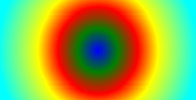
以下是一个简单的径向渐变示例。在此示例中,颜色是在指定点与由半径定义的圆上的端点之间进行插值的:
fillGradient: RadialGradient {
    centerX: 50; centerY: 50
    centerRadius: 100
    focalX: centerX; focalY: centerY
    GradientStop { position: 0; color: "blue" }
    GradientStop { position: 0.2; color: "green" }
    GradientStop { position: 0.4; color: "red" }
    GradientStop { position: 0.6; color: "yellow" }
    GradientStop { position: 1; color: "cyan" }
}
系统还支持扩展的径向渐变,其中指定了独立的焦点圆。
另请参阅 QRadialGradient 。
属性文档
这些属性用于定义中心和焦距半径。对于简单的径向渐变,应将“focalRadius ”设置为“0 ”(默认值)。
这些属性定义了中心和焦点。要指定一个简单的径向渐变,请将focalX 和focalY 分别设置为centerX 和centerY 的值。
© 2026 The Qt Company Ltd. Documentation contributions included herein are the copyrights of their respective owners. The documentation provided herein is licensed under the terms of the GNU Free Documentation License version 1.3 as published by the Free Software Foundation. Qt and respective logos are trademarks of The Qt Company Ltd. in Finland and/or other countries worldwide. All other trademarks are property of their respective owners.
