
GridGeometry QML Type
一个用于渲染网格的自定义几何提供程序。更多...
| Import Statement: | import QtQuick3D.Helpers |
| Inherits: |
属性
- horizontalLines : int
- horizontalStep : real
- verticalLines : int
- verticalStep : real
详细说明
该辅助类实现了网格几何体,可用于在场景中显示网格。
例如,以下代码片段将在包含一盏光源的场景中显示一个在两个方向上各含 19 个单元的网格。若未进行进一步变换,该网格默认面向摄像机。
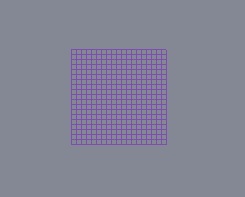
View3D {
    anchors.fill: parent
    camera: camera

    PerspectiveCamera {
        id: camera
        position: Qt.vector3d(0, 0, 600)
    }

    DirectionalLight {
        position: Qt.vector3d(-500, 500, -100)
        color: Qt.rgba(0.4, 0.2, 0.6, 1.0)
        ambientColor: Qt.rgba(0.1, 0.1, 0.1, 1.0)
    }

    Model {
        scale: Qt.vector3d(100, 100, 100)
        geometry: GridGeometry {
            horizontalLines: 20
            verticalLines: 20
        }
        materials: [ DefaultMaterial { } ]
    }
}
另请参阅 Qt Quick 3D - 自定义几何体示例和Model 。
属性文档
horizontalLines : int
指定网格中的水平线数量。默认值为 1000。
horizontalStep : real
指定水平线之间的间距。默认值为 0.1。
verticalLines : int
指定网格中的垂直线数量。默认值为 1000。
verticalStep : real
指定垂直线之间的间距。默认值为 0.1。
© 2026 The Qt Company Ltd. Documentation contributions included herein are the copyrights of their respective owners. The documentation provided herein is licensed under the terms of the GNU Free Documentation License version 1.3 as published by the Free Software Foundation. Qt and respective logos are trademarks of The Qt Company Ltd. in Finland and/or other countries worldwide. All other trademarks are property of their respective owners.
