
创建面积图
注意:这是 “带小部件的图表”示例库的一部分。
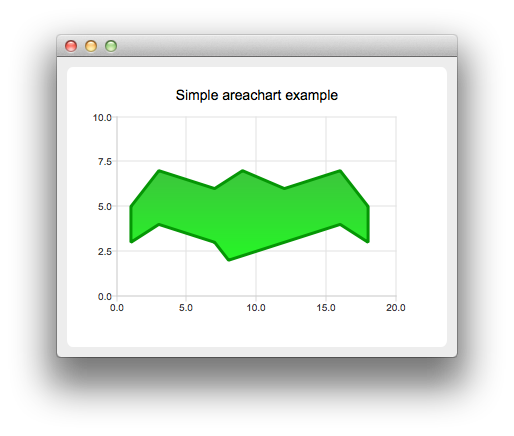
要创建面积图,我们需要两个 QLineSeries 实例。它们将分别定义面积的上界和下界。
auto series0 = new QLineSeries;
auto series1 = new QLineSeries;
我们将数据添加到这两个系列中,并使用流操作符。
*series0 << QPointF(1, 5) << QPointF(3, 7) << QPointF(7, 6) << QPointF(9, 7) << QPointF(12, 6)
         << QPointF(16, 7) << QPointF(18, 5);
*series1 << QPointF(1, 3) << QPointF(3, 4) << QPointF(7, 3) << QPointF(8, 2) << QPointF(12, 3)
         << QPointF(16, 4) << QPointF(18, 3);
现在,我们使用这两个线系列对象创建一个 QAreaSeries 实例。我们设置自定义渐变填充和轮廓宽度。
auto series = new QAreaSeries(series0, series1);
series->setName("Batman");
QPen pen(0x059605);
pen.setWidth(3);
series->setPen(pen);

QLinearGradient gradient(QPointF(0, 0), QPointF(0, 1));
gradient.setColorAt(0.0, 0x3cc63c);
gradient.setColorAt(1.0, 0x26f626);
gradient.setCoordinateMode(QGradient::ObjectBoundingMode);
series->setBrush(gradient);
最后,我们创建 QChartView 实例,设置标题、抗锯齿,并添加面积系列。我们还创建了默认坐标轴,并指定了它们的范围。
auto chart = new QChart;
chart->addSeries(series);
chart->setTitle("Simple Area Chart");
chart->createDefaultAxes();
chart->axes(Qt::Horizontal).first()->setRange(0, 20);
chart->axes(Qt::Vertical).first()->setRange(0, 10);
图表现已准备就绪,可以显示了。
createDefaultChartView(chart);© 2026 The Qt Company Ltd. Documentation contributions included herein are the copyrights of their respective owners. The documentation provided herein is licensed under the terms of the GNU Free Documentation License version 1.3 as published by the Free Software Foundation. Qt and respective logos are trademarks of The Qt Company Ltd. in Finland and/or other countries worldwide. All other trademarks are property of their respective owners.
