
创建箱线图
注意:这是 “带小部件的图表图库”示例的一部分。
该示例还演示了如何从文件中读取非连续数据,对其进行整理,并计算绘制箱线图所需的中位数。
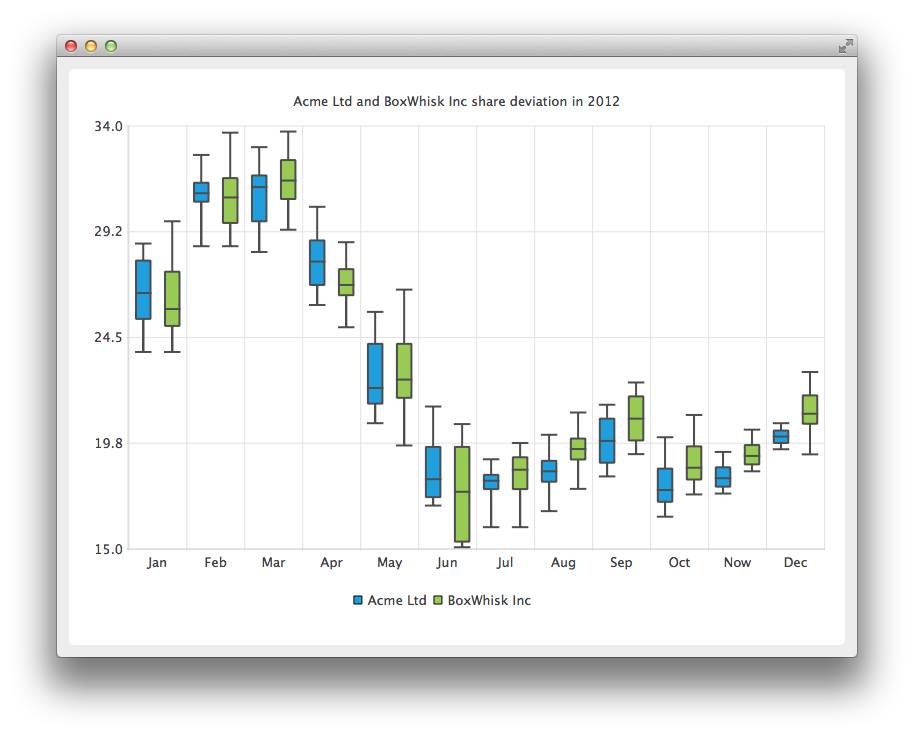
为了展示两家公司的股价偏差,我们首先创建两个 QBoxPlotSeries 来处理月度数据。
auto acmeSeries = new QBoxPlotSeries;
acmeSeries->setName("Acme Ltd");

auto boxWhiskSeries = new QBoxPlotSeries;
boxWhiskSeries->setName("BoxWhisk Inc");
QFile 类用于打开存储非连续数据的文本文件。BoxDataReader 是一个辅助类,用于读取文本文件并从数据中找出极值和中位数。 关于 BoxDataReader 的详细说明将在后面介绍。readBox 方法读取数值,并将它们赋值给 QBoxSet 对象,该方法随后将该对象返回给调用者。返回的 QBoxSet 对象会被添加到数据系列中。
QFile acmeData(":boxplot_a");
const QString errorTemplate = QStringLiteral("Failed to load '%1' file.");
if (!acmeData.open(QIODevice::ReadOnly | QIODevice::Text)) {
    m_loadError = errorTemplate.arg(acmeData.fileName());
    return false;
}

BoxPlotDataReader dataReader(&acmeData);
while (!dataReader.atEnd()) {
    QBoxSet *set = dataReader.readBox();
    if (set)
        acmeSeries->append(set);
}
在本节中,将打开第二个文件以读取第二家公司的数据。
QFile boxwhiskData(":boxplot_b");
if (!boxwhiskData.open(QIODevice::ReadOnly | QIODevice::Text)) {
    m_loadError = errorTemplate.arg(acmeData.fileName());
    return false;
}

dataReader.readFile(&boxwhiskData);
while (!dataReader.atEnd()) {
    QBoxSet *set = dataReader.readBox();
    if (set)
        boxWhiskSeries->append(set);
}
在此代码片段中,创建了一个新的 QChart 实例,并将之前创建的系列添加到其中。同时定义了标题,并将动画设置为 SeriesAnimation。
auto chart = new QChart;
chart->addSeries(acmeSeries);
chart->addSeries(boxWhiskSeries);
chart->setTitle("Acme Ltd. and BoxWhisk Inc. share deviation in 2012");
chart->setAnimationOptions(QChart::SeriesAnimations);
在此,我们要求图表为展示创建默认坐标轴。我们还通过从图表中查询坐标轴指针,然后设置该坐标轴的最小值和最大值,来设定纵坐标轴的范围。
chart->createDefaultAxes();
chart->axes(Qt::Vertical).first()->setMin(15.0);
chart->axes(Qt::Horizontal).first()->setMax(34.0);
在本节中,我们将图例设为可见,并将其放置在图表底部。
chart->legend()->setVisible(true);
chart->legend()->setAlignment(Qt::AlignBottom);
最后,我们将图表添加到视图中,并为 chartView 启用了抗锯齿功能。
createDefaultChartView(chart);图表现已准备就绪,可以显示了。
下面将详细解释 readBox 方法。
首先,从文件中读取一行内容,并过滤掉以 # 开头的行,因为它们被视为注释行。
QString line = m_textStream.readLine();
if (line.startsWith("#"))
    return nullptr;
在此文件中,数据以“数字、空格、数字”或“数字、空格”的形式排列。在此代码片段中,将行拆分为单个数字字符串,并将其存储在 `QStringList` 中。
QStringList strList = line.split(QLatin1Char(' '), Qt::SkipEmptyParts);sortedList 将按连续顺序存储这些数值,本代码片段将演示具体实现方法。首先清空 sortedList,然后从 strList 中读取数值并以 double 格式存储到 sortedList 中。qSort 方法会将 sortedList 按从小到大的顺序排列。
m_sortedList.clear();
for (int i = 1; i < strList.count(); i++)
    m_sortedList.append(strList.at(i).toDouble());

std::sort(m_sortedList.begin(), m_sortedList.end());
下面是一个代码示例,展示了如何从连续数据中选取极值和中位数。首先创建一个新的 QBoxSet。下限和上限极值很容易选取,它们就是 sortedList 中的第一个和最后一个元素。对于中位数,我们使用辅助方法 findMedian,该方法将在后面进行说明。 对于上半部分的中位数,如果数字个数是偶数或奇数,则需要调整起始数字。下半部分的结束数字则自然由整数取整决定。
auto box = new QBoxSet(strList.first());
box->setValue(QBoxSet::LowerExtreme, m_sortedList.first());
box->setValue(QBoxSet::UpperExtreme, m_sortedList.last());
box->setValue(QBoxSet::Median, findMedian(0, count));
box->setValue(QBoxSet::LowerQuartile, findMedian(0, count / 2));
box->setValue(QBoxSet::UpperQuartile, findMedian(count / 2 + (count % 2), count));
下面是 `findMedian` 方法的代码示例。如果数值个数为奇数,则从中间选取一个数值;如果数值个数为偶数,则从中间选取两个数值并计算其平均值。
© 2026 The Qt Company Ltd. Documentation contributions included herein are the copyrights of their respective owners. The documentation provided herein is licensed under the terms of the GNU Free Documentation License version 1.3 as published by the Free Software Foundation. Qt and respective logos are trademarks of The Qt Company Ltd. in Finland and/or other countries worldwide. All other trademarks are property of their respective owners.
