
创建水平堆叠条形图
注意:这是 “带小部件的图表”示例库的一部分。
堆叠条形图将数据以条形集的形式呈现,这些条形相互堆叠。堆叠是按类别进行的。创建水平堆叠条形图与创建普通条形图的方法相同,唯一的区别在于,对于水平堆叠条形图,我们需要使用 QHorizontalStackedBarSeries API 代替 QBarSeries。
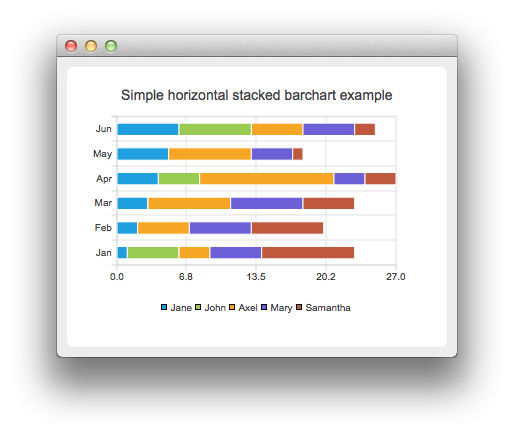
所有条形图中,条形集的使用方式均相同。为说明各种条形图之间的差异,所有示例均使用相同的数据。条形图所可视化的数据由 QBarSet 实例定义。 在此,我们创建数据集并将数据追加到其中。此处使用 << 运算符追加数据。此外,也可以使用 append 方法。
auto set0 = new QBarSet("Jane");
auto set1 = new QBarSet("John");
auto set2 = new QBarSet("Axel");
auto set3 = new QBarSet("Mary");
auto set4 = new QBarSet("Samantha");

*set0 << 1 << 2 << 3 << 4 << 5 << 6;
*set1 << 5 << 0 << 0 << 4 << 0 << 7;
*set2 << 3 << 5 << 8 << 13 << 8 << 5;
*set3 << 5 << 6 << 7 << 3 << 4 << 5;
*set4 << 9 << 7 << 5 << 3 << 1 << 2;
我们创建系列,并将条形集追加到其中。系列将拥有条形集的所有权。系列会将条形集中的数据分组为不同类别。每个条形集的第一个值会被归入第一个类别,第二个值归入第二个类别,依此类推。
auto series = new QHorizontalStackedBarSeries;
series->append(set0);
series->append(set1);
series->append(set2);
series->append(set3);
series->append(set4);
在此,我们创建图表对象并将系列添加到其中。通过 setTitle 设置图表标题,然后通过调用 setAnimationOptions(QChart::SeriesAnimations) 启用系列的动画效果。
auto chart = new QChart;
chart->addSeries(series);
chart->setTitle("Simple Horizontal Stacked Bar Chart");
chart->setAnimationOptions(QChart::SeriesAnimations);
若要将类别显示在坐标轴上,我们需要先创建一个 QBarCategoryAxis。 在此,我们根据类别列表创建一个类别坐标轴,并将其添加到图表左侧,作为 y 轴。图表将拥有该坐标轴的所有权。对于 x 轴,我们使用一个对齐到底部的数值坐标轴。
QStringList categories {"Jan", "Feb", "Mar", "Apr", "May", "Jun"};
auto axisY = new QBarCategoryAxis;
axisY->append(categories);
chart->addAxis(axisY, Qt::AlignLeft);
series->attachAxis(axisY);
auto axisX = new QValueAxis;
chart->addAxis(axisX, Qt::AlignBottom);
series->attachAxis(axisX);我们还希望显示图例。为此,我们从图表中获取图例指针并将其设为可见。同时,通过将对齐方式设置为Qt::AlignBottom ,将图例放置在图表底部。
chart->legend()->setVisible(true);
chart->legend()->setAlignment(Qt::AlignBottom);
最后,我们将图表添加到视图中。
createDefaultChartView(chart);© 2026 The Qt Company Ltd. Documentation contributions included herein are the copyrights of their respective owners. The documentation provided herein is licensed under the terms of the GNU Free Documentation License version 1.3 as published by the Free Software Foundation. Qt and respective logos are trademarks of The Qt Company Ltd. in Finland and/or other countries worldwide. All other trademarks are property of their respective owners.
