
使用图例标记
注意:这是 “带小部件的图表”示例库的一部分。
在此示例中,我们将创建一个应用程序,该应用程序利用 QLegendMarker 的 clicked 信号来显示或隐藏图表中的相应数据系列。“连接图例标记”按钮将图例中所有标记的 clicked 信号连接到 handleMarkerClicked 槽。
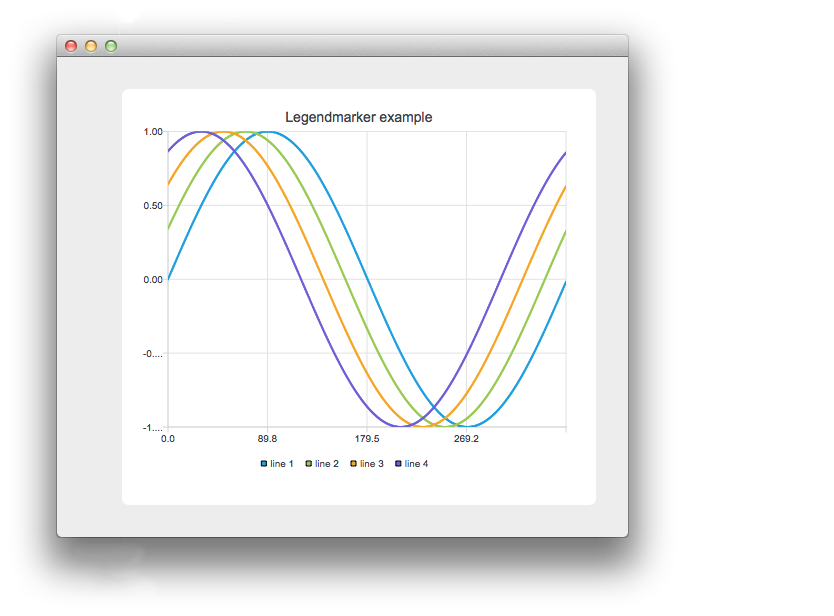
我们的应用程序包含用于在图表中添加或删除系列的按钮,以及一个用于将图例标记的“clicked”信号连接或断开与处理程序连接的按钮。在上图中,我们已将标记连接好,并点击了其中一个标记。
    // Connect all markers to handler
    const auto markers = m_chart->legend()->markers();
    for (QLegendMarker *marker : markers) {
        // Disconnect possible existing connection to avoid multiple connections
        QObject::disconnect(marker, &QLegendMarker::clicked,
                            this, &LegendMarkersWidget::handleMarkerClicked);
        QObject::connect(marker, &QLegendMarker::clicked,
                         this, &LegendMarkersWidget::handleMarkerClicked);
    }
在此,我们将图例中的标记连接到我们的处理程序。为避免将同一标记连接多次,我们首先将其断开。
    const auto markers = m_chart->legend()->markers();
    for (QLegendMarker *marker : markers) {
        QObject::disconnect(marker, &QLegendMarker::clicked,
                            this, &LegendMarkersWidget::handleMarkerClicked);
    }
这里我们将所有标记与我们的处理程序断开连接。
    auto marker = qobject_cast<QLegendMarker *>(sender());
    Q_ASSERT(marker);
在我们的处理程序中,首先将事件的发送者强制转换为 QLegendMarker。
switch (marker->type())然后,我们检查标记的类型。如果需要访问标记的详细方法,则必须将其强制转换为正确的类型。如果我们只需要 QAbstractSeries 的指针,则无需进行强制转换。 如果是饼图或条形图系列,我们可能需要相关 QPieSlice 或 QBarSet 的指针。
        // Toggle visibility of series
        marker->series()->setVisible(!marker->series()->isVisible());

        // Turn legend marker back to visible, since hiding series also hides the marker
        // and we don't want it to happen now.
        marker->setVisible(true);
我们希望在标记被点击时切换系列的可见性。为此,我们从标记中获取相关系列的指针,并切换其可见性。由于图例标记默认会跟随系列的可见性,因此我们也会将标记本身设回可见状态。 如果不这样做,图例中的标记将不可见,我们也就无法再点击它了。
        // Dim the marker, if series is not visible
        qreal alpha = 1.0;

        if (!marker->series()->isVisible())
            alpha = 0.5;

        QColor color;
        QBrush brush = marker->labelBrush();
        color = brush.color();
        color.setAlphaF(alpha);
        brush.setColor(color);
        marker->setLabelBrush(brush);

        brush = marker->brush();
        color = brush.color();
        color.setAlphaF(alpha);
        brush.setColor(color);
        marker->setBrush(brush);

        QPen pen = marker->pen();
        color = pen.color();
        color.setAlphaF(alpha);
        pen.setColor(color);
        marker->setPen(pen);
当系列被隐藏时,我们不会让标记不可见,而是将其颜色变暗。这里我们通过修改 laberBrush 的颜色来实现这一点。
© 2026 The Qt Company Ltd. Documentation contributions included herein are the copyrights of their respective owners. The documentation provided herein is licensed under the terms of the GNU Free Documentation License version 1.3 as published by the Free Software Foundation. Qt and respective logos are trademarks of The Qt Company Ltd. in Finland and/or other countries worldwide. All other trademarks are property of their respective owners.
