
创建嵌套环形图
注意:这是 “带小部件的图表”示例库的一部分。
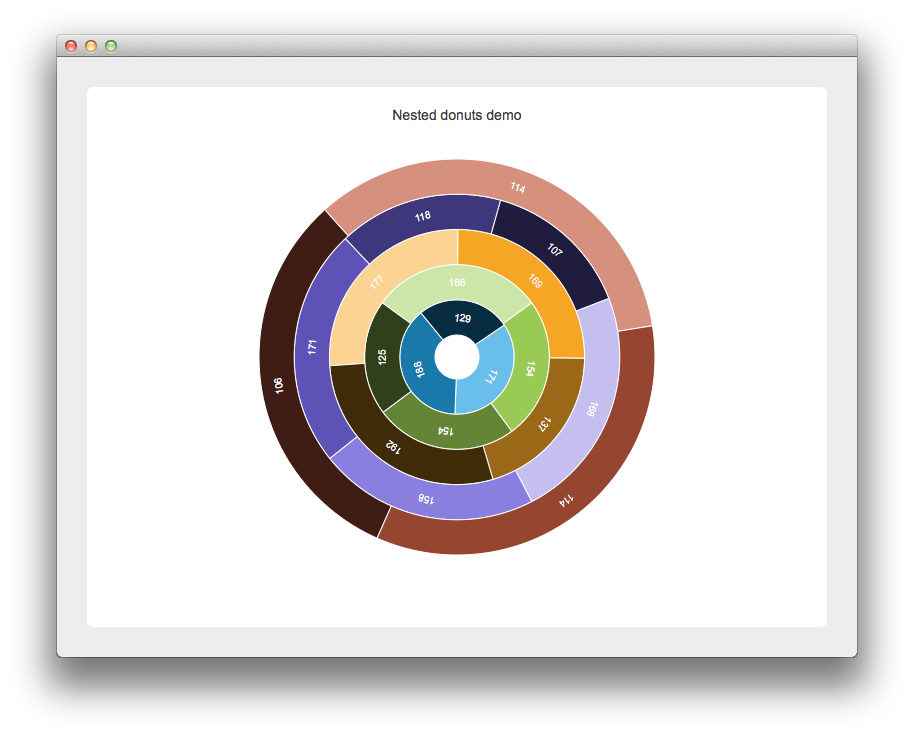
首先,我们创建一个 QChartView 实例,并为其启用抗锯齿功能。随后,从该 QChartView 实例中获取一个 QChart 对象。禁用图例并设置图表标题。最后一行代码启用了图表的动画效果。
auto chartView = new QChartView(this);
chartView->setRenderHint(QPainter::Antialiasing);
QChart *chart = chartView->chart();
chart->legend()->setVisible(false);
chart->setTitle("Nested Donuts (Hover over segments to explode them)");
chart->setAnimationOptions(QChart::AllAnimations);
chart->layout()->setContentsMargins(0, 0, 0, 0);
定义了三个变量,用于定义环形图。minSize 和 maxSize 定义了整个环形图的相对大小,其中 minSize 表示最小环形图的相对内径,maxSize 表示最大环形图的相对外径。
以下代码块定义了各个环形图及其扇区。首先创建一个新的 QPieSeries 对象。每个环形图中的扇区数量是随机生成的。内部的 for 循环会生成具有随机值的扇区,并将其标签设置为该值。 接下来,将扇区的标签设为可见,并将其颜色设为白色。为了使示例更具趣味性,将扇区的悬停信号连接到控件的槽中,其内部工作原理将在后文解释。 最后,将扇区添加到甜甜圈中。调整甜甜圈的大小以实现甜甜圈的嵌套。然后,将该甜甜圈添加到控件的甜甜圈列表中,并添加到图表中。
for (int i = 0; i < donutCount; i++) {
    auto donut = new QPieSeries;
    int sliceCount =  3 + QRandomGenerator::global()->bounded(3);
    for (int j = 0; j < sliceCount; j++) {
        qreal value = 100 + QRandomGenerator::global()->bounded(100);
        auto slice = new QPieSlice(QString("%1").arg(value), value);
        slice->setLabelVisible(true);
        slice->setLabelColor(Qt::white);
        slice->setLabelPosition(QPieSlice::LabelInsideTangential);
        connect(slice, &QPieSlice::hovered, this, &NestedDonutsWidget::explodeSlice);
        donut->append(slice);
        donut->setHoleSize(minSize + i * (maxSize - minSize) / donutCount);
        donut->setPieSize(minSize + (i + 1) * (maxSize - minSize) / donutCount);
    }
    m_donuts.append(donut);
    chartView->chart()->addSeries(donut);
}
最后,将该控件放置在应用程序使用的布局中。
auto mainLayout = new QGridLayout;
mainLayout->addWidget(chartView, 1, 1);
setLayout(mainLayout);
为了使示例更具趣味性,甜甜圈会每 1.25 秒随机旋转一次。
m_updateTimer = new QTimer(this);
connect(m_updateTimer, &QTimer::timeout, this, &NestedDonutsWidget::updateRotation);
m_updateTimer->start(1250);
该小部件的 updatedRotation 槽函数定义如下。它遍历所有甜甜圈,并用一个随机值修改它们的当前旋转角度。
void NestedDonutsWidget::updateRotation()
{
    for (int i = 0; i < m_donuts.count(); i++) {
        QPieSeries *donut = m_donuts.at(i);
        qreal phaseShift =  -50 + QRandomGenerator::global()->bounded(100);
        donut->setPieStartAngle(donut->pieStartAngle() + phaseShift);
        donut->setPieEndAngle(donut->pieEndAngle() + phaseShift);
    }
}
前面提到的 `explodeSlice` 槽函数代码如下所示。如果切片被设置为“展开”状态,则停止控制甜甜圈旋转的计时器。随后从切片中获取其起始角和结束角。 为了突出显示选中的扇区,位于包含该选中扇区的甜甜圈外侧的所有其他甜甜圈,其起始角和结束角都会被调整,以确保它们不会“阻挡”突出显示的扇区。如果该扇区不再被选中,则恢复到原始状态。
void NestedDonutsWidget::explodeSlice(bool exploded)
{
    auto slice = qobject_cast<QPieSlice *>(sender());
    if (exploded) {
        m_updateTimer->stop();
        qreal sliceStartAngle = slice->startAngle();
        qreal sliceEndAngle = slice->startAngle() + slice->angleSpan();

        QPieSeries *donut = slice->series();
        qreal seriesIndex = m_donuts.indexOf(donut);
        for (int i = seriesIndex + 1; i < m_donuts.count(); i++) {
            m_donuts.at(i)->setPieStartAngle(sliceEndAngle);
            m_donuts.at(i)->setPieEndAngle(360 + sliceStartAngle);
        }
    } else {
        for (int i = 0; i < m_donuts.count(); i++) {
            m_donuts.at(i)->setPieStartAngle(0);
            m_donuts.at(i)->setPieEndAngle(360);
        }
        m_updateTimer->start();
    }
    slice->setExploded(exploded);
}
© 2026 The Qt Company Ltd. Documentation contributions included herein are the copyrights of their respective owners. The documentation provided herein is licensed under the terms of the GNU Free Documentation License version 1.3 as published by the Free Software Foundation. Qt and respective logos are trademarks of The Qt Company Ltd. in Finland and/or other countries worldwide. All other trademarks are property of their respective owners.
