
使用光标和点选择
注意:这是 “带小部件的图表”示例库的一部分。
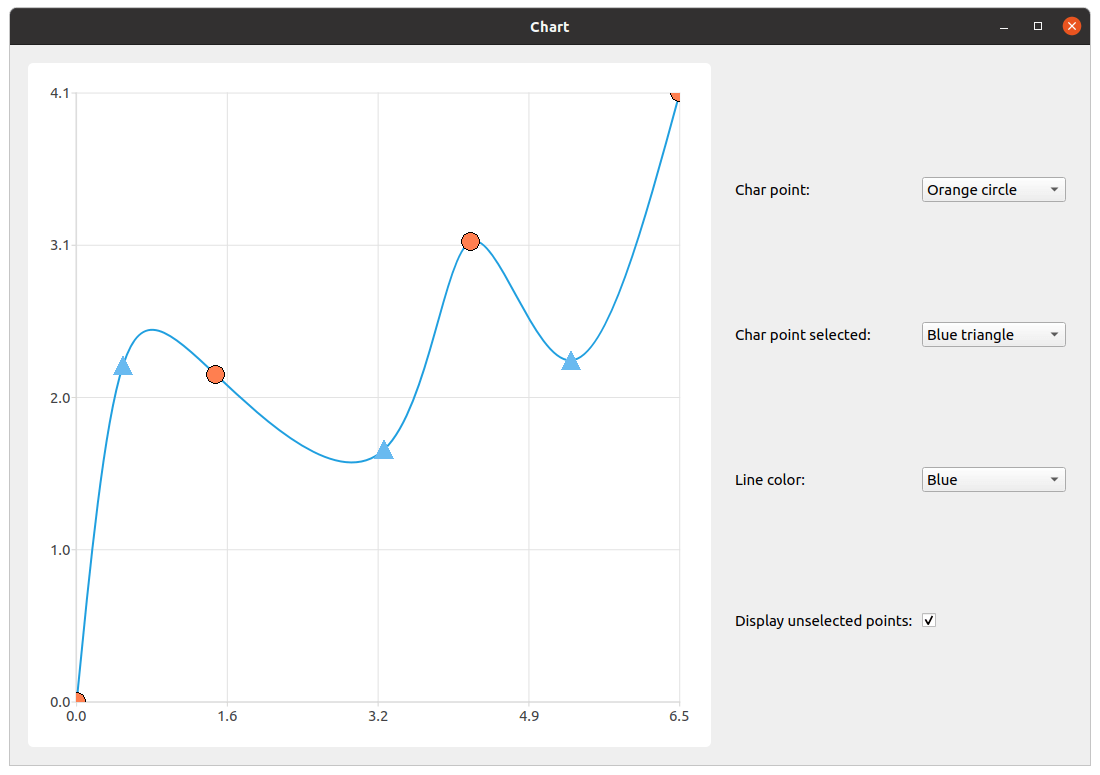
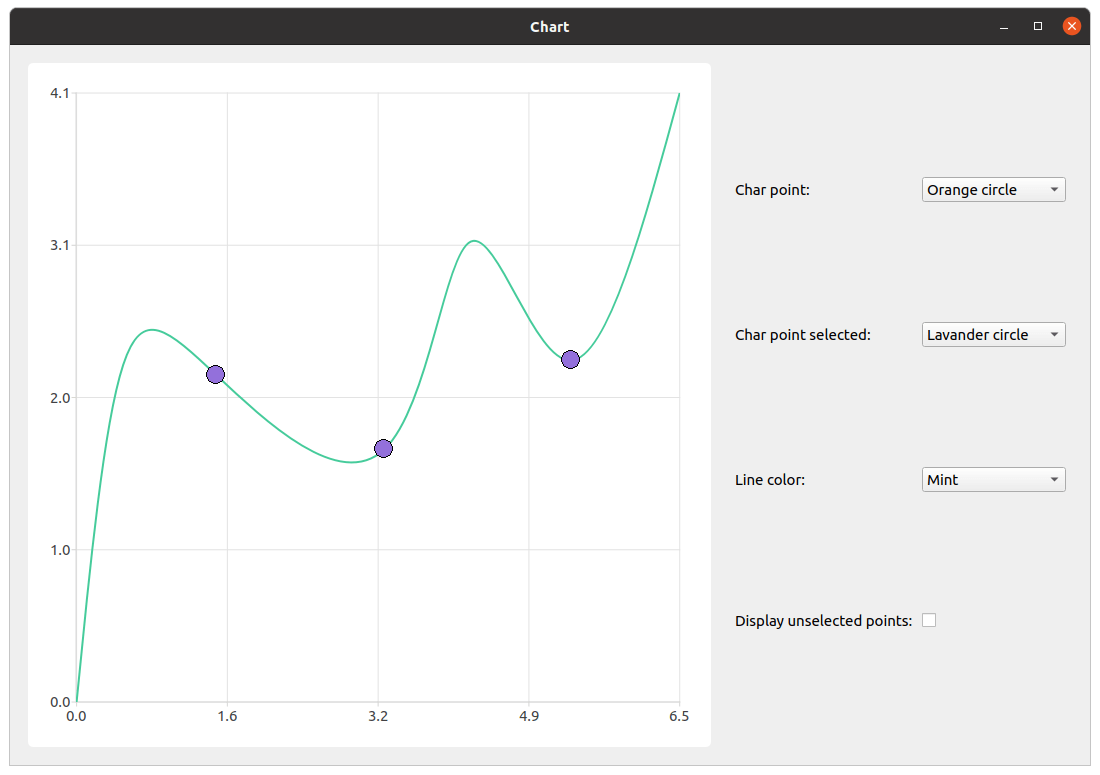
我们首先创建一个系列,为其填充数据,并设置选择功能。请务必注意,不要将数据点的可见性设置为“true ”,因为浅色标记功能是一个独立的功能,同时启用这两项设置会导致意外行为。
constexpr qreal marker_size = 20.;

auto series = new QSplineSeries;
series->append({QPointF(0., 0.),
                QPointF(0.5, 2.27),
                QPointF(1.5, 2.2),
                QPointF(3.3, 1.7),
                QPointF(4.23, 3.1),
                QPointF(5.3, 2.3),
                QPointF(6.47, 4.1)
});
series->setMarkerSize(marker_size);
series->setLightMarker(rectangle(marker_size, Qt::red));
series->setSelectedLightMarker(blueTriangle(marker_size));

QObject::connect(series, &QXYSeries::clicked, series, [=](const QPointF &point) {
    int index = series->points().indexOf(point);
    if (index != -1)
        series->toggleSelection({index});
});随后,我们创建QChart 、QChartview 以及带有布局的控件小部件,用于排列自定义元素。
auto chart = new QChart;
chart->addSeries(series);
chart->createDefaultAxes();
chart->legend()->setVisible(false);
chart->layout()->setContentsMargins(0, 0, 0, 0);
chart->setTitle("Select points with mouse click");

auto chartView = new QChartView(chart, this);
chartView->setRenderHint(QPainter::Antialiasing);

auto controlWidget = new QWidget(this);
auto controlLayout = new QGridLayout(controlWidget);
下一步是创建自定义元素。
auto charPointCombobox = new QComboBox(controlWidget);
auto charPointSelectedCombobox = new QComboBox(controlWidget);
auto lineColorCombobox = new QComboBox(controlWidget);
auto showUnselectedPointsCheckbox = new QCheckBox(controlWidget);
我们为标记选择下拉列表创建标签,并为下拉列表填充项目。此外,我们还为下拉列表提供功能支持。考虑到“轻标记”功能的实现,我们需要确保“显示未选中点”选项是否被勾选。 通过将QImage 的值设置为"empty" ,即可关闭亮标的可视性。如果用户取消勾选“显示未选中点”并更改亮标图像,未选中点必须保持不可见。如果未进行此检查,亮标将被赋予新的QImage ,即使已关闭该功能,未选中点仍会显示。
auto charPoint = new QLabel(tr("Char point: "), controlWidget);
charPointCombobox->addItems({tr("Red rectangle"),
                             tr("Green triangle"),
                             tr("Orange circle")
});
QObject::connect(charPointCombobox, &QComboBox::currentIndexChanged, series, [=](const int index) {
    if (showUnselectedPointsCheckbox->isChecked())
        series->setLightMarker(getPointRepresentation(PointType(index), marker_size));
});
对于选中点的光标和线条颜色,几乎采用相同的处理流程。唯一的区别在于无需检查未选中点的可见性,因为这不会影响功能。
auto charPointSelected = new QLabel(tr("Char point selected: "), controlWidget);
charPointSelectedCombobox->addItems({tr("Blue triangle"),
                                     tr("Yellow rectangle"),
                                     tr("Lavender circle")
});
QObject::connect(charPointSelectedCombobox, &QComboBox::currentIndexChanged, series, [=](const int index) {
    series->setSelectedLightMarker(getSelectedPointRepresentation(SelectedPointType(index), marker_size));
});

auto lineColorLabel = new QLabel(tr("Line color: "), controlWidget);
lineColorCombobox->addItems({tr("Blue"),
                             tr("Black"),
                             tr("Mint")
});
QObject::connect(lineColorCombobox, &QComboBox::currentIndexChanged, series, [=](const int index) {
    series->setColor(makeLineColor(LineColor(index)));
});在更改未选中点的可见性时存在细微差异。如前所述,将光标标记设为不可见是通过将其设置为“空”QImage 来实现的。因此,根据复选框的状态,选中点的光标标记会被设置为“空”QImage ,或设置为从对应下拉列表当前索引中提取的光标标记。
auto showUnselectedPointsLabel = new QLabel(tr("Display unselected points: "), controlWidget);
showUnselectedPointsCheckbox->setChecked(true);
QObject::connect(showUnselectedPointsCheckbox, &QCheckBox::stateChanged, series, [=](const int state) {
    if (state)
        series->setLightMarker(getPointRepresentation(PointType(charPointCombobox->currentIndex()), marker_size));
    else
        series->setLightMarker(QImage());
});
最后一步是排列元素、将所有控件添加到主控件中,并设置主窗口的大小。
controlLayout->addWidget(charPoint, 0, 0);
controlLayout->addWidget(charPointCombobox, 0, 1);

controlLayout->addWidget(charPointSelected, 1, 0);
controlLayout->addWidget(charPointSelectedCombobox, 1, 1);

controlLayout->addWidget(lineColorLabel, 2, 0);
controlLayout->addWidget(lineColorCombobox, 2, 1);

controlLayout->addWidget(showUnselectedPointsLabel, 3, 0);
controlLayout->addWidget(showUnselectedPointsCheckbox, 3, 1, 1, 2);

m_mainWidget = new QWidget(this);
auto mainLayout = new QHBoxLayout(m_mainWidget);
mainLayout->addWidget(chartView);
mainLayout->addWidget(controlWidget);
© 2026 The Qt Company Ltd. Documentation contributions included herein are the copyrights of their respective owners. The documentation provided herein is licensed under the terms of the GNU Free Documentation License version 1.3 as published by the Free Software Foundation. Qt and respective logos are trademarks of The Qt Company Ltd. in Finland and/or other countries worldwide. All other trademarks are property of their respective owners.
