
使用负值条形图显示温度记录
注意:这是 “带小部件的图表”图库示例的一部分。在本示例中,我们使用温度数据。
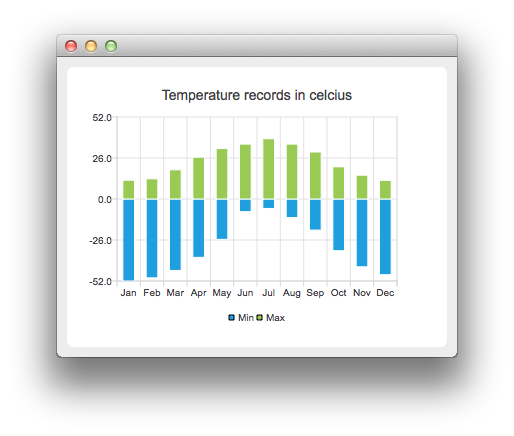
首先,我们创建两个柱状图集并将数据添加到其中。一个图集表示最低温度,另一个表示最高温度。
auto low = new QBarSet("Min");
auto high = new QBarSet("Max");

*low << -52 << -50 << -45.3 << -37.0 << -25.6 << -8.0
     << -6.0 << -11.8 << -19.7 << -32.8 << -43.0 << -48.0;
*high << 11.9 << 12.8 << 18.5 << 26.5 << 32.0 << 34.8
      << 38.2 << 34.8 << 29.8 << 20.4 << 15.1 << 11.8;
我们创建系列,并将条形集添加到该系列中。该系列将拥有这些条形集。
auto series = new QStackedBarSeries;
series->append(low);
series->append(high);
在此,我们创建图表对象并将数据系列添加到其中。通过 setTitle 方法设置图表标题,然后调用 setAnimationOptions(QChart::SeriesAnimations) 启用数据系列的动画效果
auto chart = new QChart;
chart->addSeries(series);
chart->setTitle("Temperature records in Celcius");
chart->setAnimationOptions(QChart::SeriesAnimations);
为了在坐标轴上显示类别,我们需要创建一个 QBarCategoryAxis。这里我们创建了一个包含类别列表的类别轴,并将其添加到图表中,对齐方式设为底部,作为 x 轴。图表将拥有该轴的所有权。对于 y 轴,我们使用一个值轴,对齐方式设为左侧。 我们修改了 y 轴的范围,因为这样比自动缩放能得到更理想的效果。
QStringList categories = {
    "Jan", "Feb", "Mar", "Apr", "May", "Jun", "Jul", "Aug", "Sep", "Oct", "Nov", "Dec"
};

auto axisX = new QBarCategoryAxis;
axisX->append(categories);
axisX->setTitleText("Month");
chart->addAxis(axisX, Qt::AlignBottom);
auto axisY = new QValueAxis;
axisY->setRange(-52, 52);
axisY->setTitleText("Temperature [°C]");
chart->addAxis(axisY, Qt::AlignLeft);
series->attachAxis(axisX);
series->attachAxis(axisY);我们还希望显示图例。为此,我们从图表中获取图例指针并将其设为可见。同时,通过将对齐方式设置为Qt::AlignBottom ,将图例放置在图表底部。
chart->legend()->setVisible(true);
chart->legend()->setAlignment(Qt::AlignBottom);
最后,我们将图表添加到视图中。
createDefaultChartView(chart);图表现已准备就绪,可以显示了。
© 2026 The Qt Company Ltd. Documentation contributions included herein are the copyrights of their respective owners. The documentation provided herein is licensed under the terms of the GNU Free Documentation License version 1.3 as published by the Free Software Foundation. Qt and respective logos are trademarks of The Qt Company Ltd. in Finland and/or other countries worldwide. All other trademarks are property of their respective owners.
