
Qt Quick 3D - 简单的 RuntimeLoader 示例
演示如何在运行时加载 3D 资源并查询其场景对象。
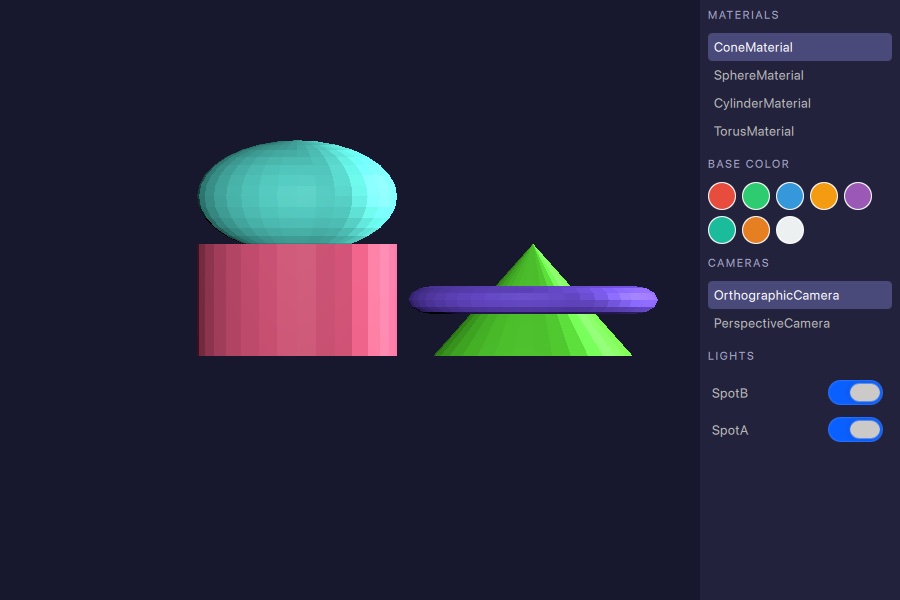
本示例展示了如何使用RuntimeLoader 在运行时加载3D资源,以及如何使用query 函数来获取已加载场景中包含的材质、摄像机和灯光。
加载资源
RuntimeLoader 组件会加载一个 glTF 2.0 资源,并创建相应的Qt Quick 3D 对象作为其子对象。source 属性指向该资源文件:
RuntimeLoader {
    id: loader
    source: "torus_and_cone.glb"

    onStatusChanged: {
        if (status !== RuntimeLoader.Success)
            return
        root.sceneMaterials = loader.queryAll(RuntimeLoader.Materials)
        root.sceneCameras = loader.queryAll(RuntimeLoader.Cameras)
        root.sceneLights = loader.queryAll(RuntimeLoader.Lights)
        if (root.sceneCameras.length > 0)
            view3d.camera = root.sceneCameras[0]
        if (root.sceneMaterials.length > 0)
            root.selectedMaterial = root.sceneMaterials[0]
    }
}当status 变为RuntimeLoader.Success 时,表示场景已准备就绪,此时可以调用查询函数。
查询场景对象
加载成功后,queryAll() 会返回所有与给定QueryFilter 匹配的场景对象列表。该示例一次性检索了材质、摄像机和光源:
root.sceneMaterials = loader.queryAll(RuntimeLoader.Materials)
root.sceneCameras = loader.queryAll(RuntimeLoader.Cameras)
root.sceneLights = loader.queryAll(RuntimeLoader.Lights)返回的列表是包含QQuick3DObject 引用值的普通 JavaScript 数组。这些引用可直接赋值给ListView model ,或用于设置场景的活动属性,例如View3D.camera 。
与场景对象交互
材质
材质列表中的每个条目均可被选中,以便为其应用其中一种颜色色板。该辅助函数会在将值写入颜色属性之前,将返回的对象转换为正确的材质类型:
function applyColorToSelected(color) {
    if (!root.selectedMaterial)
        return
    if (root.selectedMaterial instanceof PrincipledMaterial)
        (root.selectedMaterial as PrincipledMaterial).baseColor = color
    else if (root.selectedMaterial instanceof SpecularGlossyMaterial)
        (root.selectedMaterial as SpecularGlossyMaterial).albedoColor = color
}
摄像机
点击侧边面板中的摄像机条目,会将其分配给View3D.camera ,并立即切换为当前视点。
灯光
侧边栏中的每盏灯光都配有一个切换按钮,用于设置其visible 属性,可在不将其从场景中移除的情况下启用或禁用该灯光:
Switch {
    checked: modelData.visible
    onToggled: modelData.visible = checked
}© 2026 The Qt Company Ltd. Documentation contributions included herein are the copyrights of their respective owners. The documentation provided herein is licensed under the terms of the GNU Free Documentation License version 1.3 as published by the Free Software Foundation. Qt and respective logos are trademarks of The Qt Company Ltd. in Finland and/or other countries worldwide. All other trademarks are property of their respective owners.
